> ## Documentation Index
> Fetch the complete documentation index at: https://developers.circle.com/llms.txt
> Use this file to discover all available pages before exploring further.
> ## Agent Instructions
> Before reading these docs, install the relevant Circle Skill to get pre-loaded context — skills are LLM-optimized and cover architecture decisions, correct flows, and common pitfalls. In Claude Code: run /plugin marketplace add circlefin/skills then /plugin install circle-skills@circle. With Vercel Skills CLI: run npx skills add circlefin/skills. Available skills: use-usdc https://github.com/circlefin/skills/blob/master/plugins/circle/skills/use-usdc/SKILL.md (balances, transfers, approvals on EVM and Solana); EURC has no skill — see https://developers.circle.com/stablecoins/what-is-eurc.md; bridge-stablecoin https://github.com/circlefin/skills/blob/master/plugins/circle/skills/bridge-stablecoin/SKILL.md (crosschain transfers via CCTP, USDC, EURC, and third-party assets); use-arc https://github.com/circlefin/skills/blob/master/plugins/circle/skills/use-arc/SKILL.md (Arc chain config, contract deployment, USDC bridging — Arc docs: https://docs.arc.io/llms.txt); use-circle-wallets https://github.com/circlefin/skills/blob/master/plugins/circle/skills/use-circle-wallets/SKILL.md (choose wallet type); use-developer-controlled-wallets https://github.com/circlefin/skills/blob/master/plugins/circle/skills/use-developer-controlled-wallets/SKILL.md (custodial wallets for payouts and treasury); use-user-controlled-wallets https://github.com/circlefin/skills/blob/master/plugins/circle/skills/use-user-controlled-wallets/SKILL.md (embedded wallets with Web2 login); use-modular-wallets https://github.com/circlefin/skills/blob/master/plugins/circle/skills/use-modular-wallets/SKILL.md (smart contract wallets with passkeys and ERC-4337); use-gateway https://github.com/circlefin/skills/blob/master/plugins/circle/skills/use-gateway/SKILL.md (unified USDC balance, nanopayments); use-smart-contract-platform https://github.com/circlefin/skills/blob/master/plugins/circle/skills/use-smart-contract-platform/SKILL.md (deploy, interact, monitor contracts). Pair any skill with the Circle MCP server for live SDK signatures, contract addresses, and chain IDs: {"mcpServers":{"circle":{"url":"https://api.circle.com/v1/codegen/mcp"}}}.
> Read the product overview first. Each product has an overview explaining when and why to use it. Read it before quickstarts.
> Pick the right wallet type. Developer-controlled (you hold keys), user-controlled (end user holds keys via PIN/social login), or modular (smart contract wallets with passkeys). See https://developers.circle.com/wallets.md.
> Use CCTP V2 for crosschain transfers. CCTP natively transfers USDC and EURC via burn-and-mint, and supports permissionless wrapping of third-party assets via lock-and-mint. V1 is legacy; always use V2 unless V1 is specified or the chain requires it (Noble, Sui, and Aptos still require V1). Migration guide: https://developers.circle.com/cctp/migration-from-v1-to-v2.md.
> Use Bridge Kit for frontend bridging. Wraps CCTP with a simpler SDK for user-facing apps. Use CCTP directly for backend transfers.
> Gas Station vs Paymaster. Gas Station sponsors gas for Circle Wallet transactions. Paymaster lets users pay gas in USDC. Different use cases — read both overviews.
> Gateway Nanopayments for sub-cent payments. Gasless USDC micropayments down to $0.000001 via x402 and batched settlement. For pay-per-request APIs, AI agent payments, streaming.
> Look up USDC addresses per chain. Never hardcode — use https://developers.circle.com/stablecoins/usdc-contract-addresses.md.
> Prefer SDKs over raw API calls. Node.js and Python SDKs handle auth, retries, and errors.
> API key required. Bearer token in Authorization header. Testnet and mainnet use separate keys and may use different base URLs depending on the product.
> Set up webhooks when available. Most operations are async. Webhooks deliver transaction confirmations and state changes.
> When calling list endpoints, paginate using pageSize and pageAfter until no nextPageAfter cursor is returned—stopping at the first page silently misses records.
> Building an AI agent? Start with the Agent Stack—Circle CLI, agent wallets, and nanopayments built for autonomous use cases: https://developers.circle.com/agent-stack.md.
# StableFX technical guide
> Technical implementation details for StableFX
StableFX is a foreign exchange (FX) platform that enables onchain stablecoin
conversion between fiat-backed currencies such as USDC and EURC.
Built on [Arc](https://docs.arc.io), StableFX combines offchain
Request-for-Quote (RFQ) execution with onchain settlement. This allows you to
execute stablecoin FX transactions that are fast, auditable, and programmable.
**Note:** The StableFX execution engine provides offchain API methods for
performing the onchain settlements. It's possible to integrate with StableFX
without broadcasting any onchain transactions.
## Architecture
StableFX is composed of modular layers that form the FX infrastructure:
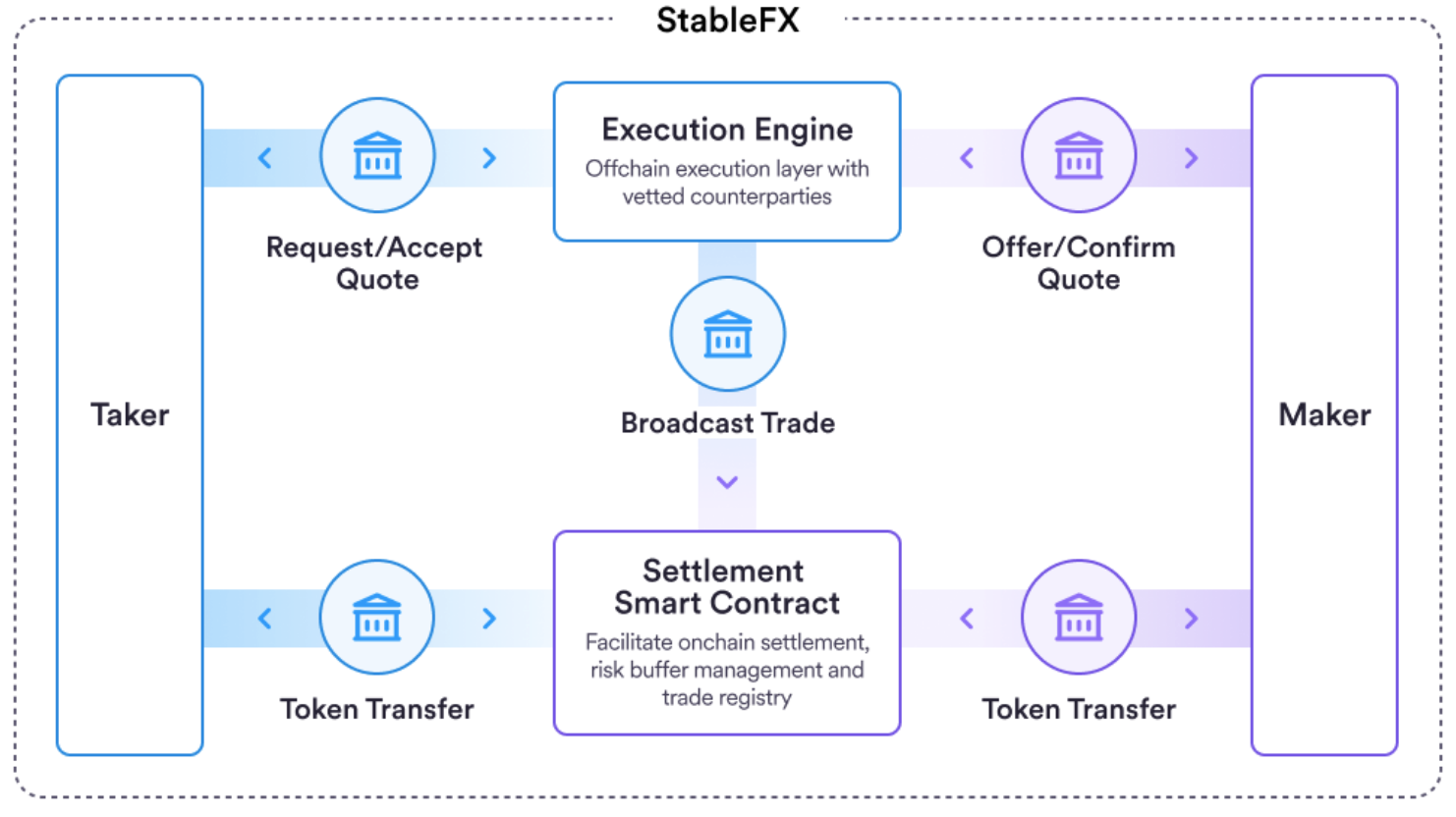 StableFX uses an RFQ model for pricing. A taker (for example, a fintech,
exchange, or corporate treasury) requests a quote for a supported stablecoin
pair. Approved makers (liquidity providers) return executable quotes.
### Execution engine
The execution engine is the offchain API that manages RFQ distribution,
validation, and quote ranking between takers and makers. It provides an offchain
API that can be used for price discovery, quote creation, and trade execution.
The execution engine collects signatures and broadcasts them to the onchain
contract for participants in StableFX.
### Settlement contract
The settlement contract is the smart contract on Arc that performs onchain
escrow and delivery of both sides of a trade. Participants in StableFX can use
the execution engine to submit their onchain transactions, or integrate with the
smart contract directly, depending on their technical requirements.
## Quote request and trade execution
The following sections describe the quote request and trade execution process.
### API keys
The StableFX API uses your API key for authentication and to determine which
data to use and which blockchain to execute against. You receive a `TEST` API
key that executes against Arc testnet, using the base URL
`https://api-sandbox.circle.com/`. When you're ready to move to production,
request a `LIVE` API key that executes against Arc mainnet, using
`https://api.circle.com/`.
### Quote request
Takers use the StableFX API to request quotes. The taker can specify the amount
of the sell currency or the buy currency in the quote request. The full quote
request has the following properties:
* `from.currency`: The currency of the sell currency
* `from.amount`: The amount of the sell currency
* `to.currency`: The currency of the buy currency
* `to.amount`: The amount of the buy currency
* `tenor`: The settlement schedule for the trade
The `tenor` parameter specifies how long the trade should take to settle. The
available settlement schedules are `instant`, `hourly`, and `daily`.
* `instant`: the settlement window is 30 minutes from trade creation
* `hourly`: the settlement window is 1 hour from trade creation
* `daily`: the settlement window is 1 day from trade creation
The taker receives a quote response from the execution engine, depending on the
maker responses. The response time from RFQ submission to quote response is less
than 500 ms. The execution engine takes the best priced quote from all maker
responses. The quote response contains a summary of the quote, the StableFX fee,
and the expiry of the quote.
For a full specification of the quote request and response, see the
[Request a quote](/api-reference/stablefx/all/create-quote) endpoint.
Quote requests can fail. Common reasons for failure include:
* Invalid currency pair
* Amount less than the minimum trade amount (\< 10 USDC)
### Quote flow and fee calculation
The quote flow varies depending on what the taker specifies in their quote
request.
**If the taker specifies an amount of the buy currency:**
1. StableFX calculates the taker fee in the sell currency and adds the fee on
top of the requested buy amount when requesting a quote from Talos
2. Talos returns a quote for the combined amount
3. StableFX returns to the taker the quoted combined amount and the fee in the
buy currency; the taker understands that they receive the combined amount
minus the fee
This flow ensures that the maker and the taker view the same quote amount, while
the fee is transparent to the taker.
**If the taker specifies an amount of the sell currency:**
1. StableFX sends the requested sell amount to Talos with no fee adjustment
2. Talos returns a quote for the requested sell amount
3. StableFX returns both the from and to amounts to the taker and separately
adds the taker fee in the sell currency
The maker fee is not shown to the taker.
### Maker quote response
StableFX requests quotes from makers via the Talos platform. Makers choose the
rate of exchange for their quote response.
Circle has a subaccount in Talos for each settlement tenor. For makers, each
subaccount is a unique customer, so through Talos they must support each of the
settlement tenor customers.
### Quote acceptance
The taker accepts the quote by creating a trade through the execution engine.
Creating the trade requires the quote ID and a randomly generated idempotency
key. At this point, the quoted rate is locked in. This rate lock lasts until the
trade expires, is settled, or is breached.
## Trade signature broadcasting
After the taker confirms the quote, the maker and taker submit their trade
signatures to StableFX. StableFX verifies the signatures and broadcasts a
contract function call to the smart contract. There is a 10 minute window for
the maker and taker to submit signatures, or the trade will expire.
The broadcast parameters include the maker and taker details including the trade
consideration and signatures.
## Trade settlement
The `FxEscrow` smart contract is used to settle the trade. This contract uses
the `Permit2` contract to allow it to pull a specified amount of currency from
the maker and taker wallets to the contract.
### Settlement model
StableFX implements a settlement model that is characterized by:
* Explicit taker funding
* Maker-triggered settlement
When settlement occurs, the StableFX smart contract makes the following token
transfers:
* **To the taker**: the buy currency minus the taker fee
* **To the maker**: the sell currency minus the maker fee
* **To the StableFX fee wallet**: the StableFX taker fee in the buy currency and
the StableFX maker fee in the sell currency
This ensures net settlement while maintaining transparency and alignment with
the quote presented to both parties.
### Wallets and funding
Makers and takers can use any Arc supported wallet to fund trades. Both makers
and takers must use the same wallet throughout the course of a single trade.
Wallets must be individually owned and not omnibus wallets.
Wallets must support the
[`Permit2`](https://docs.uniswap.org/contracts/permit2/overview) contract and be
capable of signing EIP-712 typed data without broadcasting the transaction.
Users must approve the `Permit2` contract through the specific token contract
they're using to fund trades.
### Taker funding
To fund trades, the taker submits a signed `Permit2` request to the `FxEscrow`
smart contract for trades with `pending_settlement` status using the contract
trade identifiers. This can be done with the StableFX API or by directly
transacting with the `FxEscrow` contract. The contract holds the taker funded
tokens until the trade is settled or breached.
### Maker funding
The maker initiates a settlement transaction by funding trades that have been
taker funded. When a maker identifies trades with status `taker_funded` they can
submit a fund request to the FxEscrow smart contract. This can be done with the
StableFX API or by directly transacting with the FxEscrow contract.
#### Maker net funding
Makers can fund the net position of their accumulated trades with a given taker.
This is done by calculating the net position and only submitting the funds
required to cover the net position. For example, if a maker has an open trade
with a taker where they are selling 100 USDC and buying 90 EURC, and another
open trade with the same taker where they are selling 90 EURC and buying 100
USDC, their net position is 0. They would not need to submit any funds to the
`FxEscrow` contract.
StableFX uses an RFQ model for pricing. A taker (for example, a fintech,
exchange, or corporate treasury) requests a quote for a supported stablecoin
pair. Approved makers (liquidity providers) return executable quotes.
### Execution engine
The execution engine is the offchain API that manages RFQ distribution,
validation, and quote ranking between takers and makers. It provides an offchain
API that can be used for price discovery, quote creation, and trade execution.
The execution engine collects signatures and broadcasts them to the onchain
contract for participants in StableFX.
### Settlement contract
The settlement contract is the smart contract on Arc that performs onchain
escrow and delivery of both sides of a trade. Participants in StableFX can use
the execution engine to submit their onchain transactions, or integrate with the
smart contract directly, depending on their technical requirements.
## Quote request and trade execution
The following sections describe the quote request and trade execution process.
### API keys
The StableFX API uses your API key for authentication and to determine which
data to use and which blockchain to execute against. You receive a `TEST` API
key that executes against Arc testnet, using the base URL
`https://api-sandbox.circle.com/`. When you're ready to move to production,
request a `LIVE` API key that executes against Arc mainnet, using
`https://api.circle.com/`.
### Quote request
Takers use the StableFX API to request quotes. The taker can specify the amount
of the sell currency or the buy currency in the quote request. The full quote
request has the following properties:
* `from.currency`: The currency of the sell currency
* `from.amount`: The amount of the sell currency
* `to.currency`: The currency of the buy currency
* `to.amount`: The amount of the buy currency
* `tenor`: The settlement schedule for the trade
The `tenor` parameter specifies how long the trade should take to settle. The
available settlement schedules are `instant`, `hourly`, and `daily`.
* `instant`: the settlement window is 30 minutes from trade creation
* `hourly`: the settlement window is 1 hour from trade creation
* `daily`: the settlement window is 1 day from trade creation
The taker receives a quote response from the execution engine, depending on the
maker responses. The response time from RFQ submission to quote response is less
than 500 ms. The execution engine takes the best priced quote from all maker
responses. The quote response contains a summary of the quote, the StableFX fee,
and the expiry of the quote.
For a full specification of the quote request and response, see the
[Request a quote](/api-reference/stablefx/all/create-quote) endpoint.
Quote requests can fail. Common reasons for failure include:
* Invalid currency pair
* Amount less than the minimum trade amount (\< 10 USDC)
### Quote flow and fee calculation
The quote flow varies depending on what the taker specifies in their quote
request.
**If the taker specifies an amount of the buy currency:**
1. StableFX calculates the taker fee in the sell currency and adds the fee on
top of the requested buy amount when requesting a quote from Talos
2. Talos returns a quote for the combined amount
3. StableFX returns to the taker the quoted combined amount and the fee in the
buy currency; the taker understands that they receive the combined amount
minus the fee
This flow ensures that the maker and the taker view the same quote amount, while
the fee is transparent to the taker.
**If the taker specifies an amount of the sell currency:**
1. StableFX sends the requested sell amount to Talos with no fee adjustment
2. Talos returns a quote for the requested sell amount
3. StableFX returns both the from and to amounts to the taker and separately
adds the taker fee in the sell currency
The maker fee is not shown to the taker.
### Maker quote response
StableFX requests quotes from makers via the Talos platform. Makers choose the
rate of exchange for their quote response.
Circle has a subaccount in Talos for each settlement tenor. For makers, each
subaccount is a unique customer, so through Talos they must support each of the
settlement tenor customers.
### Quote acceptance
The taker accepts the quote by creating a trade through the execution engine.
Creating the trade requires the quote ID and a randomly generated idempotency
key. At this point, the quoted rate is locked in. This rate lock lasts until the
trade expires, is settled, or is breached.
## Trade signature broadcasting
After the taker confirms the quote, the maker and taker submit their trade
signatures to StableFX. StableFX verifies the signatures and broadcasts a
contract function call to the smart contract. There is a 10 minute window for
the maker and taker to submit signatures, or the trade will expire.
The broadcast parameters include the maker and taker details including the trade
consideration and signatures.
## Trade settlement
The `FxEscrow` smart contract is used to settle the trade. This contract uses
the `Permit2` contract to allow it to pull a specified amount of currency from
the maker and taker wallets to the contract.
### Settlement model
StableFX implements a settlement model that is characterized by:
* Explicit taker funding
* Maker-triggered settlement
When settlement occurs, the StableFX smart contract makes the following token
transfers:
* **To the taker**: the buy currency minus the taker fee
* **To the maker**: the sell currency minus the maker fee
* **To the StableFX fee wallet**: the StableFX taker fee in the buy currency and
the StableFX maker fee in the sell currency
This ensures net settlement while maintaining transparency and alignment with
the quote presented to both parties.
### Wallets and funding
Makers and takers can use any Arc supported wallet to fund trades. Both makers
and takers must use the same wallet throughout the course of a single trade.
Wallets must be individually owned and not omnibus wallets.
Wallets must support the
[`Permit2`](https://docs.uniswap.org/contracts/permit2/overview) contract and be
capable of signing EIP-712 typed data without broadcasting the transaction.
Users must approve the `Permit2` contract through the specific token contract
they're using to fund trades.
### Taker funding
To fund trades, the taker submits a signed `Permit2` request to the `FxEscrow`
smart contract for trades with `pending_settlement` status using the contract
trade identifiers. This can be done with the StableFX API or by directly
transacting with the `FxEscrow` contract. The contract holds the taker funded
tokens until the trade is settled or breached.
### Maker funding
The maker initiates a settlement transaction by funding trades that have been
taker funded. When a maker identifies trades with status `taker_funded` they can
submit a fund request to the FxEscrow smart contract. This can be done with the
StableFX API or by directly transacting with the FxEscrow contract.
#### Maker net funding
Makers can fund the net position of their accumulated trades with a given taker.
This is done by calculating the net position and only submitting the funds
required to cover the net position. For example, if a maker has an open trade
with a taker where they are selling 100 USDC and buying 90 EURC, and another
open trade with the same taker where they are selling 90 EURC and buying 100
USDC, their net position is 0. They would not need to submit any funds to the
`FxEscrow` contract.