> ## Documentation Index
> Fetch the complete documentation index at: https://developers.circle.com/llms.txt
> Use this file to discover all available pages before exploring further.
> ## Agent Instructions
> Before reading these docs, install the relevant Circle Skill to get pre-loaded context — skills are LLM-optimized and cover architecture decisions, correct flows, and common pitfalls. In Claude Code: run /plugin marketplace add circlefin/skills then /plugin install circle-skills@circle. With Vercel Skills CLI: run npx skills add circlefin/skills. Available skills: use-usdc https://github.com/circlefin/skills/blob/master/plugins/circle/skills/use-usdc/SKILL.md (balances, transfers, approvals on EVM and Solana); EURC has no skill — see https://developers.circle.com/stablecoins/what-is-eurc.md; bridge-stablecoin https://github.com/circlefin/skills/blob/master/plugins/circle/skills/bridge-stablecoin/SKILL.md (crosschain transfers via CCTP, USDC, EURC, and third-party assets); use-arc https://github.com/circlefin/skills/blob/master/plugins/circle/skills/use-arc/SKILL.md (Arc chain config, contract deployment, USDC bridging — Arc docs: https://docs.arc.io/llms.txt); use-circle-wallets https://github.com/circlefin/skills/blob/master/plugins/circle/skills/use-circle-wallets/SKILL.md (choose wallet type); use-developer-controlled-wallets https://github.com/circlefin/skills/blob/master/plugins/circle/skills/use-developer-controlled-wallets/SKILL.md (custodial wallets for payouts and treasury); use-user-controlled-wallets https://github.com/circlefin/skills/blob/master/plugins/circle/skills/use-user-controlled-wallets/SKILL.md (embedded wallets with Web2 login); use-modular-wallets https://github.com/circlefin/skills/blob/master/plugins/circle/skills/use-modular-wallets/SKILL.md (smart contract wallets with passkeys and ERC-4337); use-gateway https://github.com/circlefin/skills/blob/master/plugins/circle/skills/use-gateway/SKILL.md (unified USDC balance, nanopayments); use-smart-contract-platform https://github.com/circlefin/skills/blob/master/plugins/circle/skills/use-smart-contract-platform/SKILL.md (deploy, interact, monitor contracts). Pair any skill with the Circle MCP server for live SDK signatures, contract addresses, and chain IDs: {"mcpServers":{"circle":{"url":"https://api.circle.com/v1/codegen/mcp"}}}.
> Read the product overview first. Each product has an overview explaining when and why to use it. Read it before quickstarts.
> Pick the right wallet type. Developer-controlled (you hold keys), user-controlled (end user holds keys via PIN/social login), or modular (smart contract wallets with passkeys). See https://developers.circle.com/wallets.md.
> Use CCTP V2 for crosschain transfers. CCTP natively transfers USDC and EURC via burn-and-mint, and supports permissionless wrapping of third-party assets via lock-and-mint. V1 is legacy; always use V2 unless V1 is specified or the chain requires it (Noble, Sui, and Aptos still require V1). Migration guide: https://developers.circle.com/cctp/migration-from-v1-to-v2.md.
> Use Bridge Kit for frontend bridging. Wraps CCTP with a simpler SDK for user-facing apps. Use CCTP directly for backend transfers.
> Gas Station vs Paymaster. Gas Station sponsors gas for Circle Wallet transactions. Paymaster lets users pay gas in USDC. Different use cases — read both overviews.
> Gateway Nanopayments for sub-cent payments. Gasless USDC micropayments down to $0.000001 via x402 and batched settlement. For pay-per-request APIs, AI agent payments, streaming.
> Look up USDC addresses per chain. Never hardcode — use https://developers.circle.com/stablecoins/usdc-contract-addresses.md.
> Prefer SDKs over raw API calls. Node.js and Python SDKs handle auth, retries, and errors.
> API key required. Bearer token in Authorization header. Testnet and mainnet use separate keys and may use different base URLs depending on the product.
> Set up webhooks when available. Most operations are async. Webhooks deliver transaction confirmations and state changes.
> When calling list endpoints, paginate using pageSize and pageAfter until no nextPageAfter cursor is returned—stopping at the first page silently misses records.
> Building an AI agent? Start with the Agent Stack—Circle CLI, agent wallets, and nanopayments built for autonomous use cases: https://developers.circle.com/agent-stack.md.
# iOS SDK UI customization API
> iOS SDK UI and key mapping reference for customizations.
This article describes two different ways to customize your iOS application
using the [iOS SDK](/sdks/user-controlled/ios-sdk):
* **Static Resources** customize the UI layout during build time.
* **Programmatic Customization** modifies the layout at run time.
**Note:**
You can combine static and programmatic approaches for customization.
To use the SDK in the most flexible way, combine the reference in this article
with the [iOS SDK](/sdks/user-controlled/ios-sdk).
**Sample Application**: Refer to the
[iOS sample application](https://github.com/circlefin/w3s-ios-sample-app-wallets)
for example code.
## Layouts
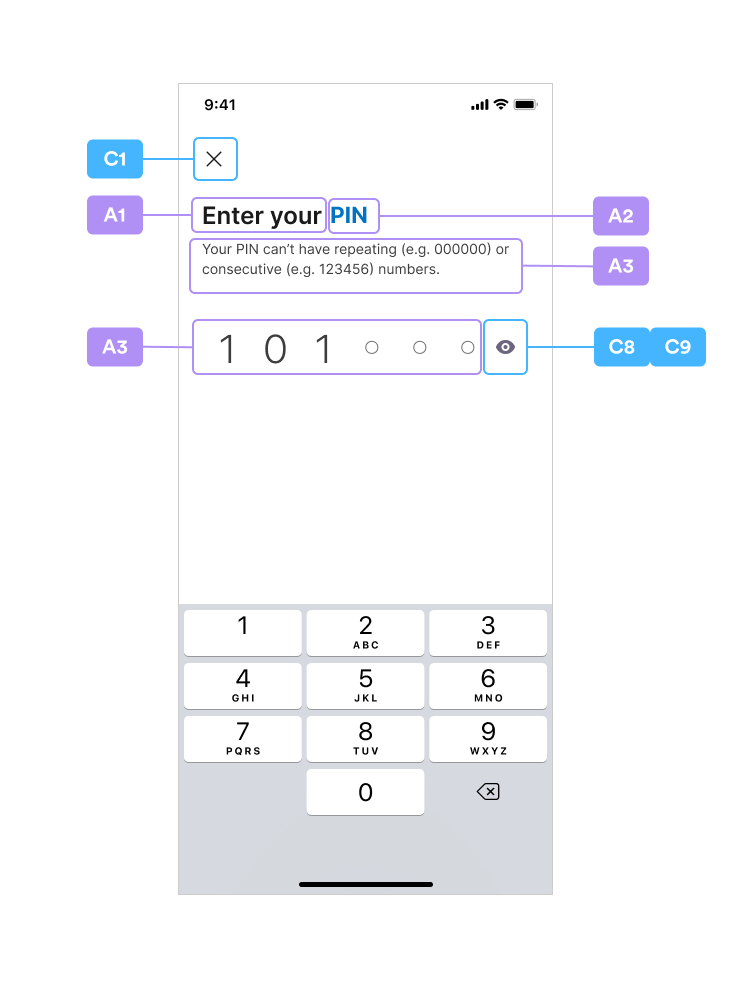
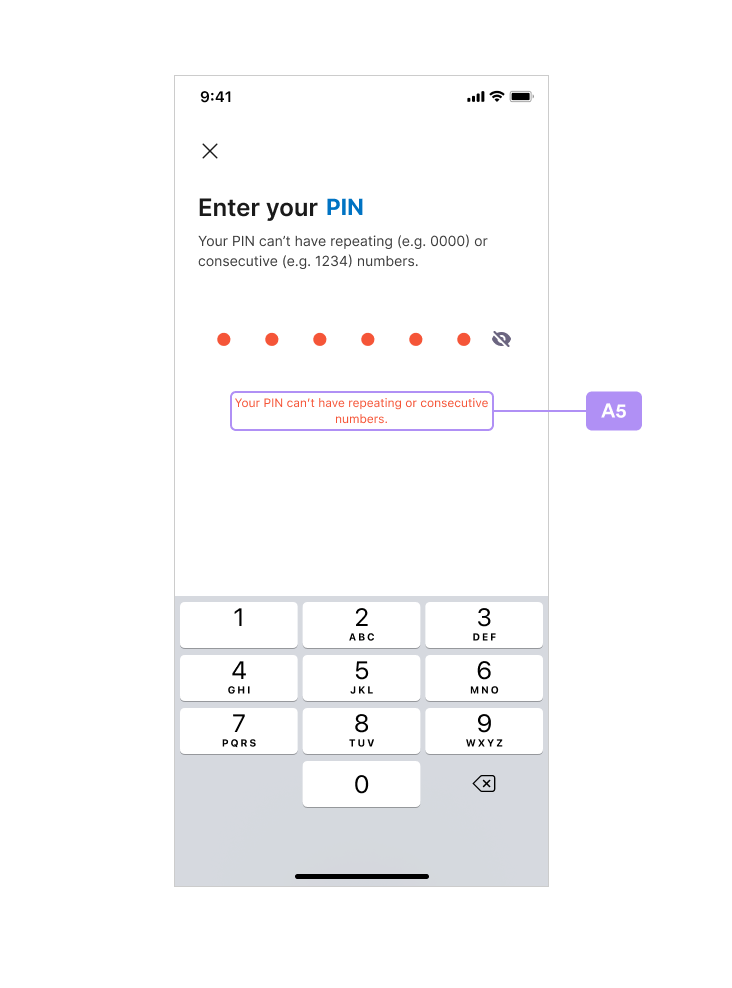
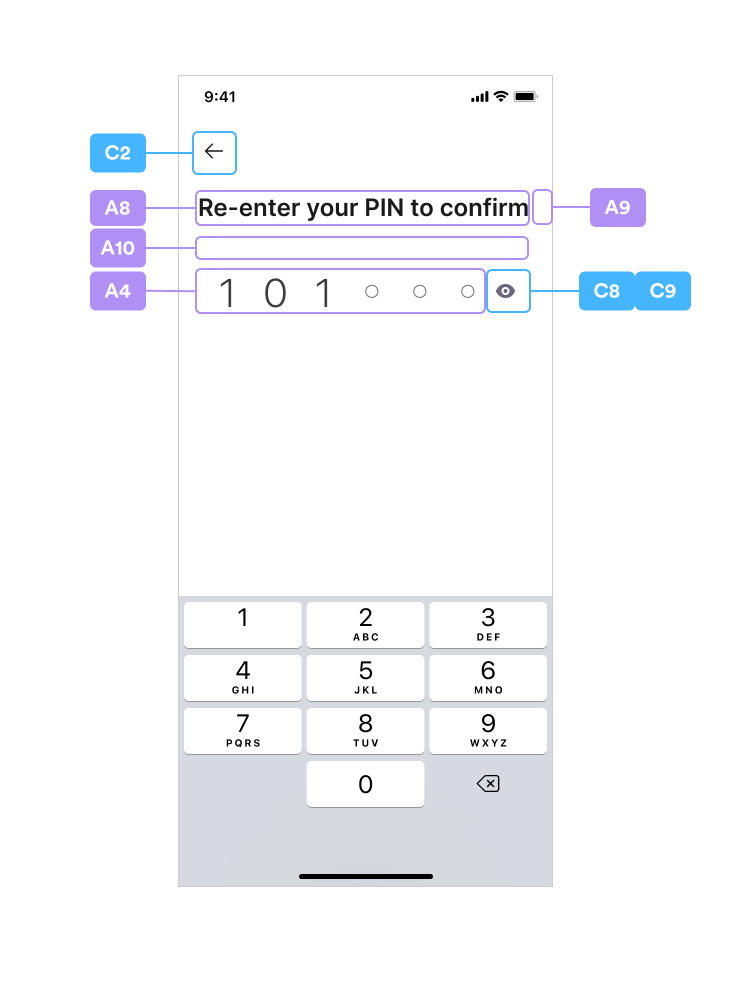
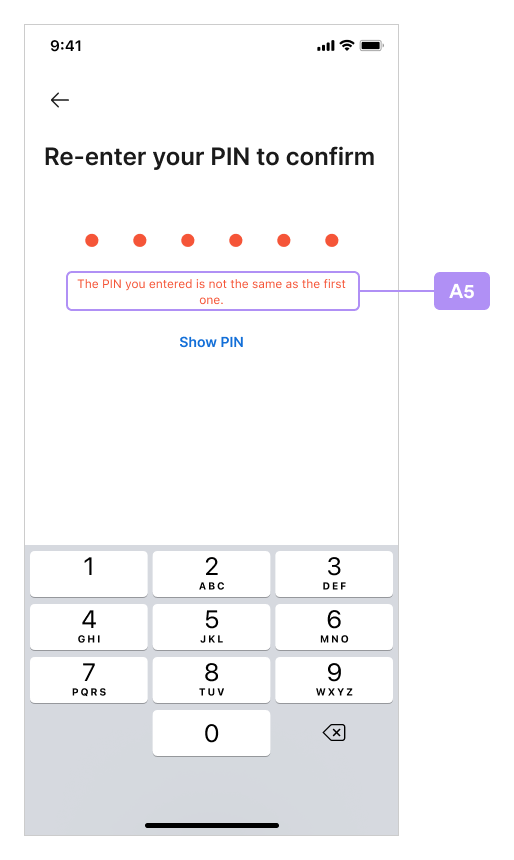
## How to Use the Layout Images and Index Tables
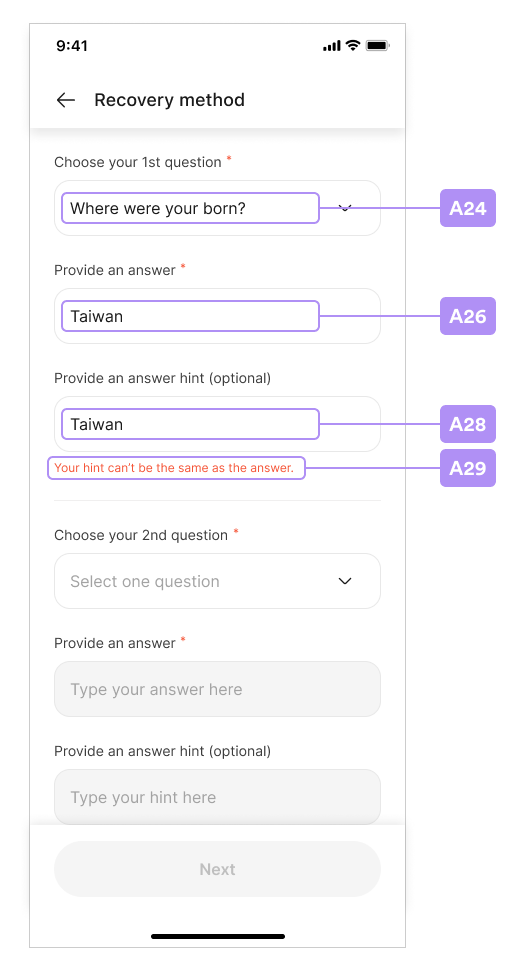
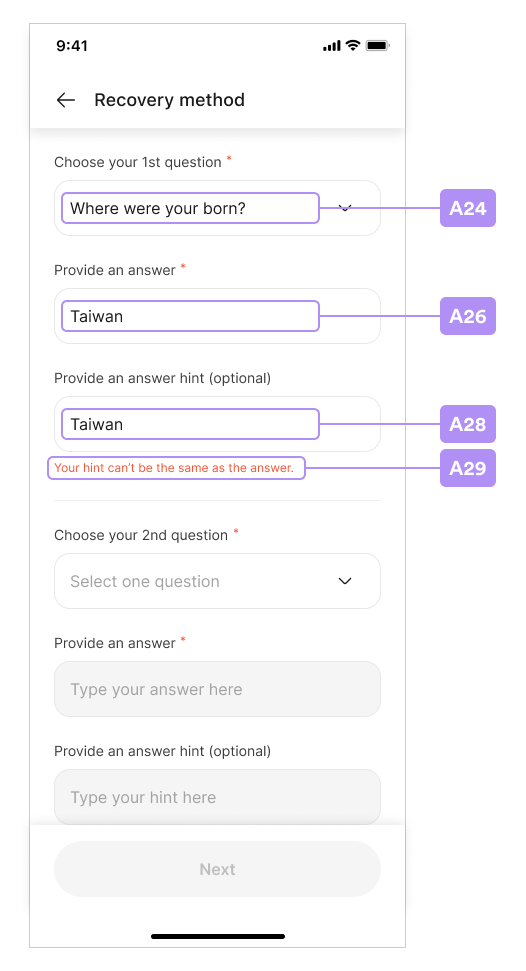
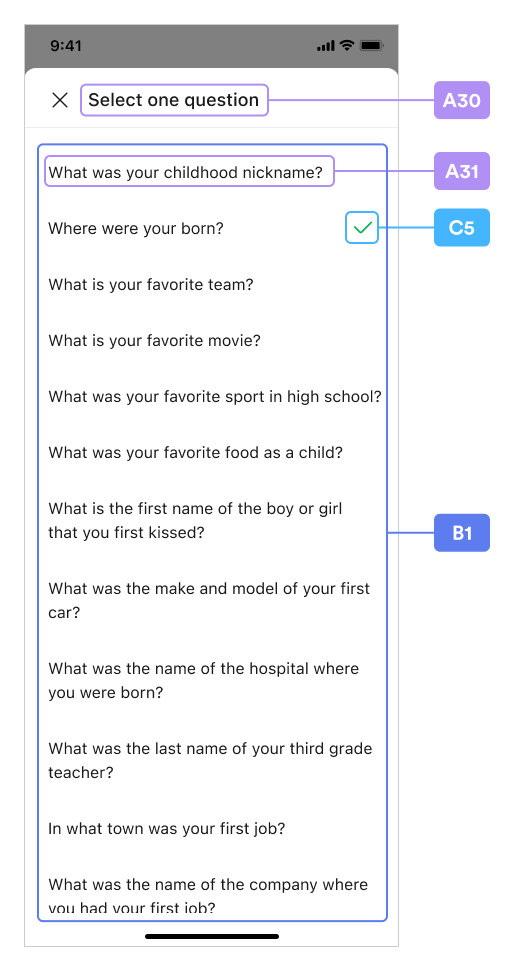
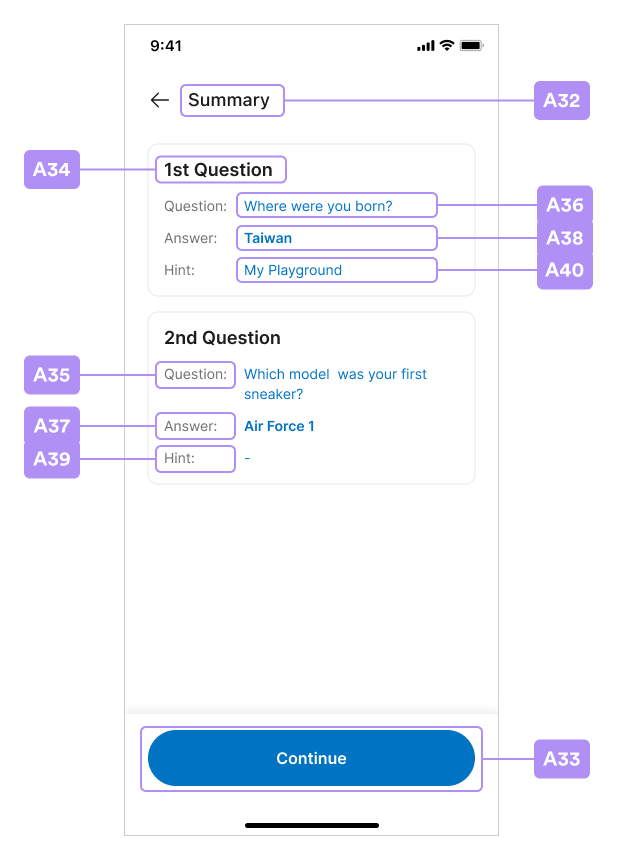
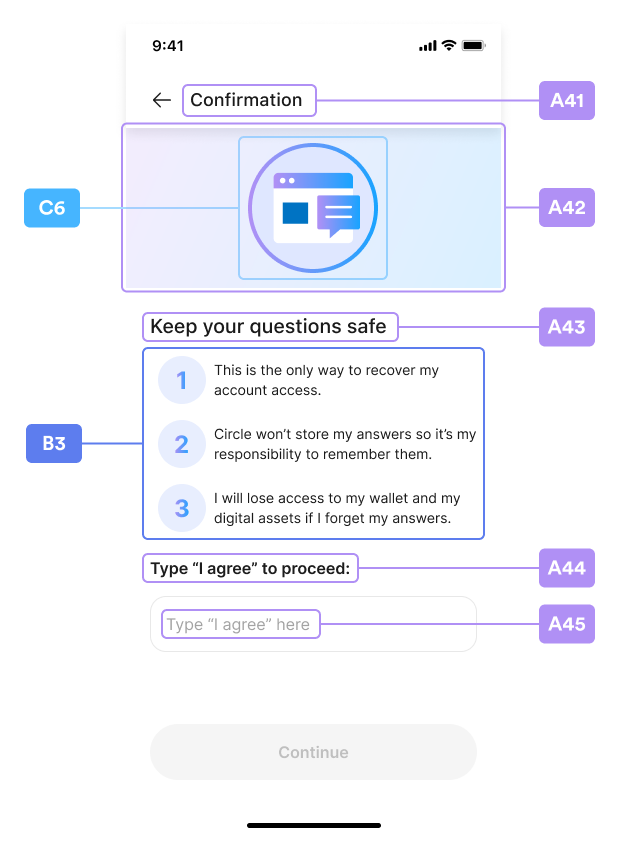
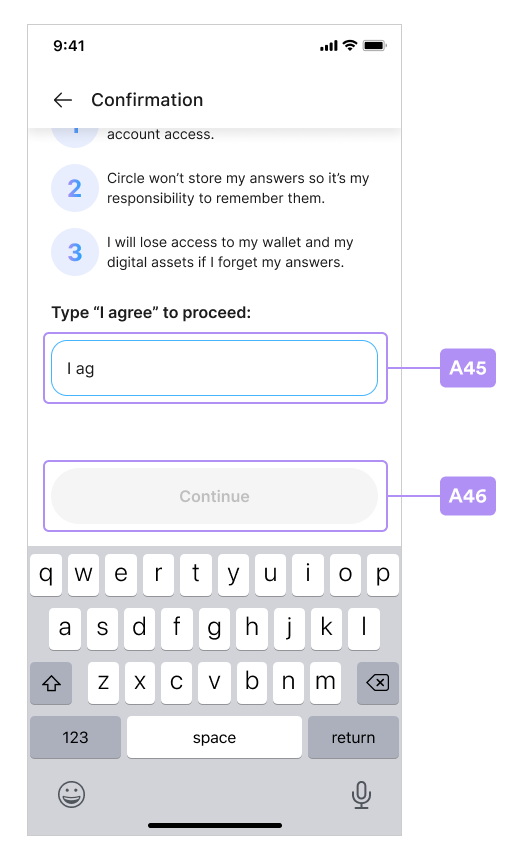
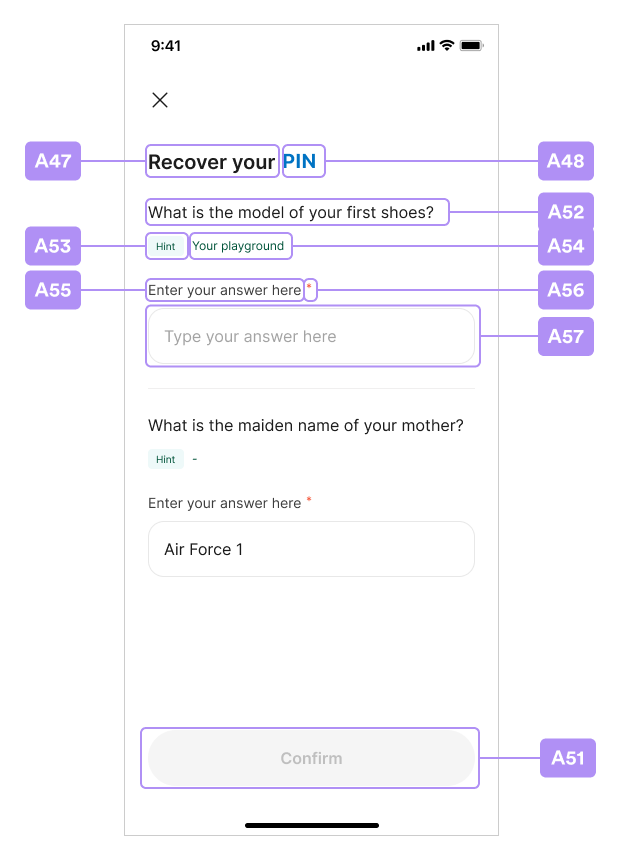
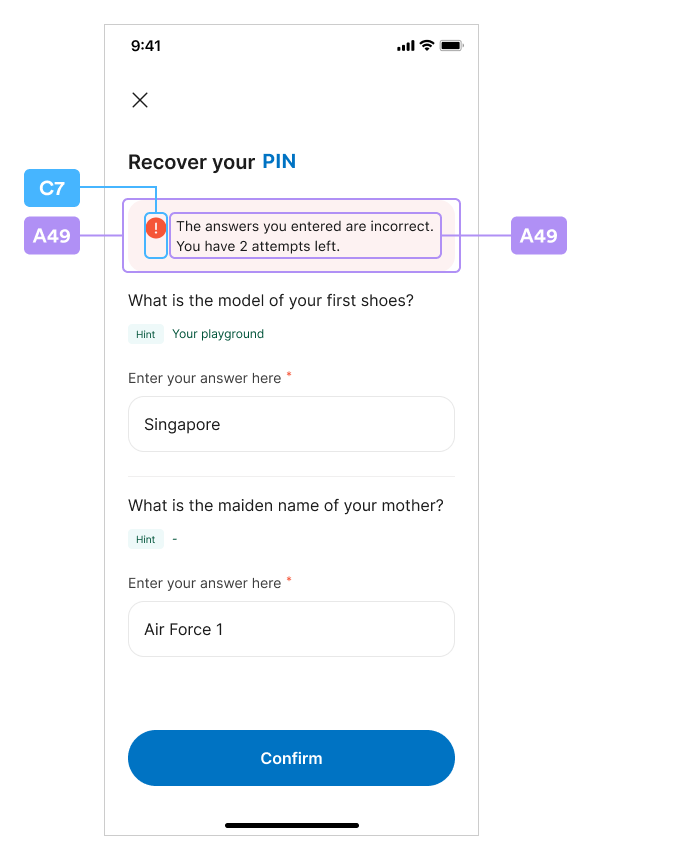
This section includes screenshots of layouts for the SDK functionality. As you
review the layouts, you can cross-reference the alphanumeric tags in the images
with the values in the index tables that follow this section:
* [Index Table A](/sdks/user-controlled/ios-sdk-ui-customization-api#index-table-a)
* [Index Table B](/sdks/user-controlled/ios-sdk-ui-customization-api#index-table-b)
* [Index Table C](/sdks/user-controlled/ios-sdk-ui-customization-api#index-table-c)
## New PIN Code
 ## Confirm PIN Code
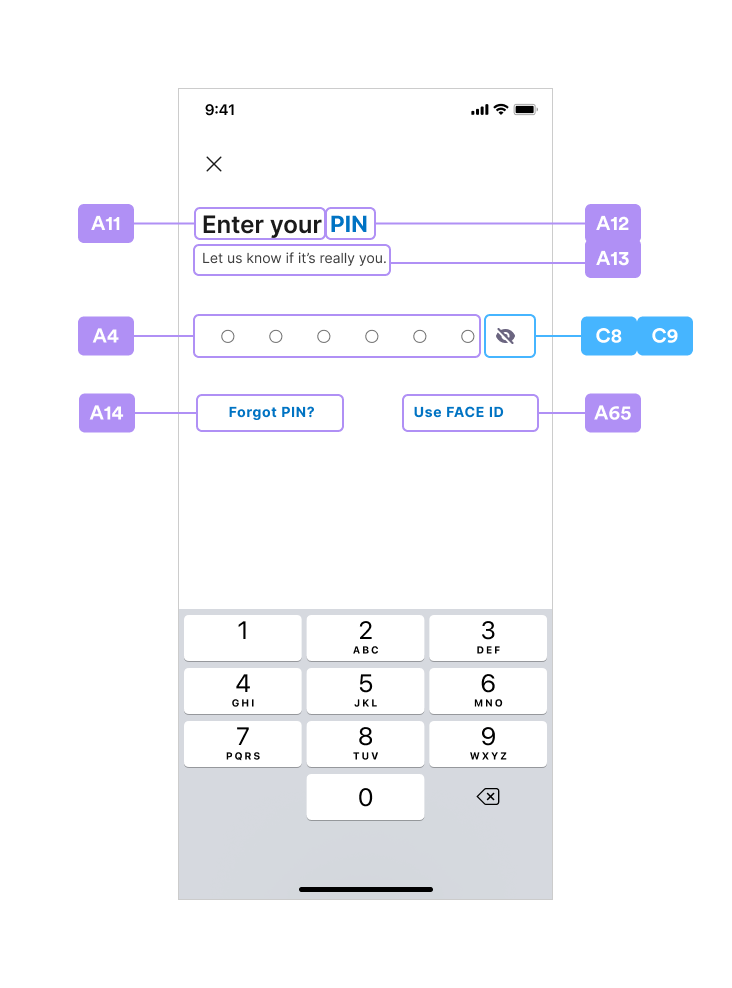
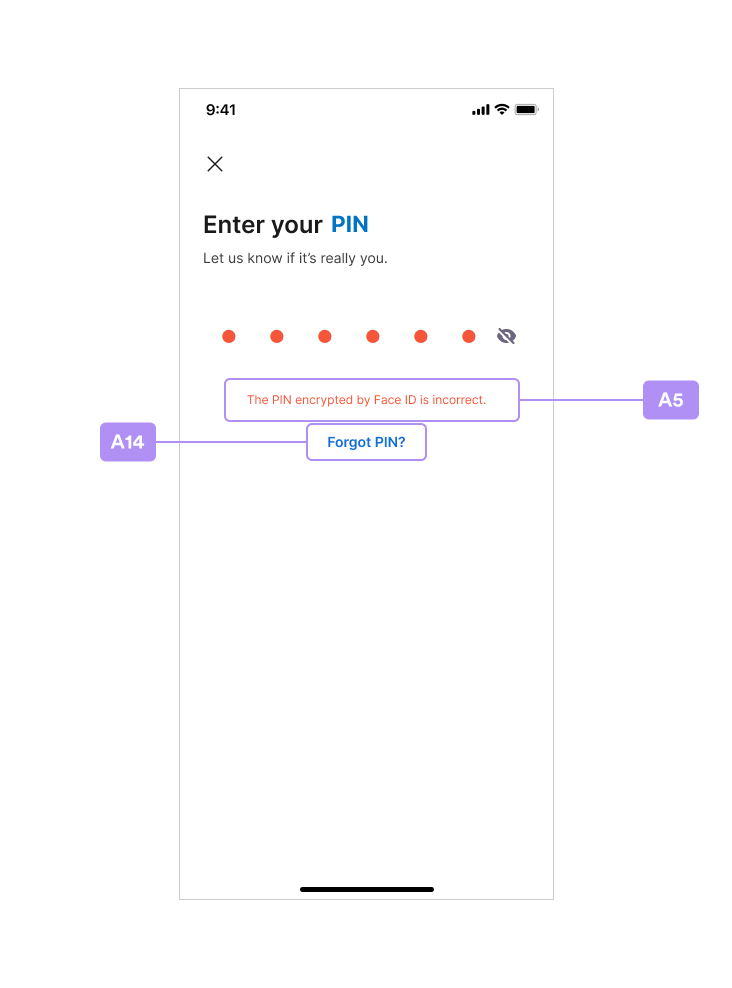
 ## Enter PIN Code
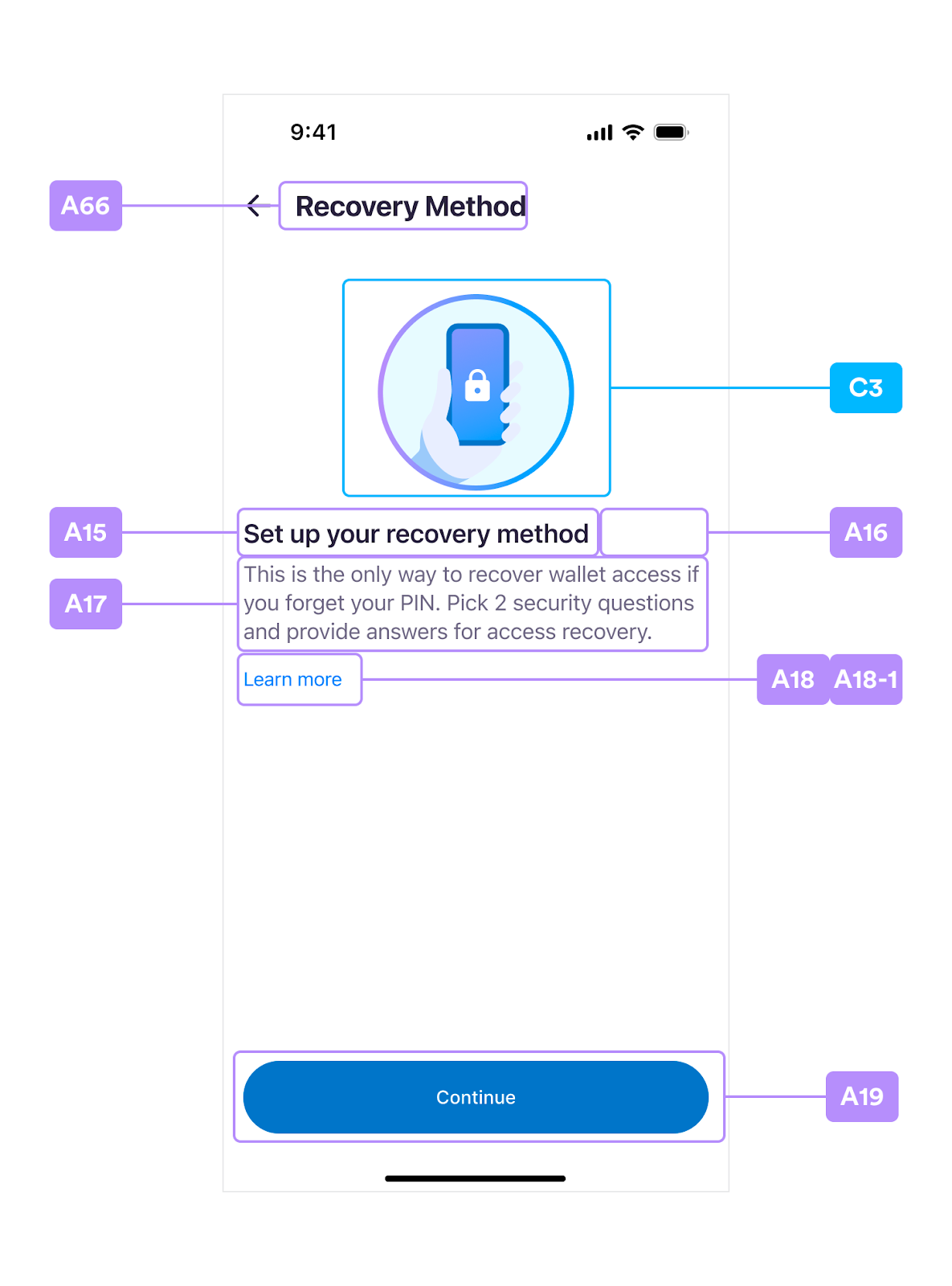
 ## Security Intro
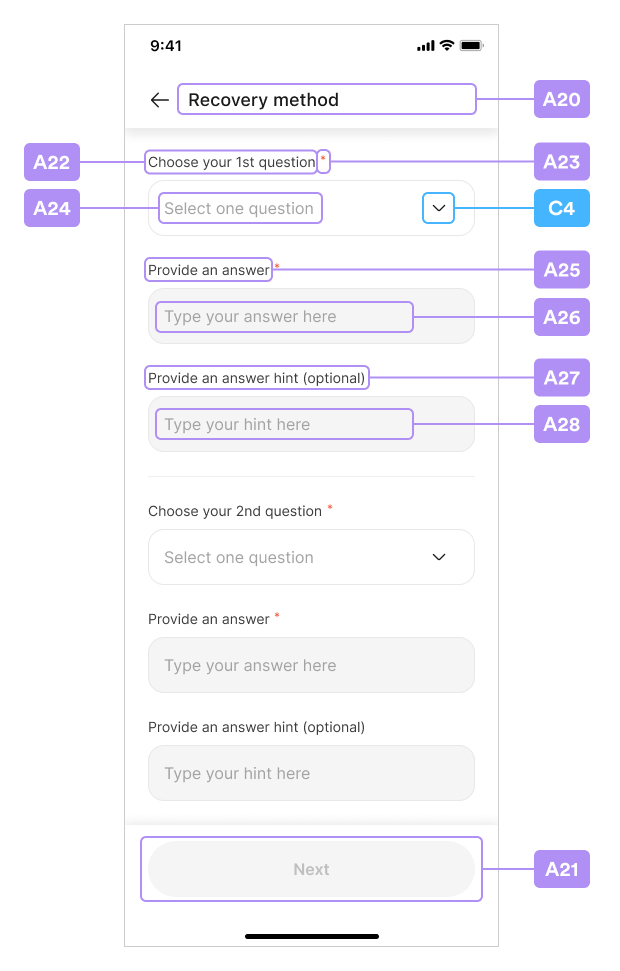
 ## Security Questions
 ## Select Question
 ## Security Summary
 ## Security Confirm
 ## Recover PIN Code
 ## Biometrics Setup
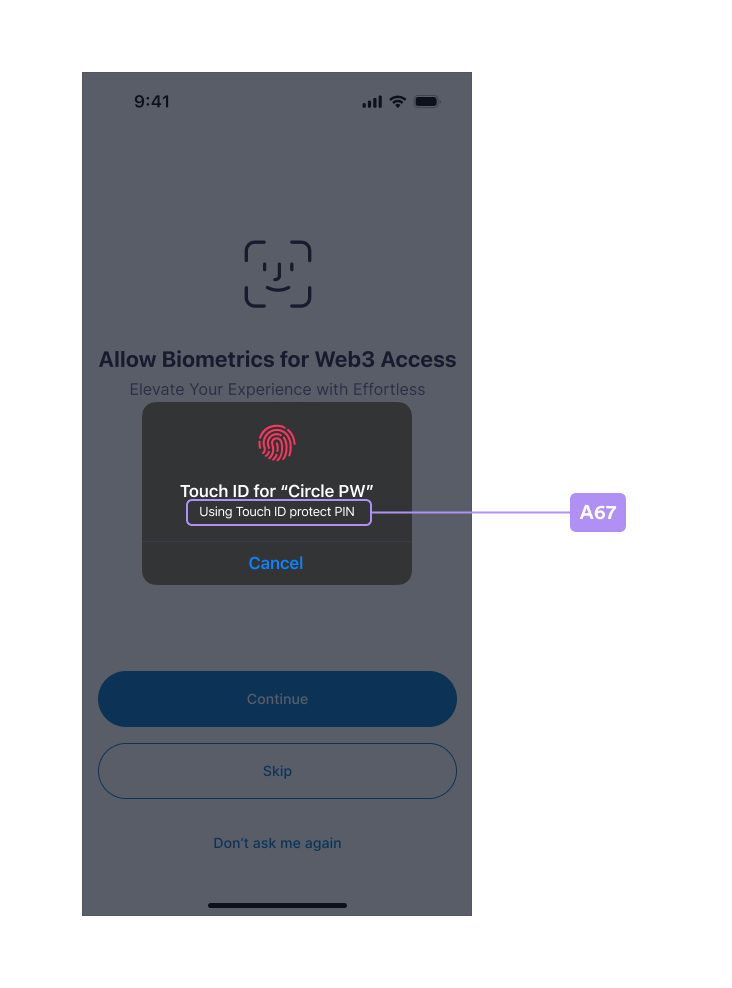
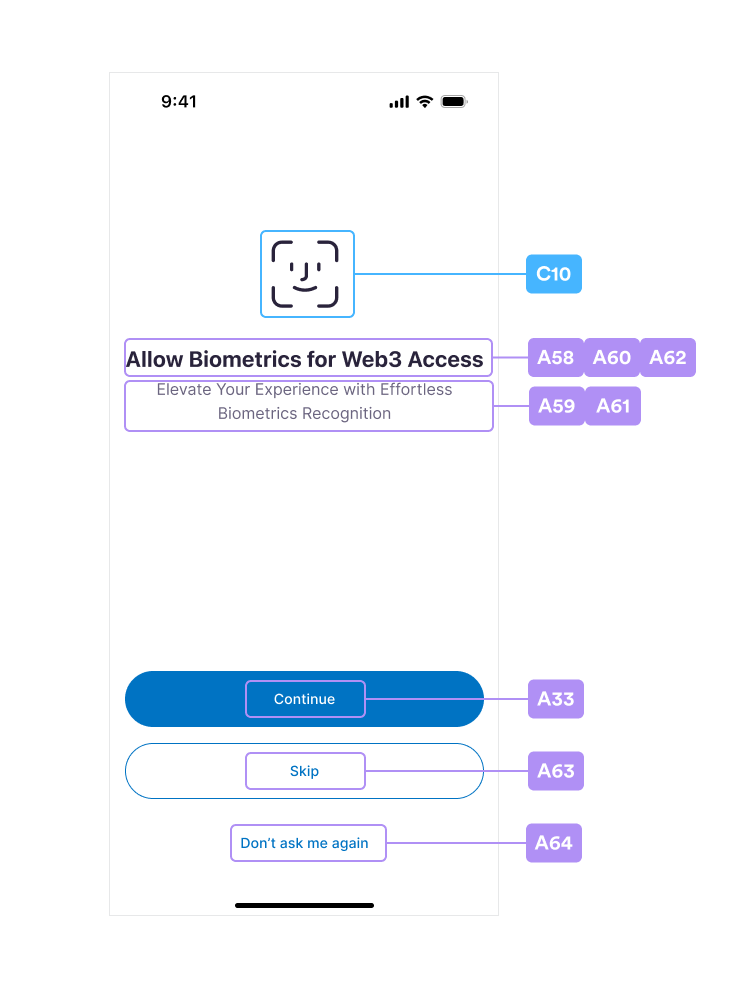 ### Touch ID Setup
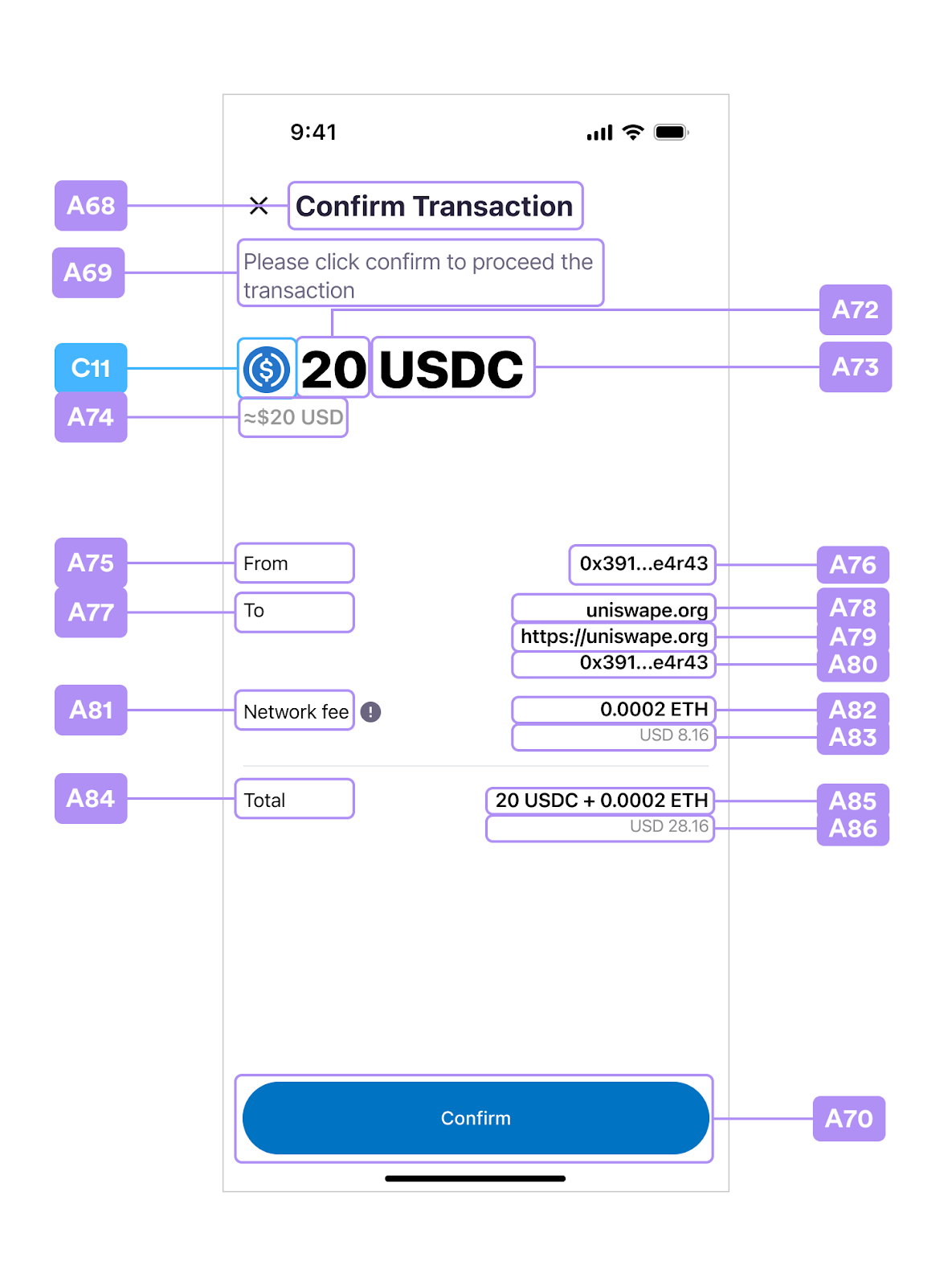
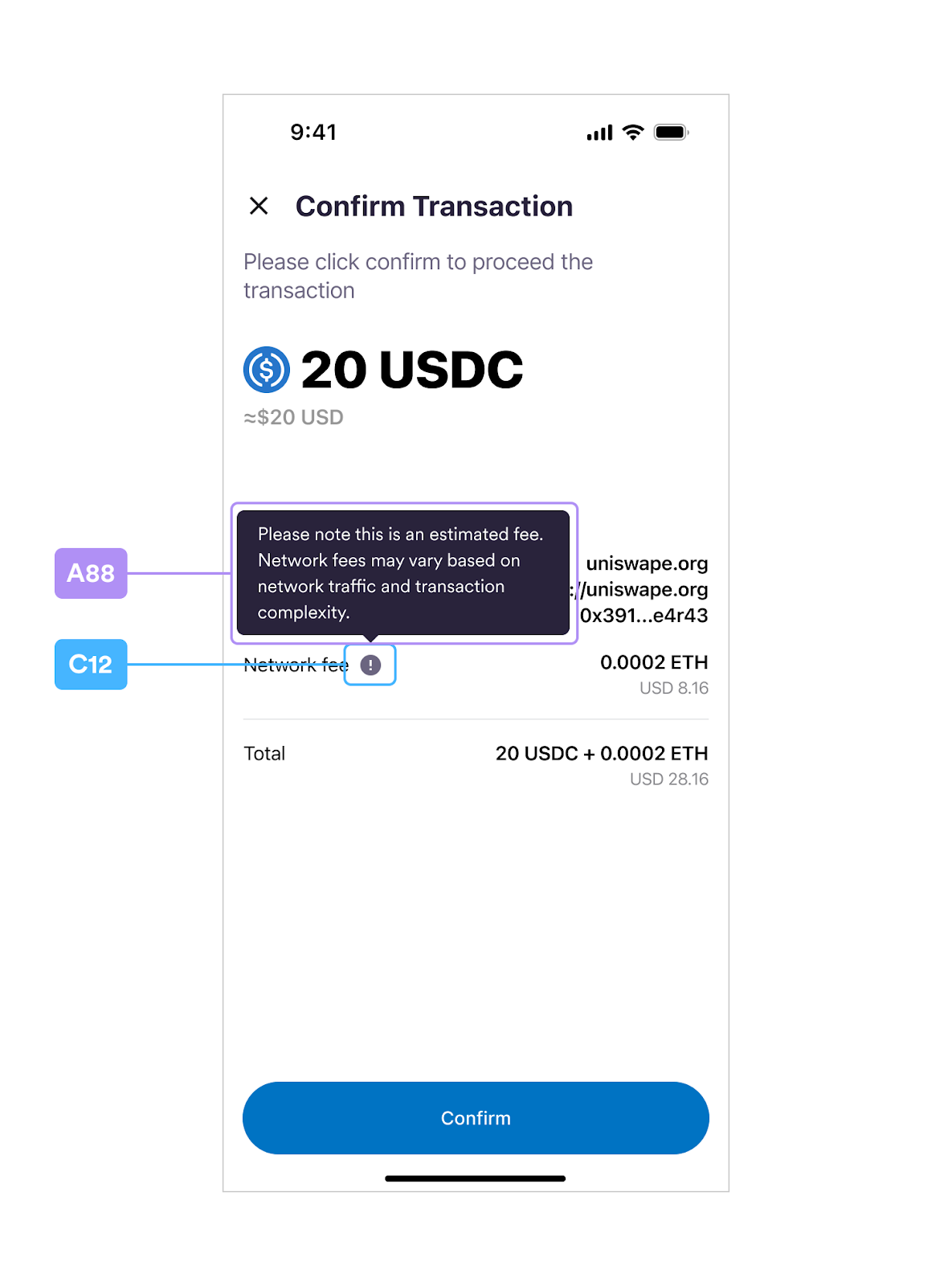
 ## Confirm Transaction
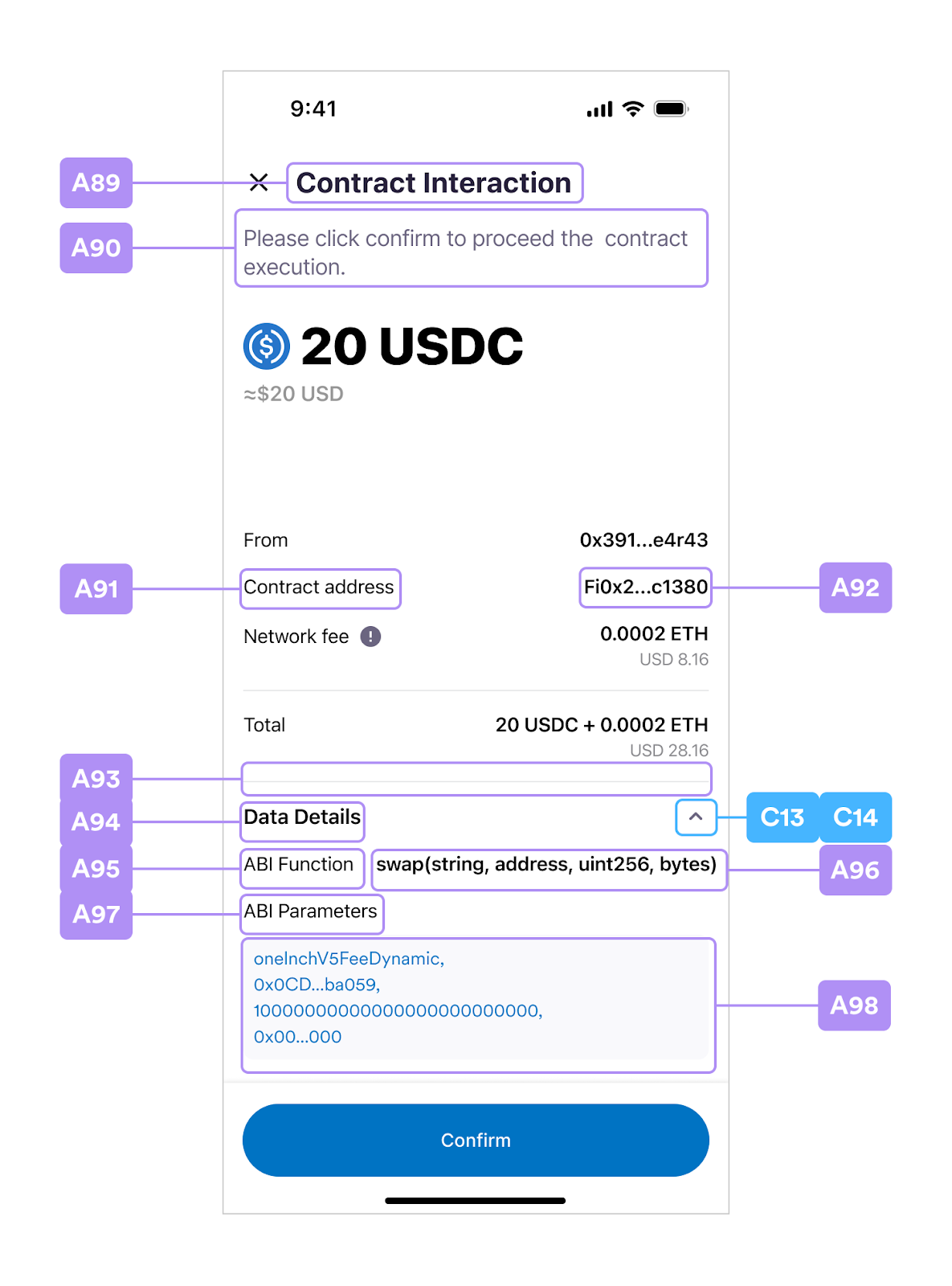
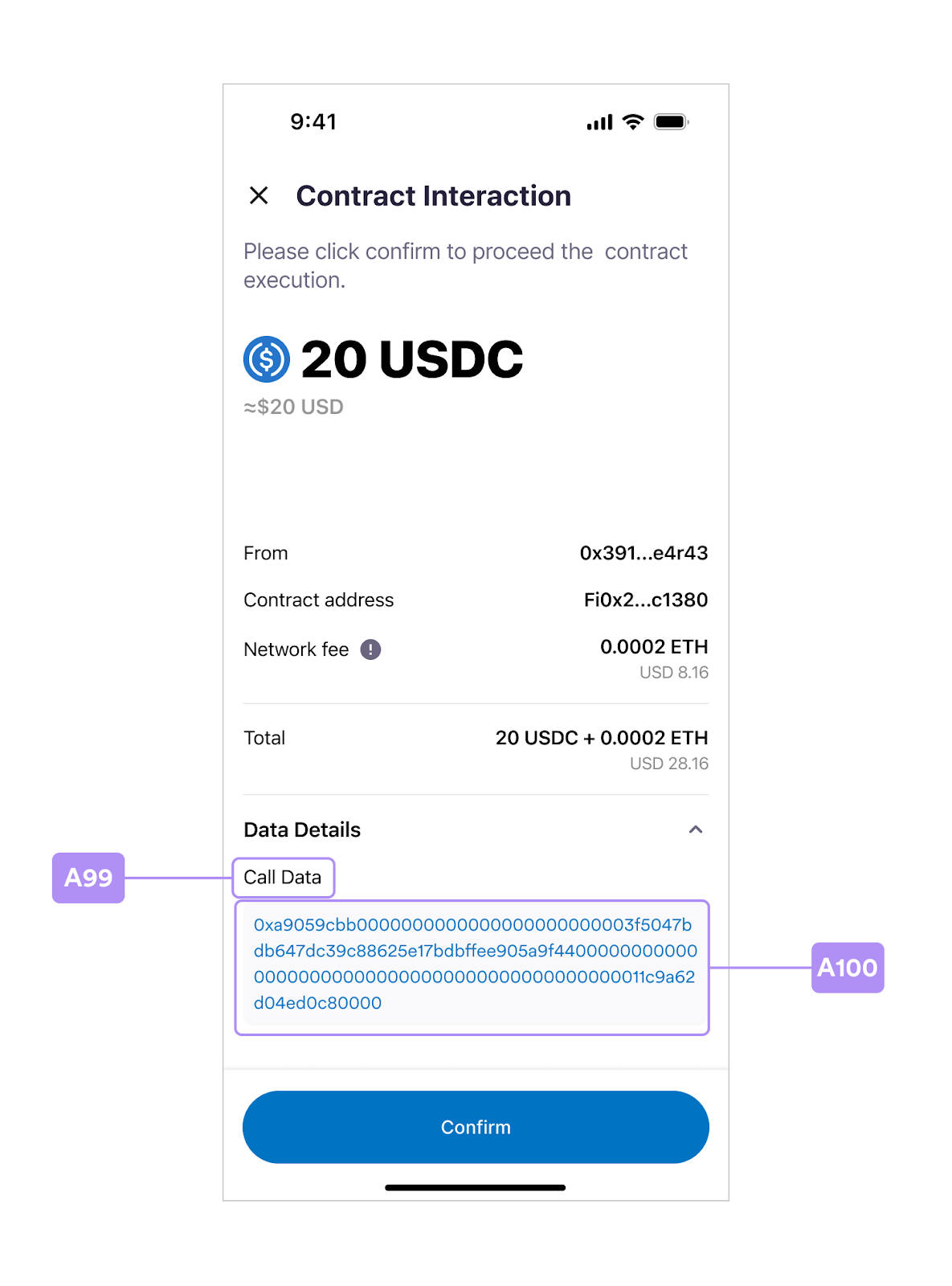
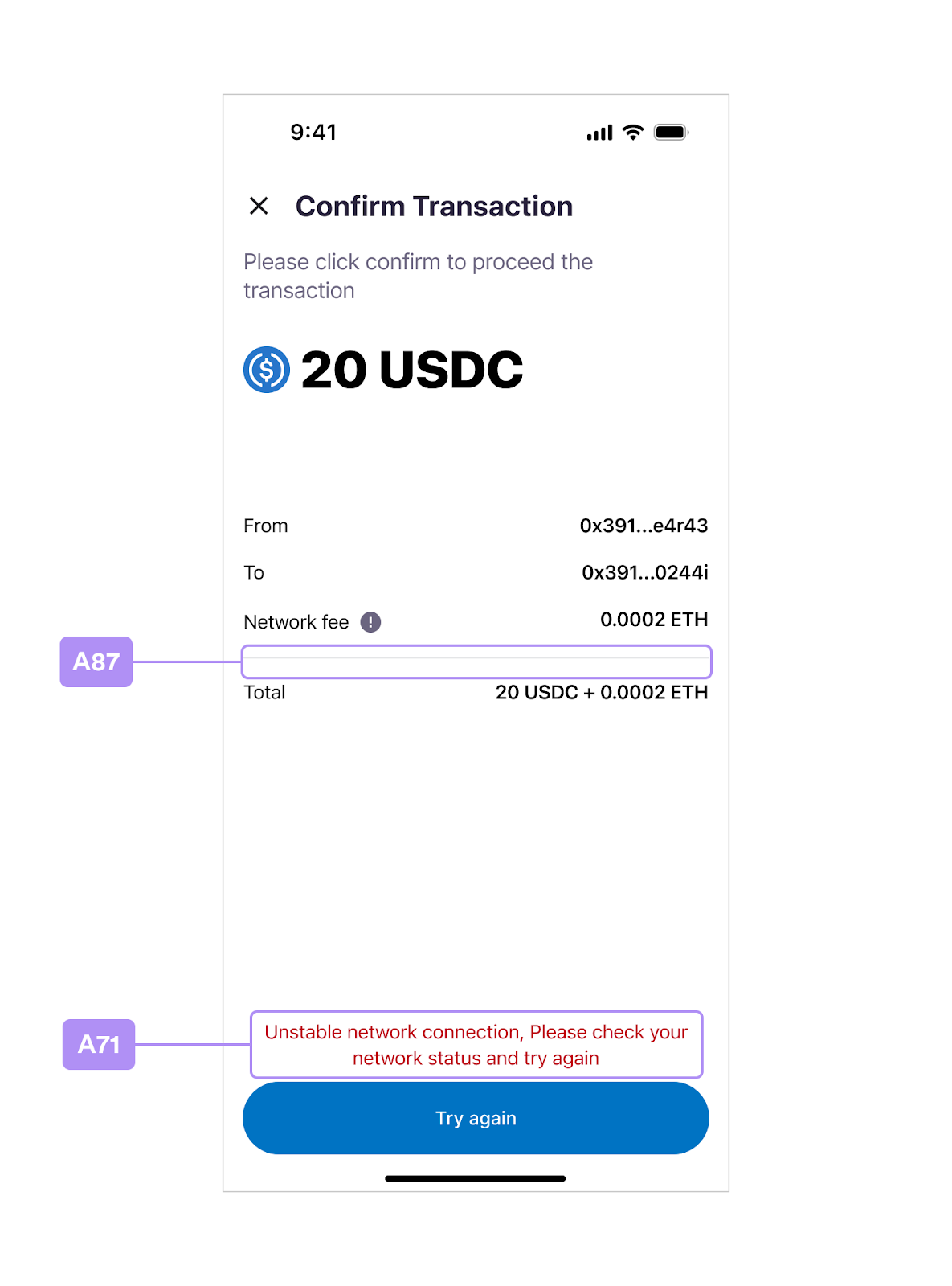 ## Contract Interaction
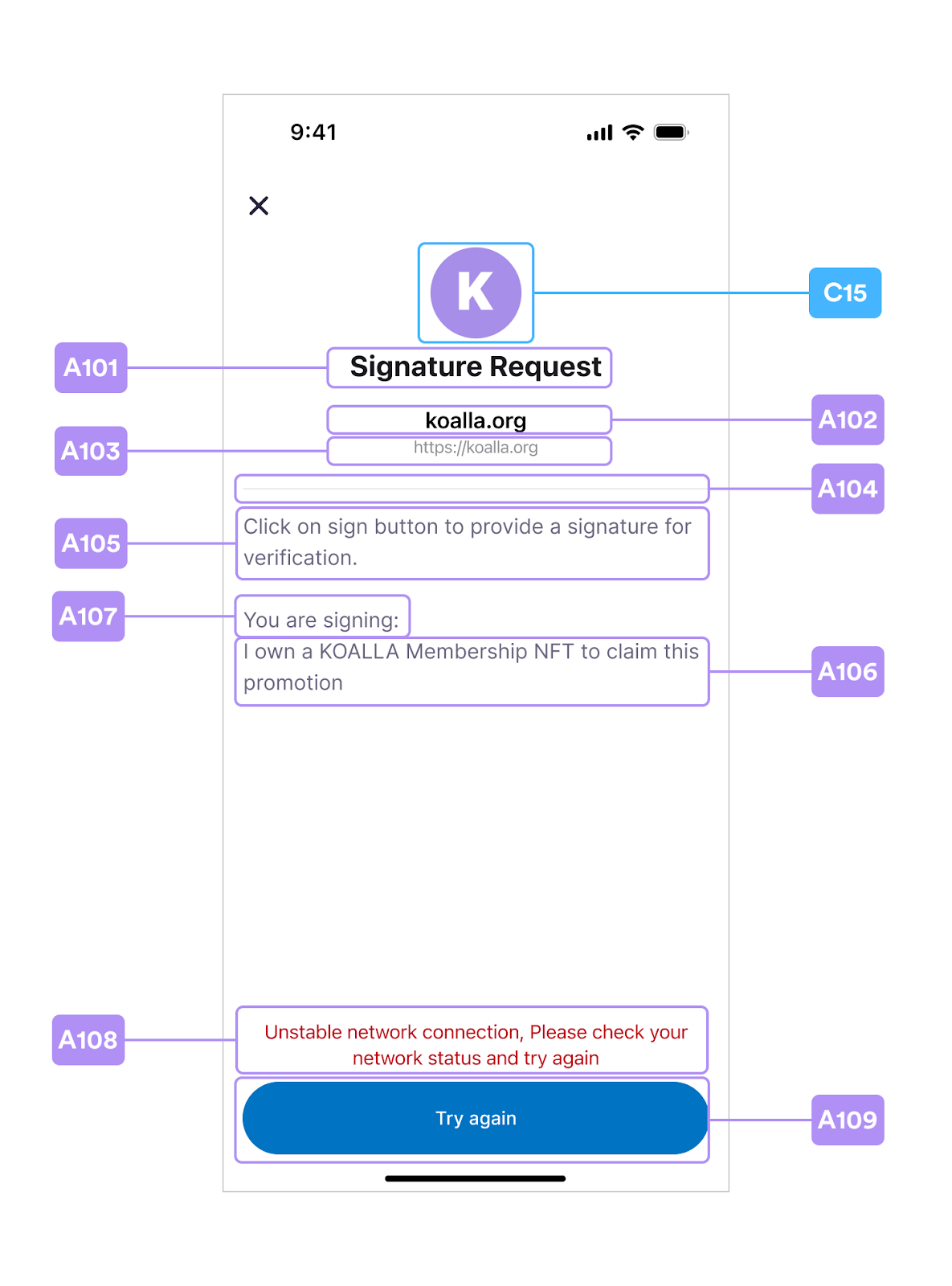
 ## Signature Request
 ## Verify Email OTP
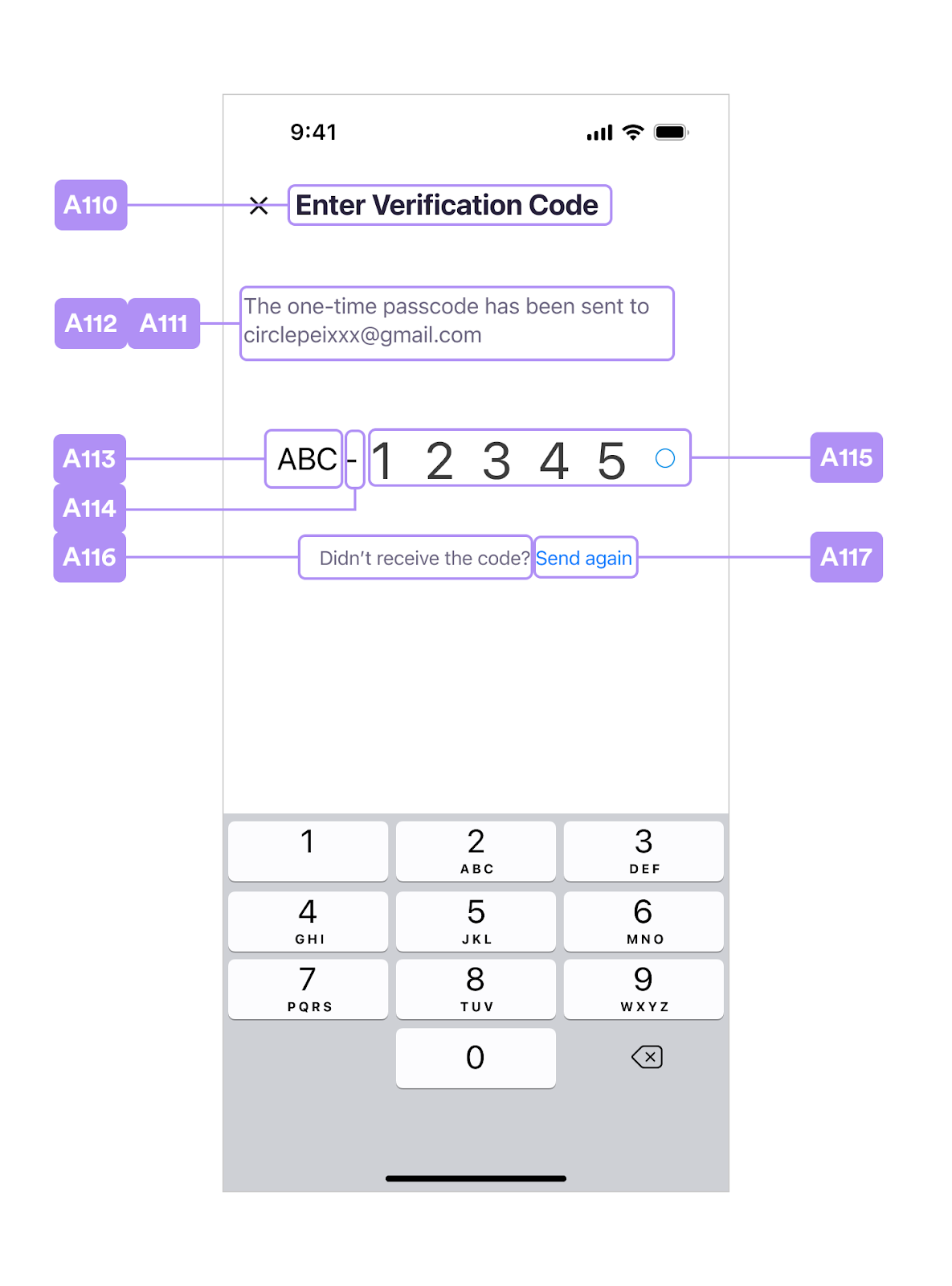
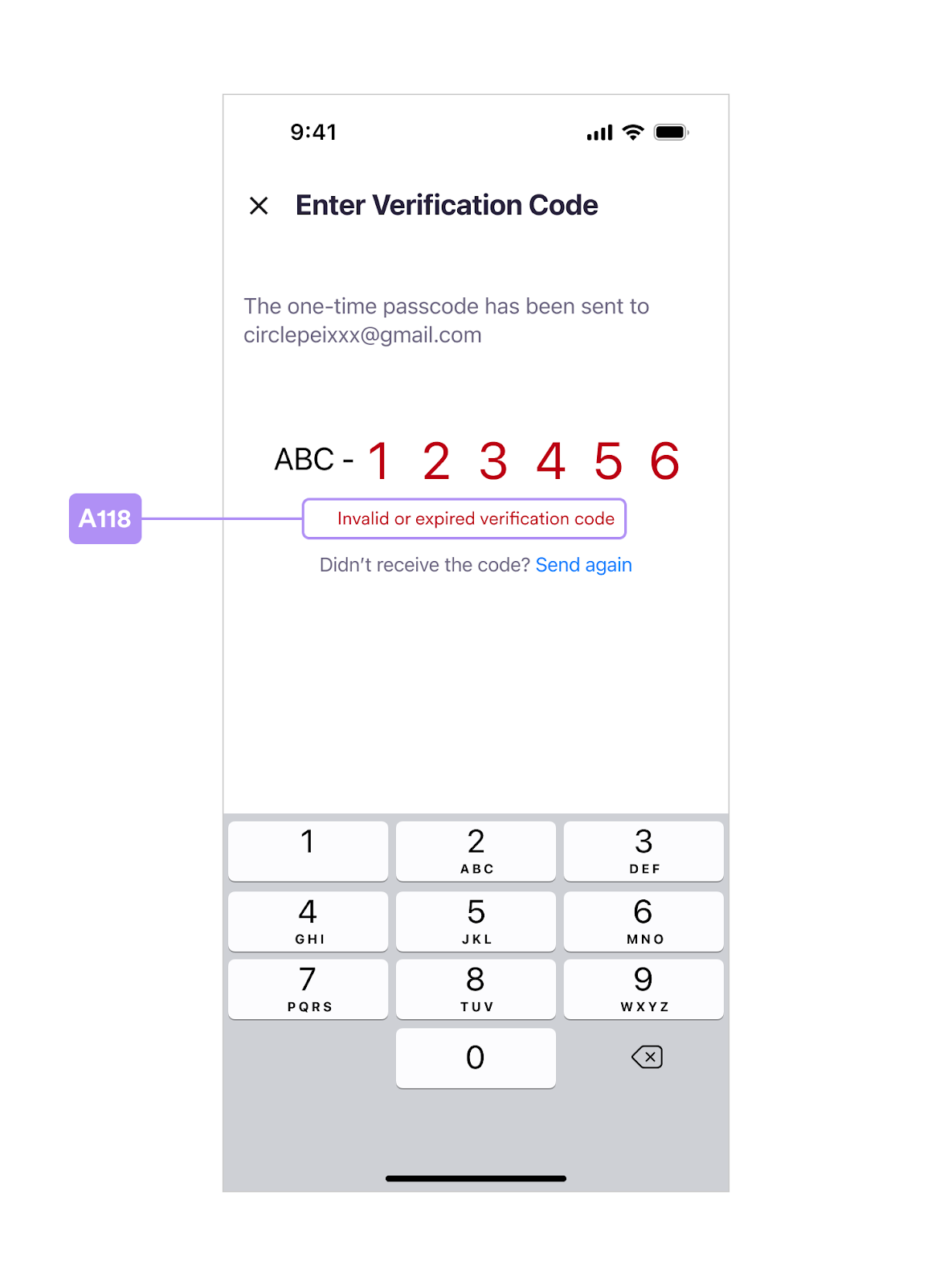 ## Index Table A
Based on the layouts, table A provides the UI item named in the controller and
the keys in use. You can get the UIViewController from `WalletSdkDelegate` and
customize the UI items in the run time. Also, you can provide the values in
static resources `CirclePWLocalizable.strings` and `CirclePWTheme.json` for
customization layouts in build time.
| | **Programmatic Customization** | | | **Static Resources** | | |
| - | :-: | :-: | - | - | - | - |
| | | | | **CirclePWLocalizable.strings** | **CirclePWTheme.json** | |
| **#** | **Controller** | **Item** | **Note** | | **font** | **color** |
| **A1** | NewPINCodeViewController | titleLabel1 | - | circlepw\_new\_pincode\_headline | semibold | text\_main |
| **A2** | '' | titleLabel2 | - | circlepw\_new\_pincode\_headline\_2 | bold | title\_gradients |
| **A3** | '' | subtitleLabel | - | circlepw\_new\_pincode\_subhead | regular | text\_auxiliary |
| **A4** | BasePINInputViewController | - | dots and texts will be generated dynamically | - | light | pin\_dot\_base / pin\_dot\_base\_border / pin\_dot\_activated / pin\_dot\_focused / pin\_digit\_activated / success / error |
| **A5** | '' | - | shows ApiError.displayString | - | regular | error |
| **A8** | ConfirmPINCodeViewController | titleLabel1 | - | circlepw\_confirm\_pincode\_headline | semibold | text\_main |
| **A9** | '' | titleLabel2 | - | circlepw\_confirm\_pincode\_headline\_2 | bold | title\_gradients |
| **A10** | '' | subtitleLabel | - | circlepw\_confirm\_pincode\_subhead | regular | text\_auxiliary |
| **A11** | EnterPINCodeViewController | titleLabel1 | - | circlepw\_enter\_pincode\_headline | semibold | text\_main |
| **A12** | '' | titleLabel2 | - | circlepw\_enter\_pincode\_headline\_2 | bold | title\_gradients |
| **A13** | '' | subtitleLabel | - | circlepw\_enter\_pincode\_subhead | regular | text\_auxiliary |
| **A14** | '' | forgotPINButton | - | circlepw\_enter\_pincode\_forgot\_pin | semibold | text\_action / text\_action\_pressed |
| **A65** | '' | biometricsButton | - | circlepw\_enter\_pincode\_use\_biometrics | semibold | text\_action / text\_action\_pressed |
| **A15** | SecurityIntrosViewController | titleLabel1 | - | circlepw\_security\_intros\_headline | semibold | text\_main |
| **A16** | '' | titleLabel2 | - | circlepw\_security\_intros\_headline\_2 | bold | title\_gradients |
| **A17** | '' | introDescLabel | - | circlepw\_security\_intros\_description | regular | text\_auxiliary2 |
| **A18** | '' | introLinkButton | - | circlepw\_security\_intros\_link | regular | text\_action / text\_action\_pressed |
| **A18-1** | '' | introLink | custom your url string | - | - | - |
| **A19** | '' | continueButton | text | circlepw\_continue | semibold | main\_bt\_text / main\_bt\_text\_pressed / main\_bt\_text\_disabled |
| | '' | '' | background | - | - | main\_bt\_background / main\_bt\_background\_pressed / main\_bt\_background\_disabled |
| **A20** | SecurityQuestionsViewController | baseNaviTitleLabel | - | circlepw\_security\_questions\_title | medium | text\_main |
| **A21** | '' | nextButton | text | circlepw\_next | semibold | main\_bt\_text / main\_bt\_text\_pressed / main\_bt\_text\_disabled |
| | '' | | background | - | - | main\_bt\_background / main\_bt\_background\_pressed / main\_bt\_background\_disabled |
| **A22** | SecurityQuestionTableViewCell | questionTitleLabel | - | circlepw\_security\_questions\_question\_header | regular | text\_auxiliary |
| **A23** | '' | questionMarkLabel | - | circlepw\_security\_questions\_required\_mark | regular | error |
| **A24** | '' | - | placeholder | circlepw\_security\_questions\_question\_placeholder | regular | text\_placeholder |
| | '' | - | selected question | - | regular | text\_main |
| **A25** | '' | answerTitleLabel | - | circlepw\_security\_questions\_answer\_header | regular | text\_auxiliary |
| **A26** | '' | - | placeholder | circlepw\_security\_questions\_answer\_placeholder | regular | text\_placeholder |
| | '' | - | input text | - | regular | text\_main |
| | '' | - | view | - | - | input\_background\_disabled / input\_border / input\_border\_focused |
| **A27** | '' | hintTitleLabel | - | circlepw\_security\_questions\_answer\_hint\_header | regular | text\_auxiliary |
| **A28** | '' | - | placeholder | circlepw\_security\_questions\_answer\_hint\_placeholder | regular | text\_placeholder |
| | '' | - | input text | - | regular | text\_main |
| | '' | - | view | - | - | input\_background\_disabled / input\_border / input\_border\_focused |
| **A29** | '' | hintWarningLabel | ApiError(.hintsMatchAnswers) | - | regular | error |
| **A30** | SelectQuestionViewController | baseNaviTitleLabel | - | circlepw\_select\_question\_title | medium | text\_main |
| **A31** | SelectQuestionTableViewCell | titleLabel | question list | - | regular | text\_main |
| **A32** | SecuritySummaryViewController | baseNaviTitleLabel | - | circlepw\_security\_summary\_title | medium | text\_main |
| **A33** | '' | continueButton | text | circlepw\_continue | semibold | main\_bt\_text / main\_bt\_text\_pressed / main\_bt\_text\_disabled |
| | '' | | background | - | - | main\_bt\_background / main\_bt\_background\_pressed / main\_bt\_background\_disabled |
| **A34** | SecuritySummaryTableViewCell | titleLabel | - | \{ordinal} + circlepw\_question | semibold | text\_main2 |
| **A35** | '' | questionTitleLabel | - | circlepw\_question + “:” | regular | text\_auxiliary2 |
| **A36** | '' | - | - | - | regular | text\_summary |
| **A37** | '' | answerTitleLabel | - | circlepw\_answer + “:“ | regular | text\_auxiliary2 |
| **A38** | '' | - | - | - | semibold | text\_summary\_highlight |
| **A39** | '' | hintTitleLabel | - | circlepw\_hint + “:“ | regular | text\_auxiliary2 |
| **A40** | '' | - | - | circlepw\_empty\_placeholder | regular | text\_summary |
| **A41** | SecurityConfirmViewController | baseNaviTitleLabel | - | circlepw\_security\_confirm\_title | medium | text\_main |
| **A42** | '' | imageBgView | - | - | - | security\_confirm\_main\_bg |
| **A43** | '' | tipsTitleLabel | - | circlepw\_security\_confirm\_headline | medium | text\_main |
| **A44** | '' | agreeTitleLabel | - | circlepw\_security\_confirm\_input\_headline | semibold | text\_main2 |
| **A45** | '' | agreeTextField | placeholder | circlepw\_security\_confirm\_input\_placeholder | regular | text\_placeholder |
| | '' | '' | input text | - | regular | text\_main2 |
| | '' | '' | view | - | - | input\_background\_disabled / input\_border / input\_border\_focused |
| **A46** | '' | continueButton | text | circlepw\_continue | semibold | main\_bt\_text / main\_bt\_text\_pressed / main\_bt\_text\_disabled |
| | '' | '' | background | - | - | main\_bt\_background / main\_bt\_background\_pressed / main\_bt\_background\_disabled |
| **A47** | RecoverPINCodeViewController | titleLabel1 | - | circlepw\_recover\_pincode\_headline | semibold | text\_main |
| **A48** | '' | titleLabel2 | - | circlepw\_recover\_pincode\_headline\_2 | bold | title\_gradients |
| **A49** | '' | - | shows ApiError.displayString | - | regular | text\_main |
| **A50** | '' | errorMessageView | background | - | - | error\_background |
| **A51** | '' | confirmButton | text | circlepw\_confirm | semibold | main\_bt\_text / main\_bt\_text\_pressed / main\_bt\_text\_disabled |
| | '' | '' | background | - | - | main\_bt\_background / main\_bt\_background\_pressed / main\_bt\_background\_disabled |
| **A52** | RecoverPINCodeTableViewCell | - | - | - | regular | text\_main2 |
| **A53** | '' | hintTitleLabel | text | circlepw\_hint | regular | recover\_pin\_hint\_title |
| | '' | '' | background | - | - | recover\_pin\_hint\_title\_bg |
| **A54** | '' | - | placeholder | circlepw\_empty\_placeholder | regular | recover\_pin\_hint |
| **A55** | '' | answerTitleLabel | - | circlepw\_recover\_pincode\_answer\_input\_header | regular | text\_auxiliary |
| **A56** | '' | answerMarkLabel | - | circlepw\_security\_questions\_required\_mark | regular | error |
| **A57** | '' | - | placeholder | circlepw\_recover\_pincode\_answer\_input\_placeholder | regular | text\_placeholder |
| | '' | - | input text | - | regular | text\_main |
| | '' | - | view | - | - | input\_background\_disabled / input\_border / input\_border\_focused |
| **A58** | BiometricsPromptViewController | promptTitleLabel | Set up biometrics first in the process | circlepw\_pin\_biometrics\_allow\_title | bold | text\_prompt |
| **A60** | '' | '' | After first setting up biometrics process | circlepw\_pin\_biometrics\_failed\_title | | |
| **A62** | '' | '' | Update after failure to use biometric PIN | circlepw\_pin\_biometrics\_update\_title | | |
| **A59** | '' | promptSubtitleLabel | Set up biometrics in the process | circlepw\_pin\_biometrics\_allow\_subtitle | regular | text\_prompt2 |
| **A61** | '' | '' | Update after failure to use biometric PIN | circlepw\_pin\_biometrics\_update\_subtitle | | |
| **A63** | '' | skipButton | text | circlepw\_skip | semibold | second\_bt\_text |
| | '' | '' | background | - | - | second\_bt\_border / second\_bt\_background / second\_bt\_background\_pressed |
| **A64** | '' | dontAskButton | text | circlepw\_pin\_biometrics\_disable | semibold | plain\_bt\_text |
| | '' | '' | background | - | - | plain\_bt\_background / plain\_bt\_background\_pressed |
| **A67** | - | - | - | circlepw\_pin\_touch\_id\_dialog\_subtitle | - | - |
| **A68** | BaseRequestViewController | baseNaviTitleLabel | - | circlepw\_transaction\_request\_title | medium | text\_main |
| **A69** | '' | descriptionLabel | - | circlepw\_transaction\_request\_subtitle | regular | text\_auxiliary |
| **A70** | '' | confirmButton | text | circlepw\_confirm / circlepw\_try\_again | semibold | main\_bt\_text / main\_bt\_text\_pressed / main\_bt\_text\_disabled |
| | '' | '' | background | - | - | main\_bt\_background / main\_bt\_background\_pressed / main\_bt\_background\_disabled |
| **A71** | '' | errorLabel | shows ApiError.displayString | - | regular | error |
| **A72** | TransactionRequestViewController | amountLabel | - | - | heavy | text\_prompt |
| **A73** | '' | currencyLabel | - | circlepw\_transaction\_request\_main\_currency | heavy | text\_prompt |
| **A74** | '' | txFiatValueLabel | If it has no value, it will be hidden | circlepw\_transaction\_request\_exchange\_amount | semibold | text\_exchange |
| **A75** | '' | fromTitleLabel | If the fromLabel has no value, it will be hidden | circlepw\_transaction\_request\_from\_label | regular | text\_prompt |
| **A76** | '' | fromLabel | - | circlepw\_transaction\_request\_from | semibold | text\_prompt |
| **A77** | '' | toTitleLabel | - | circlepw\_transaction\_request\_to\_label | regular | text\_prompt |
| **A78** | '' | toContractNameLabel | If it has no value, it will be hidden | circlepw\_transaction\_request\_to\_contract\_name | semibold | text\_prompt |
| **A79** | '' | toContractURLLabel | If it has no value, it will be hidden | circlepw\_transaction\_request\_to\_contract\_url | semibold | text\_prompt |
| **A80** | '' | toLabel | - | - | semibold | text\_prompt |
| **A81** | '' | feeTitleLabel | If the feeLabel has no value, it will be hidden | circlepw\_transaction\_request\_network\_fee\_label | regular | text\_prompt |
| **A82** | '' | feeLabel | - | circlepw\_transaction\_request\_network\_fee | semibold | text\_prompt |
| **A83** | '' | feeFiatValueLabel | - | circlepw\_transaction\_request\_exchange\_network\_fee | regular | text\_exchange |
| **A84** | '' | totalTitleLabel | If the totalLabel has no value, it will be hidden | circlepw\_transaction\_request\_total\_label | regular | text\_prompt |
| **A85** | '' | totalLabel | - | - | semibold | text\_prompt |
| **A86** | '' | totalFiatValueLabel | If it or the totalLabel has no value, it will be hidden | circlepw\_transaction\_request\_exchange\_total\_value | regular | text\_exchange |
| **A87** | '' | dividerView1 | - | - | - | divider |
| **A88** | FeeTipViewController | descriptionLabel | - | circlepw\_transaction\_request\_fee\_tip | regular | tip\_text |
| | '' | backgroundColor | - | - | - | tip\_background |
| **A89** | ContractRequestViewController | baseNaviTitleLabel | - | circlepw\_contract\_interaction\_title | medium | text\_main |
| **A90** | '' | descriptionLabel | - | circlepw\_contract\_interaction\_subtitle | regular | text\_auxiliary |
| **A91** | '' | contractAddressTitleLabel | - | circlepw\_contract\_interaction\_contract\_address\_label | regular | text\_prompt |
| **A92** | '' | contractAddressLabel | - | - | semibold | text\_prompt |
| **A93** | '' | dividerView2 | - | - | - | divider |
| **A94** | '' | dataDetailsLabel | - | circlepw\_contract\_interaction\_data\_details | semibold | text\_prompt |
| **A95** | '' | abiFunctionTitleLabel | - | circlepw\_contract\_interaction\_abi\_function\_label | regular | text\_prompt |
| **A96** | '' | abiFunctionLabel | - | - | semibold | text\_prompt |
| **A97** | '' | abiParameterTitleLabel | - | circlepw\_contract\_interaction\_abi\_parameter\_label | regular | text\_prompt |
| **A98** | '' | abiParameterLabel | text | - | regular | text\_interactive |
| | '' | '' | background | - | - | interactive\_background |
| **A99** | '' | callDataTitleLabel | - | circlepw\_contract\_interaction\_call\_data\_label | regular | text\_prompt |
| **A100** | '' | callDataLabel | text | - | regular | text\_interactive |
| | '' | '' | background | - | - | interactive\_background |
| **A101** | SignatureRequestViewController | titleLabel | - | circlepw\_signature\_request\_title | semibold | text\_main |
| **A102** | '' | contractNameLabel | If it has no value, it will be hidden | circlepw\_signature\_request\_contract\_name | semibold | text\_prompt |
| **A103** | '' | contractURLLabel | If it has no value, it will be hidden | circlepw\_signature\_request\_contract\_name | regular | text\_sign\_url |
| **A104** | '' | dividerView | - | - | - | divider |
| **A105** | '' | subtitleLabel | - | circlepw\_signature\_request\_subtitle | regular | text\_auxiliary |
| **A106** | '' | descriptionLabel | - | circlepw\_signature\_request\_description | regular | text\_auxiliary |
| **A107** | '' | messageLabel | - | - | regular | text\_auxiliary |
| **A108** | '' | errorLabel | shows ApiError.displayString | - | regular | error |
| **A109** | '' | confirmButton | text | circlepw\_confirm / circlepw\_try\_again | semibold | main\_bt\_text / main\_bt\_text\_pressed / main\_bt\_text\_disabled |
| | '' | '' | background | - | - | main\_bt\_background / main\_bt\_background\_pressed / main\_bt\_background\_disabled |
| **A110** | EmailOTPViewController | baseNaviTitleLabel | - | circlepw\_email\_otp\_title | medium | text\_main |
| **A111** | '' | descriptionLabel | - | circlepw\_email\_otp\_description | regular | text\_auxiliary |
| **A112** | '' | | - | circlepw\_email\_otp\_email | | |
| **A113** | '' | otpHeadLabel | - | - | regular | text\_prompt |
| **A114** | '' | otpDashLabel | - | circlepw\_email\_otp\_dash | regular | text\_prompt |
| **A115** | '' | - | texts will be generated dynamically | - | light | pin\_dot\_base / pin\_dot\_base\_border / pin\_dot\_focused / pin\_digit\_activated / success / error |
| **A116** | '' | sendAgainHintLabel | - | circlepw\_email\_otp\_send\_again\_hint | regular | text\_auxiliary |
| **A117** | '' | sendAgainButton | - | circlepw\_email\_otp\_send\_again | regular | text\_action / text\_action\_pressed |
| **A118** | '' | errorMessageLabel | shows ApiError.displayString | - | regular | error |
## Index Table B
By confirming the `WalletSdkLayoutProvider`, you can custom layout from Table-B
dynamically. See the
[Sample Code](https://circlepay.atlassian.net/wiki/spaces/~62e7eea5da8620d53392126b/pages/767852579/PW+SDK+UI+Customization+-+iOS#WalletSdkLayoutProvider "https://circlepay.atlassian.net/wiki/spaces/~62e7eea5da8620d53392126b/pages/767852579/PW+SDK+UI+Customization+-+iOS#WalletSdkLayoutProvider").
| **#** | **WalletSdkLayoutProvider** | **Note** |
| :- | :- | :- |
| **B1** | func securityQuestions() -> \[SecurityQuestion] | Set security question list |
| **B2** | func securityQuestionsRequiredCount() -> Int | Set security question required count (default is 2) |
| **B3** | func securityConfirmItems() -> \[SecurityConfirmItem] | Set security confirm item list |
| **B4** | func displayDateFormat() -> String | Set the date format for display date strings. (Default is "yyyy-MM-dd") |
| **-** | func imageStore() -> ImageStore | Set local and remote images (more details in **Table-C**) |
| **-** | func themeFont() -> ThemeConfig.ThemeFont? | Set theme font programmatically- Provide the ThemeFont structure by code. - This method will override the font setups in CirclePWTheme.json file. - |
## Index Table C
| | **Used in WalletSdkLayoutProvider** | **Used in WalletSdkDelegate** | |
| - | - | - | - |
| **#** | **ImageStore.Img (Enum)** | **Controller** | **Item** |
| **C1** | naviClose | - | - |
| **C2** | naviBack | - | - |
| **C3** | securityIntroMain | SecurityIntrosViewController | introImageView |
| **C4** | dropdownArrow | SecurityQuestionTableViewCell | questionTrailingButton |
| **C5** | selectCheckMark | SelectQuestionTableViewCell | checkmarkImage |
| **C6** | securityConfirmMain | SecurityConfirmViewController | imageView |
| **C7** | errorInfo | RecoverPINCodeViewController | errorImageView |
| **C8** | showPin | BasePINInputViewController
## Index Table A
Based on the layouts, table A provides the UI item named in the controller and
the keys in use. You can get the UIViewController from `WalletSdkDelegate` and
customize the UI items in the run time. Also, you can provide the values in
static resources `CirclePWLocalizable.strings` and `CirclePWTheme.json` for
customization layouts in build time.
| | **Programmatic Customization** | | | **Static Resources** | | |
| - | :-: | :-: | - | - | - | - |
| | | | | **CirclePWLocalizable.strings** | **CirclePWTheme.json** | |
| **#** | **Controller** | **Item** | **Note** | | **font** | **color** |
| **A1** | NewPINCodeViewController | titleLabel1 | - | circlepw\_new\_pincode\_headline | semibold | text\_main |
| **A2** | '' | titleLabel2 | - | circlepw\_new\_pincode\_headline\_2 | bold | title\_gradients |
| **A3** | '' | subtitleLabel | - | circlepw\_new\_pincode\_subhead | regular | text\_auxiliary |
| **A4** | BasePINInputViewController | - | dots and texts will be generated dynamically | - | light | pin\_dot\_base / pin\_dot\_base\_border / pin\_dot\_activated / pin\_dot\_focused / pin\_digit\_activated / success / error |
| **A5** | '' | - | shows ApiError.displayString | - | regular | error |
| **A8** | ConfirmPINCodeViewController | titleLabel1 | - | circlepw\_confirm\_pincode\_headline | semibold | text\_main |
| **A9** | '' | titleLabel2 | - | circlepw\_confirm\_pincode\_headline\_2 | bold | title\_gradients |
| **A10** | '' | subtitleLabel | - | circlepw\_confirm\_pincode\_subhead | regular | text\_auxiliary |
| **A11** | EnterPINCodeViewController | titleLabel1 | - | circlepw\_enter\_pincode\_headline | semibold | text\_main |
| **A12** | '' | titleLabel2 | - | circlepw\_enter\_pincode\_headline\_2 | bold | title\_gradients |
| **A13** | '' | subtitleLabel | - | circlepw\_enter\_pincode\_subhead | regular | text\_auxiliary |
| **A14** | '' | forgotPINButton | - | circlepw\_enter\_pincode\_forgot\_pin | semibold | text\_action / text\_action\_pressed |
| **A65** | '' | biometricsButton | - | circlepw\_enter\_pincode\_use\_biometrics | semibold | text\_action / text\_action\_pressed |
| **A15** | SecurityIntrosViewController | titleLabel1 | - | circlepw\_security\_intros\_headline | semibold | text\_main |
| **A16** | '' | titleLabel2 | - | circlepw\_security\_intros\_headline\_2 | bold | title\_gradients |
| **A17** | '' | introDescLabel | - | circlepw\_security\_intros\_description | regular | text\_auxiliary2 |
| **A18** | '' | introLinkButton | - | circlepw\_security\_intros\_link | regular | text\_action / text\_action\_pressed |
| **A18-1** | '' | introLink | custom your url string | - | - | - |
| **A19** | '' | continueButton | text | circlepw\_continue | semibold | main\_bt\_text / main\_bt\_text\_pressed / main\_bt\_text\_disabled |
| | '' | '' | background | - | - | main\_bt\_background / main\_bt\_background\_pressed / main\_bt\_background\_disabled |
| **A20** | SecurityQuestionsViewController | baseNaviTitleLabel | - | circlepw\_security\_questions\_title | medium | text\_main |
| **A21** | '' | nextButton | text | circlepw\_next | semibold | main\_bt\_text / main\_bt\_text\_pressed / main\_bt\_text\_disabled |
| | '' | | background | - | - | main\_bt\_background / main\_bt\_background\_pressed / main\_bt\_background\_disabled |
| **A22** | SecurityQuestionTableViewCell | questionTitleLabel | - | circlepw\_security\_questions\_question\_header | regular | text\_auxiliary |
| **A23** | '' | questionMarkLabel | - | circlepw\_security\_questions\_required\_mark | regular | error |
| **A24** | '' | - | placeholder | circlepw\_security\_questions\_question\_placeholder | regular | text\_placeholder |
| | '' | - | selected question | - | regular | text\_main |
| **A25** | '' | answerTitleLabel | - | circlepw\_security\_questions\_answer\_header | regular | text\_auxiliary |
| **A26** | '' | - | placeholder | circlepw\_security\_questions\_answer\_placeholder | regular | text\_placeholder |
| | '' | - | input text | - | regular | text\_main |
| | '' | - | view | - | - | input\_background\_disabled / input\_border / input\_border\_focused |
| **A27** | '' | hintTitleLabel | - | circlepw\_security\_questions\_answer\_hint\_header | regular | text\_auxiliary |
| **A28** | '' | - | placeholder | circlepw\_security\_questions\_answer\_hint\_placeholder | regular | text\_placeholder |
| | '' | - | input text | - | regular | text\_main |
| | '' | - | view | - | - | input\_background\_disabled / input\_border / input\_border\_focused |
| **A29** | '' | hintWarningLabel | ApiError(.hintsMatchAnswers) | - | regular | error |
| **A30** | SelectQuestionViewController | baseNaviTitleLabel | - | circlepw\_select\_question\_title | medium | text\_main |
| **A31** | SelectQuestionTableViewCell | titleLabel | question list | - | regular | text\_main |
| **A32** | SecuritySummaryViewController | baseNaviTitleLabel | - | circlepw\_security\_summary\_title | medium | text\_main |
| **A33** | '' | continueButton | text | circlepw\_continue | semibold | main\_bt\_text / main\_bt\_text\_pressed / main\_bt\_text\_disabled |
| | '' | | background | - | - | main\_bt\_background / main\_bt\_background\_pressed / main\_bt\_background\_disabled |
| **A34** | SecuritySummaryTableViewCell | titleLabel | - | \{ordinal} + circlepw\_question | semibold | text\_main2 |
| **A35** | '' | questionTitleLabel | - | circlepw\_question + “:” | regular | text\_auxiliary2 |
| **A36** | '' | - | - | - | regular | text\_summary |
| **A37** | '' | answerTitleLabel | - | circlepw\_answer + “:“ | regular | text\_auxiliary2 |
| **A38** | '' | - | - | - | semibold | text\_summary\_highlight |
| **A39** | '' | hintTitleLabel | - | circlepw\_hint + “:“ | regular | text\_auxiliary2 |
| **A40** | '' | - | - | circlepw\_empty\_placeholder | regular | text\_summary |
| **A41** | SecurityConfirmViewController | baseNaviTitleLabel | - | circlepw\_security\_confirm\_title | medium | text\_main |
| **A42** | '' | imageBgView | - | - | - | security\_confirm\_main\_bg |
| **A43** | '' | tipsTitleLabel | - | circlepw\_security\_confirm\_headline | medium | text\_main |
| **A44** | '' | agreeTitleLabel | - | circlepw\_security\_confirm\_input\_headline | semibold | text\_main2 |
| **A45** | '' | agreeTextField | placeholder | circlepw\_security\_confirm\_input\_placeholder | regular | text\_placeholder |
| | '' | '' | input text | - | regular | text\_main2 |
| | '' | '' | view | - | - | input\_background\_disabled / input\_border / input\_border\_focused |
| **A46** | '' | continueButton | text | circlepw\_continue | semibold | main\_bt\_text / main\_bt\_text\_pressed / main\_bt\_text\_disabled |
| | '' | '' | background | - | - | main\_bt\_background / main\_bt\_background\_pressed / main\_bt\_background\_disabled |
| **A47** | RecoverPINCodeViewController | titleLabel1 | - | circlepw\_recover\_pincode\_headline | semibold | text\_main |
| **A48** | '' | titleLabel2 | - | circlepw\_recover\_pincode\_headline\_2 | bold | title\_gradients |
| **A49** | '' | - | shows ApiError.displayString | - | regular | text\_main |
| **A50** | '' | errorMessageView | background | - | - | error\_background |
| **A51** | '' | confirmButton | text | circlepw\_confirm | semibold | main\_bt\_text / main\_bt\_text\_pressed / main\_bt\_text\_disabled |
| | '' | '' | background | - | - | main\_bt\_background / main\_bt\_background\_pressed / main\_bt\_background\_disabled |
| **A52** | RecoverPINCodeTableViewCell | - | - | - | regular | text\_main2 |
| **A53** | '' | hintTitleLabel | text | circlepw\_hint | regular | recover\_pin\_hint\_title |
| | '' | '' | background | - | - | recover\_pin\_hint\_title\_bg |
| **A54** | '' | - | placeholder | circlepw\_empty\_placeholder | regular | recover\_pin\_hint |
| **A55** | '' | answerTitleLabel | - | circlepw\_recover\_pincode\_answer\_input\_header | regular | text\_auxiliary |
| **A56** | '' | answerMarkLabel | - | circlepw\_security\_questions\_required\_mark | regular | error |
| **A57** | '' | - | placeholder | circlepw\_recover\_pincode\_answer\_input\_placeholder | regular | text\_placeholder |
| | '' | - | input text | - | regular | text\_main |
| | '' | - | view | - | - | input\_background\_disabled / input\_border / input\_border\_focused |
| **A58** | BiometricsPromptViewController | promptTitleLabel | Set up biometrics first in the process | circlepw\_pin\_biometrics\_allow\_title | bold | text\_prompt |
| **A60** | '' | '' | After first setting up biometrics process | circlepw\_pin\_biometrics\_failed\_title | | |
| **A62** | '' | '' | Update after failure to use biometric PIN | circlepw\_pin\_biometrics\_update\_title | | |
| **A59** | '' | promptSubtitleLabel | Set up biometrics in the process | circlepw\_pin\_biometrics\_allow\_subtitle | regular | text\_prompt2 |
| **A61** | '' | '' | Update after failure to use biometric PIN | circlepw\_pin\_biometrics\_update\_subtitle | | |
| **A63** | '' | skipButton | text | circlepw\_skip | semibold | second\_bt\_text |
| | '' | '' | background | - | - | second\_bt\_border / second\_bt\_background / second\_bt\_background\_pressed |
| **A64** | '' | dontAskButton | text | circlepw\_pin\_biometrics\_disable | semibold | plain\_bt\_text |
| | '' | '' | background | - | - | plain\_bt\_background / plain\_bt\_background\_pressed |
| **A67** | - | - | - | circlepw\_pin\_touch\_id\_dialog\_subtitle | - | - |
| **A68** | BaseRequestViewController | baseNaviTitleLabel | - | circlepw\_transaction\_request\_title | medium | text\_main |
| **A69** | '' | descriptionLabel | - | circlepw\_transaction\_request\_subtitle | regular | text\_auxiliary |
| **A70** | '' | confirmButton | text | circlepw\_confirm / circlepw\_try\_again | semibold | main\_bt\_text / main\_bt\_text\_pressed / main\_bt\_text\_disabled |
| | '' | '' | background | - | - | main\_bt\_background / main\_bt\_background\_pressed / main\_bt\_background\_disabled |
| **A71** | '' | errorLabel | shows ApiError.displayString | - | regular | error |
| **A72** | TransactionRequestViewController | amountLabel | - | - | heavy | text\_prompt |
| **A73** | '' | currencyLabel | - | circlepw\_transaction\_request\_main\_currency | heavy | text\_prompt |
| **A74** | '' | txFiatValueLabel | If it has no value, it will be hidden | circlepw\_transaction\_request\_exchange\_amount | semibold | text\_exchange |
| **A75** | '' | fromTitleLabel | If the fromLabel has no value, it will be hidden | circlepw\_transaction\_request\_from\_label | regular | text\_prompt |
| **A76** | '' | fromLabel | - | circlepw\_transaction\_request\_from | semibold | text\_prompt |
| **A77** | '' | toTitleLabel | - | circlepw\_transaction\_request\_to\_label | regular | text\_prompt |
| **A78** | '' | toContractNameLabel | If it has no value, it will be hidden | circlepw\_transaction\_request\_to\_contract\_name | semibold | text\_prompt |
| **A79** | '' | toContractURLLabel | If it has no value, it will be hidden | circlepw\_transaction\_request\_to\_contract\_url | semibold | text\_prompt |
| **A80** | '' | toLabel | - | - | semibold | text\_prompt |
| **A81** | '' | feeTitleLabel | If the feeLabel has no value, it will be hidden | circlepw\_transaction\_request\_network\_fee\_label | regular | text\_prompt |
| **A82** | '' | feeLabel | - | circlepw\_transaction\_request\_network\_fee | semibold | text\_prompt |
| **A83** | '' | feeFiatValueLabel | - | circlepw\_transaction\_request\_exchange\_network\_fee | regular | text\_exchange |
| **A84** | '' | totalTitleLabel | If the totalLabel has no value, it will be hidden | circlepw\_transaction\_request\_total\_label | regular | text\_prompt |
| **A85** | '' | totalLabel | - | - | semibold | text\_prompt |
| **A86** | '' | totalFiatValueLabel | If it or the totalLabel has no value, it will be hidden | circlepw\_transaction\_request\_exchange\_total\_value | regular | text\_exchange |
| **A87** | '' | dividerView1 | - | - | - | divider |
| **A88** | FeeTipViewController | descriptionLabel | - | circlepw\_transaction\_request\_fee\_tip | regular | tip\_text |
| | '' | backgroundColor | - | - | - | tip\_background |
| **A89** | ContractRequestViewController | baseNaviTitleLabel | - | circlepw\_contract\_interaction\_title | medium | text\_main |
| **A90** | '' | descriptionLabel | - | circlepw\_contract\_interaction\_subtitle | regular | text\_auxiliary |
| **A91** | '' | contractAddressTitleLabel | - | circlepw\_contract\_interaction\_contract\_address\_label | regular | text\_prompt |
| **A92** | '' | contractAddressLabel | - | - | semibold | text\_prompt |
| **A93** | '' | dividerView2 | - | - | - | divider |
| **A94** | '' | dataDetailsLabel | - | circlepw\_contract\_interaction\_data\_details | semibold | text\_prompt |
| **A95** | '' | abiFunctionTitleLabel | - | circlepw\_contract\_interaction\_abi\_function\_label | regular | text\_prompt |
| **A96** | '' | abiFunctionLabel | - | - | semibold | text\_prompt |
| **A97** | '' | abiParameterTitleLabel | - | circlepw\_contract\_interaction\_abi\_parameter\_label | regular | text\_prompt |
| **A98** | '' | abiParameterLabel | text | - | regular | text\_interactive |
| | '' | '' | background | - | - | interactive\_background |
| **A99** | '' | callDataTitleLabel | - | circlepw\_contract\_interaction\_call\_data\_label | regular | text\_prompt |
| **A100** | '' | callDataLabel | text | - | regular | text\_interactive |
| | '' | '' | background | - | - | interactive\_background |
| **A101** | SignatureRequestViewController | titleLabel | - | circlepw\_signature\_request\_title | semibold | text\_main |
| **A102** | '' | contractNameLabel | If it has no value, it will be hidden | circlepw\_signature\_request\_contract\_name | semibold | text\_prompt |
| **A103** | '' | contractURLLabel | If it has no value, it will be hidden | circlepw\_signature\_request\_contract\_name | regular | text\_sign\_url |
| **A104** | '' | dividerView | - | - | - | divider |
| **A105** | '' | subtitleLabel | - | circlepw\_signature\_request\_subtitle | regular | text\_auxiliary |
| **A106** | '' | descriptionLabel | - | circlepw\_signature\_request\_description | regular | text\_auxiliary |
| **A107** | '' | messageLabel | - | - | regular | text\_auxiliary |
| **A108** | '' | errorLabel | shows ApiError.displayString | - | regular | error |
| **A109** | '' | confirmButton | text | circlepw\_confirm / circlepw\_try\_again | semibold | main\_bt\_text / main\_bt\_text\_pressed / main\_bt\_text\_disabled |
| | '' | '' | background | - | - | main\_bt\_background / main\_bt\_background\_pressed / main\_bt\_background\_disabled |
| **A110** | EmailOTPViewController | baseNaviTitleLabel | - | circlepw\_email\_otp\_title | medium | text\_main |
| **A111** | '' | descriptionLabel | - | circlepw\_email\_otp\_description | regular | text\_auxiliary |
| **A112** | '' | | - | circlepw\_email\_otp\_email | | |
| **A113** | '' | otpHeadLabel | - | - | regular | text\_prompt |
| **A114** | '' | otpDashLabel | - | circlepw\_email\_otp\_dash | regular | text\_prompt |
| **A115** | '' | - | texts will be generated dynamically | - | light | pin\_dot\_base / pin\_dot\_base\_border / pin\_dot\_focused / pin\_digit\_activated / success / error |
| **A116** | '' | sendAgainHintLabel | - | circlepw\_email\_otp\_send\_again\_hint | regular | text\_auxiliary |
| **A117** | '' | sendAgainButton | - | circlepw\_email\_otp\_send\_again | regular | text\_action / text\_action\_pressed |
| **A118** | '' | errorMessageLabel | shows ApiError.displayString | - | regular | error |
## Index Table B
By confirming the `WalletSdkLayoutProvider`, you can custom layout from Table-B
dynamically. See the
[Sample Code](https://circlepay.atlassian.net/wiki/spaces/~62e7eea5da8620d53392126b/pages/767852579/PW+SDK+UI+Customization+-+iOS#WalletSdkLayoutProvider "https://circlepay.atlassian.net/wiki/spaces/~62e7eea5da8620d53392126b/pages/767852579/PW+SDK+UI+Customization+-+iOS#WalletSdkLayoutProvider").
| **#** | **WalletSdkLayoutProvider** | **Note** |
| :- | :- | :- |
| **B1** | func securityQuestions() -> \[SecurityQuestion] | Set security question list |
| **B2** | func securityQuestionsRequiredCount() -> Int | Set security question required count (default is 2) |
| **B3** | func securityConfirmItems() -> \[SecurityConfirmItem] | Set security confirm item list |
| **B4** | func displayDateFormat() -> String | Set the date format for display date strings. (Default is "yyyy-MM-dd") |
| **-** | func imageStore() -> ImageStore | Set local and remote images (more details in **Table-C**) |
| **-** | func themeFont() -> ThemeConfig.ThemeFont? | Set theme font programmatically- Provide the ThemeFont structure by code. - This method will override the font setups in CirclePWTheme.json file. - |
## Index Table C
| | **Used in WalletSdkLayoutProvider** | **Used in WalletSdkDelegate** | |
| - | - | - | - |
| **#** | **ImageStore.Img (Enum)** | **Controller** | **Item** |
| **C1** | naviClose | - | - |
| **C2** | naviBack | - | - |
| **C3** | securityIntroMain | SecurityIntrosViewController | introImageView |
| **C4** | dropdownArrow | SecurityQuestionTableViewCell | questionTrailingButton |
| **C5** | selectCheckMark | SelectQuestionTableViewCell | checkmarkImage |
| **C6** | securityConfirmMain | SecurityConfirmViewController | imageView |
| **C7** | errorInfo | RecoverPINCodeViewController | errorImageView |
| **C8** | showPin | BasePINInputViewController
(NewPIN/ConfirmPIN/EnterPIN) | showPINButton (normal state) |
| **C9** | hidePin | BasePINInputViewController
(NewPIN/ConfirmPIN/EnterPIN) | showPINButton (selected state) |
| **C10** | biometricsAllowMain | BiometricsPromptViewController | imageView |
| **C11** | transactionTokenIcon | TransactionRequestViewController | tokenSymbol |
| **C12** | networkFeeTipIcon | TransactionRequestViewController | feeTipIcon |
| **C13** | showLessDetailArrow | ContractRequestViewController | showLessMoreDetailButton |
| **C14** | showMoreDetailArrow | ContractRequestViewController | showLessMoreDetailButton |
| **C15** | requestIcon | SignatureRequestViewController | requestIcon |
* Use the `ImageStore.Img (Enum)` column to customize with the
`WalletSdkLayoutProvider`:
```swift Swift theme={null}
func imageStore() -> ImageStore {
let local: [ImageStore.Img: UIImage] = [
.naviBack: UIImage(named: "ic_navi_back")!,
.naviClose: UIImage(named: "ic_navi_close")!,
.selectCheckMark: UIImage(named: "ic_checkmark")!,
.dropdownArrow: UIImage(named: "ic_trailing_down")!,
.errorInfo: UIImage(named: "ic_warning_alt")!,
.securityIntroMain: UIImage(named: "img_security_intro")!,
.securityConfirmMain: UIImage(named: "img_driver_blog")!,
.biometricsAllowMain: UIImage(named: "ic_biometrics")!,
.hidePin: UIImage(named: "eye_closed")!,
.showPin: UIImage(named: "eye_open")!,
.transactionTokenIcon: UIImage(named: "BTC")!,
.networkFeeTipIcon: UIImage(named: "BTC")!,
.showLessDetailArrow: UIImage(named: "chevron-up")!,
.showMoreDetailArrow: UIImage(named: "chevron-down")!,
.requestIcon: UIImage(named: "dApp_icon")!,
]
let remote: [ImageStore.Img: URL] = [
.securityIntroMain: URL(string: "https://www.circle.com/hs-fs/hubfs/Sundaes/810/global-payments-810x810.png")!,
.securityConfirmMain: URL(string: "https://www.circle.com/hs-fs/hubfs/Sundaes/810/Trust-810x810.png")!,
]
return ImageStore(local: local, remote: remote)
}
```
* If you set both local and remote images, the remote image will present after
the image loads, and the local image will be set as the placeholder image.
* The remote image formats supported include those from the Apple system (JPEG,
PNG, TIFF, BMP, etc.), GIF, and APNG animated images.
* The remote image formats unsupported for new image formats include HEIC, BPG,
AVIF, and vector formats such as PDF and SVG.
* The **Controller** and **Item** column shows where the images are used.\
Refer to the UI items If you have special customizations with
`WalletSdkDelegate` (not recommended)
## Static Resources
This section describes how to customize the UI for iOS statically.
**Note:**
Circle recommends customizing the UI using static files.
You can copy the icon images from the
[Sample Project](https://github.com/circlefin/w3s-ios-sample-app-wallets).
## Assets
Because the `CircleProgrammableWalletSDK` does not contain any image resources
for the SDK; you must provide the icon images from either local assets or remote
URLs.
**Important:**
Setting the `WalletSdkLayoutProvider.imageStore` in `WalletSdkLayoutProvider` is
required for you to see icons in the layouts.
## CirclePWLocalizable.strings
### Setup
1. Create a file **CirclePWLocalizable.strings** in your main bundle.
2. Provide your strings. Partial override is supported.
**Note:**
You can provide specific keys and values you want to override and others keys
will still refer to the default values.
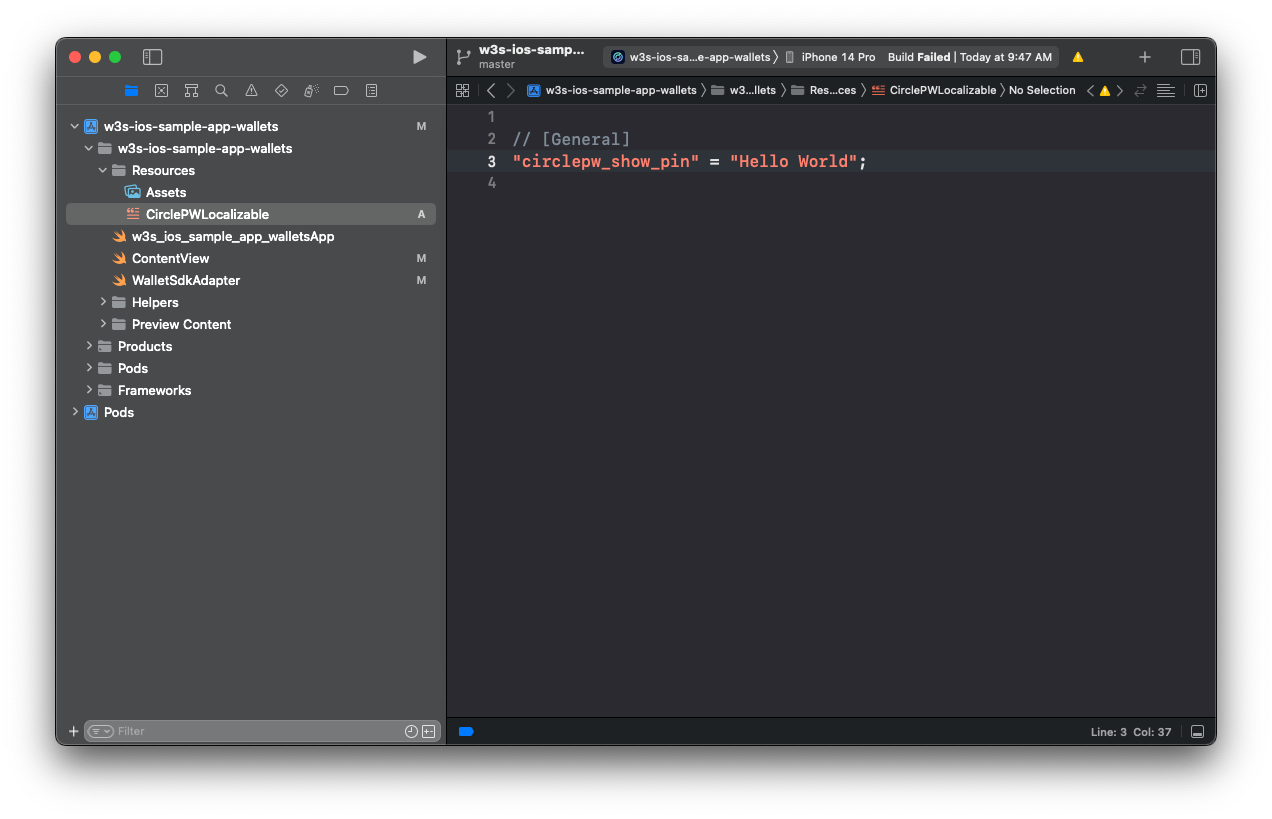 3. Localization is supported. For more information, see
[Localization | Apple Developer Documentation](https://developer.apple.com/documentation/Xcode/localization/ "https://developer.apple.com/documentation/Xcode/localization/").
3. Localization is supported. For more information, see
[Localization | Apple Developer Documentation](https://developer.apple.com/documentation/Xcode/localization/ "https://developer.apple.com/documentation/Xcode/localization/").
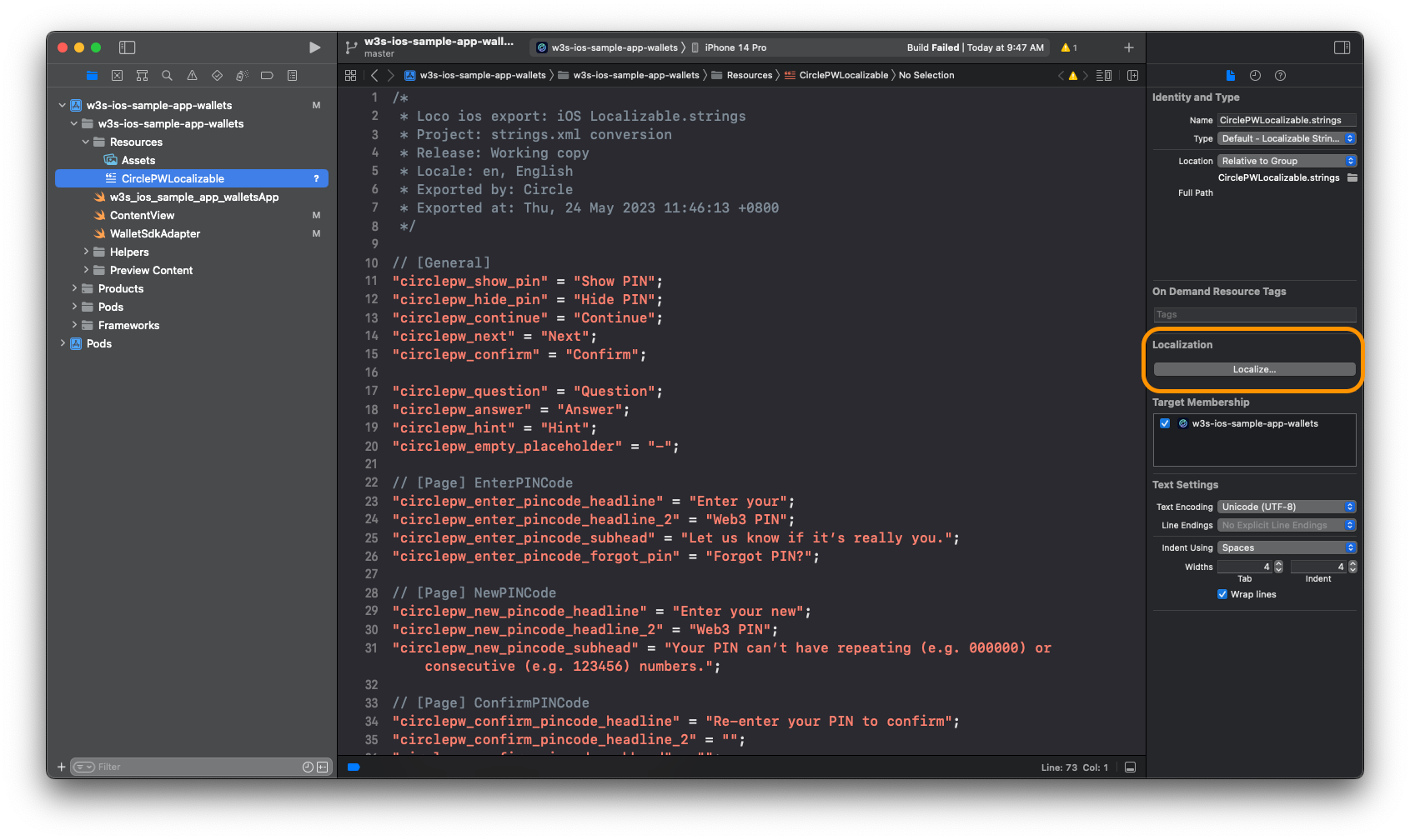 ## Example CirclePWLocalizable.strings
```swift Swift theme={null}
/*
* Loco ios export: iOS Localizable.strings
* Project: strings.xml conversion
* Release: Working copy
* Locale: en, English
* Exported by: Circle
* Exported at: Tue, 27 Jun 2023 23:35:22 +0800
*/
// [General]
"circlepw_continue" = "Continue";
"circlepw_next" = "Next";
"circlepw_confirm" = "Confirm";
"circlepw_skip" = "Skip";
"circlepw_sign" = "Sign";
"circlepw_try_again" = "Try Again";
"circlepw_question" = "Question";
"circlepw_answer" = "Answer";
"circlepw_hint" = "Hint";
"circlepw_empty_placeholder" = "-";
// [Page] EnterPINCode
"circlepw_enter_pincode_headline" = "Enter your";
"circlepw_enter_pincode_headline_2" = "Web3 PIN";
"circlepw_enter_pincode_subhead" = "Let us know if it's really you.";
"circlepw_enter_pincode_forgot_pin" = "Forgot PIN?";
// [Page] NewPINCode
"circlepw_new_pincode_headline" = "Enter your new";
"circlepw_new_pincode_headline_2" = "Web3 PIN";
"circlepw_new_pincode_subhead" = "Your PIN can't have repeating (e.g. 000000) or consecutive (e.g. 123456) numbers.";
// [Page] ConfirmPINCode
"circlepw_confirm_pincode_headline" = "Re-enter your PIN to confirm";
"circlepw_confirm_pincode_headline_2" = "";
"circlepw_confirm_pincode_subhead" = "";
// [Page] SecurityIntros
"circlepw_security_intros_headline" = "Set up your";
"circlepw_security_intros_headline_2" = "Recovery Method";
"circlepw_security_intros_description" = "This is the only way to recover wallet access if you forget your PIN. Pick 2 security questions and provide answers for access recovery.";
"circlepw_security_intros_link" = "Learn more";
// [Page] SecurityQuestions
"circlepw_security_questions_title" = "Recovery method";
"circlepw_security_questions_question_header" = "Choose your %@ question";
"circlepw_security_questions_question_placeholder" = "Select one question";
"circlepw_security_questions_required_mark" = "*";
"circlepw_security_questions_answer_header" = "Provide an answer";
"circlepw_security_questions_answer_placeholder" = "Type your answer here";
"circlepw_security_questions_answer_hint_header" = "Provide an answer hint (optional)";
"circlepw_security_questions_answer_hint_placeholder" = "Type your hint here";
// [Page] SelectQuestion
"circlepw_select_question_title" = "Select one question";
// [Page] SecuritySummary
"circlepw_security_summary_title" = "Summary";
// [Page] SecurityConfirm
"circlepw_security_confirm_title" = "Confirmation";
"circlepw_security_confirm_headline" = "Keep your questions safe";
"circlepw_security_confirm_input_headline" = "Type “I agree” to proceed:";
"circlepw_security_confirm_input_placeholder" = "Type “I agree” here";
"circlepw_security_confirm_input_match" = "I agree";
// [Page] RecoverPINCode
"circlepw_recover_pincode_headline" = "Recover your";
"circlepw_recover_pincode_headline_2" = "Web3 PIN";
"circlepw_recover_pincode_subhead" = "Please enter the answer of the security questions provided below.";
"circlepw_recover_pincode_answer_input_header" = "Enter your answer here";
"circlepw_recover_pincode_answer_input_placeholder" = "Type your answer here";
// [Page] BiometricsPrompt
"circlepw_pin_biometrics_allow_title" = "Allow Biometrics for Web3 Access";
"circlepw_pin_biometrics_allow_subtitle" = "Elevate Your Experience with Effortless Biometrics";
"circlepw_pin_biometrics_failed_title" = "Failed Biometrics for Web3 Access";
"circlepw_pin_biometrics_update_title" = "Update Biometrics for Web3 Access";
"circlepw_pin_biometrics_update_subtitle" = "Please update your biometrics";
"circlepw_pin_biometrics_disable" = "Don't ask me again";
"circlepw_pin_touch_id_dialog_subtitle" = "Using Touch ID protect PIN";
// [Page] EmailOTP
"circlepw_email_otp_title" = "Enter verification code";
"circlepw_email_otp_description" = "The one-time passcode has been sent to";
"circlepw_email_otp_email" = "your email";
"circlepw_email_otp_dash" = "-";
"circlepw_email_otp_send_again_hint" = "Didn't receive the code?";
"circlepw_email_otp_send_again" = "Send again";
// [Page] SignatureRequest
"circlepw_signature_request_title" = "Signature Request";
"circlepw_signature_request_subtitle" = "Click on sign button to provide a signature for verification";
"circlepw_signature_request_contract_name" = "";
"circlepw_signature_request_contract_url" = "";
"circlepw_signature_request_description" = "You are signing:";
// [Page] TransactionRequest
"circlepw_transaction_request_title" = "Confirm Transaction";
"circlepw_transaction_request_subtitle" = "Please click confirm to proceed the transaction";
"circlepw_transaction_request_main_currency" = "";
"circlepw_transaction_request_exchange_amount" = "";
"circlepw_transaction_request_from_label" = "From";
"circlepw_transaction_request_from" = "";
"circlepw_transaction_request_to_label" = "To";
"circlepw_transaction_request_to_contract_name" = "";
"circlepw_transaction_request_to_contract_url" = "";
"circlepw_transaction_request_network_fee_label" = "Est. Network Fee";
"circlepw_transaction_request_network_fee" = "";
"circlepw_transaction_request_exchange_network_fee" = "";
"circlepw_transaction_request_total_label" = "Total";
"circlepw_transaction_request_exchange_total_value" = "";
// [View] FeeTip
"circlepw_transaction_request_fee_tip" = "Please note this is an estimated fee. Network fees may vary based on network traffic and transaction complexity.";
// [Page] RawTransactionRequest
"circlepw_transaction_request_raw_tx_description" = "Transaction details:";
// [Page] ContractRequest
"circlepw_contract_interaction_title" = "Contract Interaction";
"circlepw_contract_interaction_subtitle" = "Please click confirm to proceed the contract execution";
"circlepw_contract_interaction_contract_address_label" = "Contract address";
"circlepw_contract_interaction_data_details" = "Data Details";
"circlepw_contract_interaction_abi_function_label" = "ABI Function";
"circlepw_contract_interaction_abi_parameter_label" = "ABI Parameters";
"circlepw_contract_interaction_call_data_label" = "Call Data";
```
## CirclePWTheme.json
### Setup
* Copy the file **CirclePWTheme.json** into your main bundle. You can use
`Cmd + drag and drop`.
## Example CirclePWLocalizable.strings
```swift Swift theme={null}
/*
* Loco ios export: iOS Localizable.strings
* Project: strings.xml conversion
* Release: Working copy
* Locale: en, English
* Exported by: Circle
* Exported at: Tue, 27 Jun 2023 23:35:22 +0800
*/
// [General]
"circlepw_continue" = "Continue";
"circlepw_next" = "Next";
"circlepw_confirm" = "Confirm";
"circlepw_skip" = "Skip";
"circlepw_sign" = "Sign";
"circlepw_try_again" = "Try Again";
"circlepw_question" = "Question";
"circlepw_answer" = "Answer";
"circlepw_hint" = "Hint";
"circlepw_empty_placeholder" = "-";
// [Page] EnterPINCode
"circlepw_enter_pincode_headline" = "Enter your";
"circlepw_enter_pincode_headline_2" = "Web3 PIN";
"circlepw_enter_pincode_subhead" = "Let us know if it's really you.";
"circlepw_enter_pincode_forgot_pin" = "Forgot PIN?";
// [Page] NewPINCode
"circlepw_new_pincode_headline" = "Enter your new";
"circlepw_new_pincode_headline_2" = "Web3 PIN";
"circlepw_new_pincode_subhead" = "Your PIN can't have repeating (e.g. 000000) or consecutive (e.g. 123456) numbers.";
// [Page] ConfirmPINCode
"circlepw_confirm_pincode_headline" = "Re-enter your PIN to confirm";
"circlepw_confirm_pincode_headline_2" = "";
"circlepw_confirm_pincode_subhead" = "";
// [Page] SecurityIntros
"circlepw_security_intros_headline" = "Set up your";
"circlepw_security_intros_headline_2" = "Recovery Method";
"circlepw_security_intros_description" = "This is the only way to recover wallet access if you forget your PIN. Pick 2 security questions and provide answers for access recovery.";
"circlepw_security_intros_link" = "Learn more";
// [Page] SecurityQuestions
"circlepw_security_questions_title" = "Recovery method";
"circlepw_security_questions_question_header" = "Choose your %@ question";
"circlepw_security_questions_question_placeholder" = "Select one question";
"circlepw_security_questions_required_mark" = "*";
"circlepw_security_questions_answer_header" = "Provide an answer";
"circlepw_security_questions_answer_placeholder" = "Type your answer here";
"circlepw_security_questions_answer_hint_header" = "Provide an answer hint (optional)";
"circlepw_security_questions_answer_hint_placeholder" = "Type your hint here";
// [Page] SelectQuestion
"circlepw_select_question_title" = "Select one question";
// [Page] SecuritySummary
"circlepw_security_summary_title" = "Summary";
// [Page] SecurityConfirm
"circlepw_security_confirm_title" = "Confirmation";
"circlepw_security_confirm_headline" = "Keep your questions safe";
"circlepw_security_confirm_input_headline" = "Type “I agree” to proceed:";
"circlepw_security_confirm_input_placeholder" = "Type “I agree” here";
"circlepw_security_confirm_input_match" = "I agree";
// [Page] RecoverPINCode
"circlepw_recover_pincode_headline" = "Recover your";
"circlepw_recover_pincode_headline_2" = "Web3 PIN";
"circlepw_recover_pincode_subhead" = "Please enter the answer of the security questions provided below.";
"circlepw_recover_pincode_answer_input_header" = "Enter your answer here";
"circlepw_recover_pincode_answer_input_placeholder" = "Type your answer here";
// [Page] BiometricsPrompt
"circlepw_pin_biometrics_allow_title" = "Allow Biometrics for Web3 Access";
"circlepw_pin_biometrics_allow_subtitle" = "Elevate Your Experience with Effortless Biometrics";
"circlepw_pin_biometrics_failed_title" = "Failed Biometrics for Web3 Access";
"circlepw_pin_biometrics_update_title" = "Update Biometrics for Web3 Access";
"circlepw_pin_biometrics_update_subtitle" = "Please update your biometrics";
"circlepw_pin_biometrics_disable" = "Don't ask me again";
"circlepw_pin_touch_id_dialog_subtitle" = "Using Touch ID protect PIN";
// [Page] EmailOTP
"circlepw_email_otp_title" = "Enter verification code";
"circlepw_email_otp_description" = "The one-time passcode has been sent to";
"circlepw_email_otp_email" = "your email";
"circlepw_email_otp_dash" = "-";
"circlepw_email_otp_send_again_hint" = "Didn't receive the code?";
"circlepw_email_otp_send_again" = "Send again";
// [Page] SignatureRequest
"circlepw_signature_request_title" = "Signature Request";
"circlepw_signature_request_subtitle" = "Click on sign button to provide a signature for verification";
"circlepw_signature_request_contract_name" = "";
"circlepw_signature_request_contract_url" = "";
"circlepw_signature_request_description" = "You are signing:";
// [Page] TransactionRequest
"circlepw_transaction_request_title" = "Confirm Transaction";
"circlepw_transaction_request_subtitle" = "Please click confirm to proceed the transaction";
"circlepw_transaction_request_main_currency" = "";
"circlepw_transaction_request_exchange_amount" = "";
"circlepw_transaction_request_from_label" = "From";
"circlepw_transaction_request_from" = "";
"circlepw_transaction_request_to_label" = "To";
"circlepw_transaction_request_to_contract_name" = "";
"circlepw_transaction_request_to_contract_url" = "";
"circlepw_transaction_request_network_fee_label" = "Est. Network Fee";
"circlepw_transaction_request_network_fee" = "";
"circlepw_transaction_request_exchange_network_fee" = "";
"circlepw_transaction_request_total_label" = "Total";
"circlepw_transaction_request_exchange_total_value" = "";
// [View] FeeTip
"circlepw_transaction_request_fee_tip" = "Please note this is an estimated fee. Network fees may vary based on network traffic and transaction complexity.";
// [Page] RawTransactionRequest
"circlepw_transaction_request_raw_tx_description" = "Transaction details:";
// [Page] ContractRequest
"circlepw_contract_interaction_title" = "Contract Interaction";
"circlepw_contract_interaction_subtitle" = "Please click confirm to proceed the contract execution";
"circlepw_contract_interaction_contract_address_label" = "Contract address";
"circlepw_contract_interaction_data_details" = "Data Details";
"circlepw_contract_interaction_abi_function_label" = "ABI Function";
"circlepw_contract_interaction_abi_parameter_label" = "ABI Parameters";
"circlepw_contract_interaction_call_data_label" = "Call Data";
```
## CirclePWTheme.json
### Setup
* Copy the file **CirclePWTheme.json** into your main bundle. You can use
`Cmd + drag and drop`.
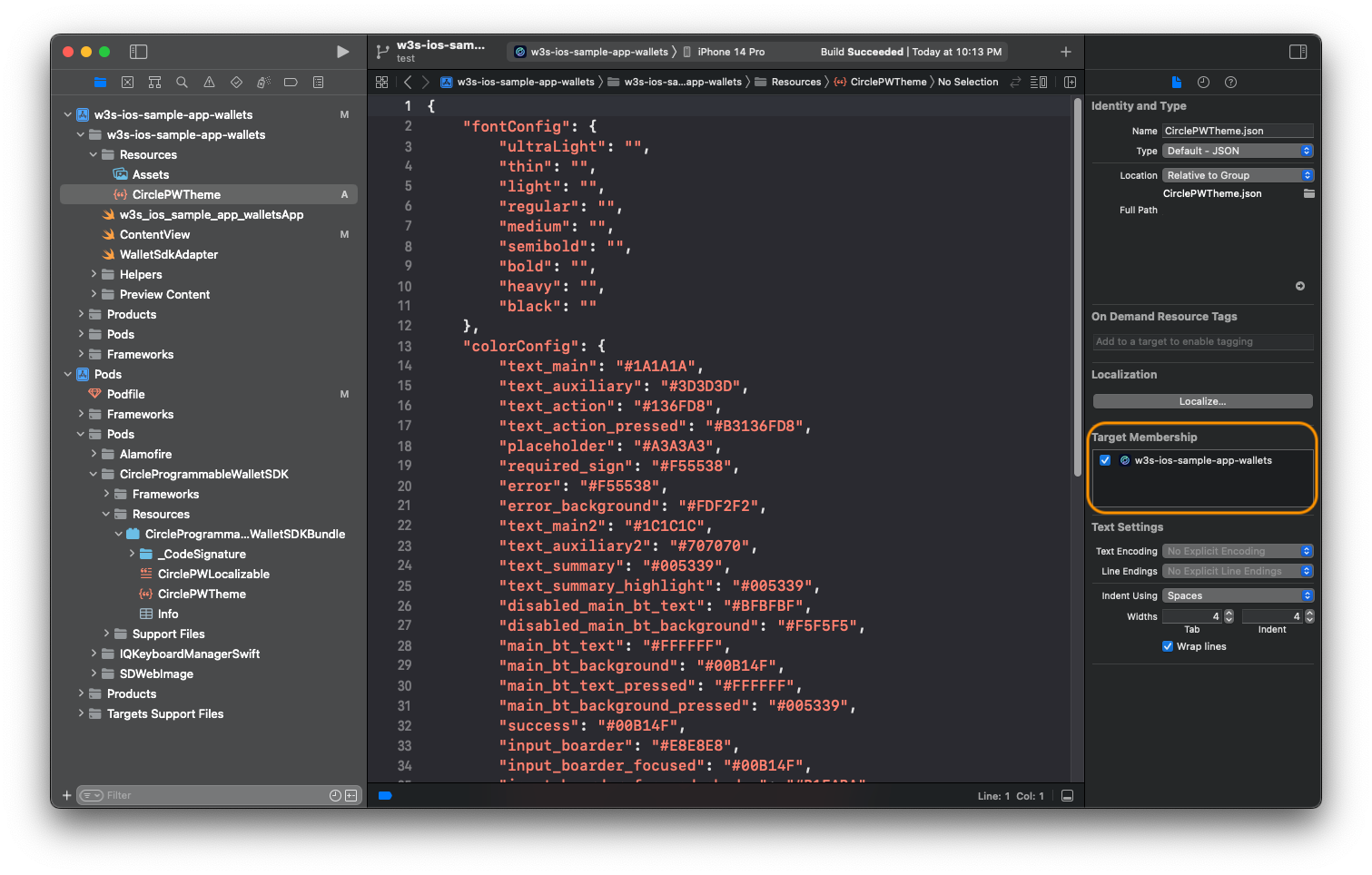
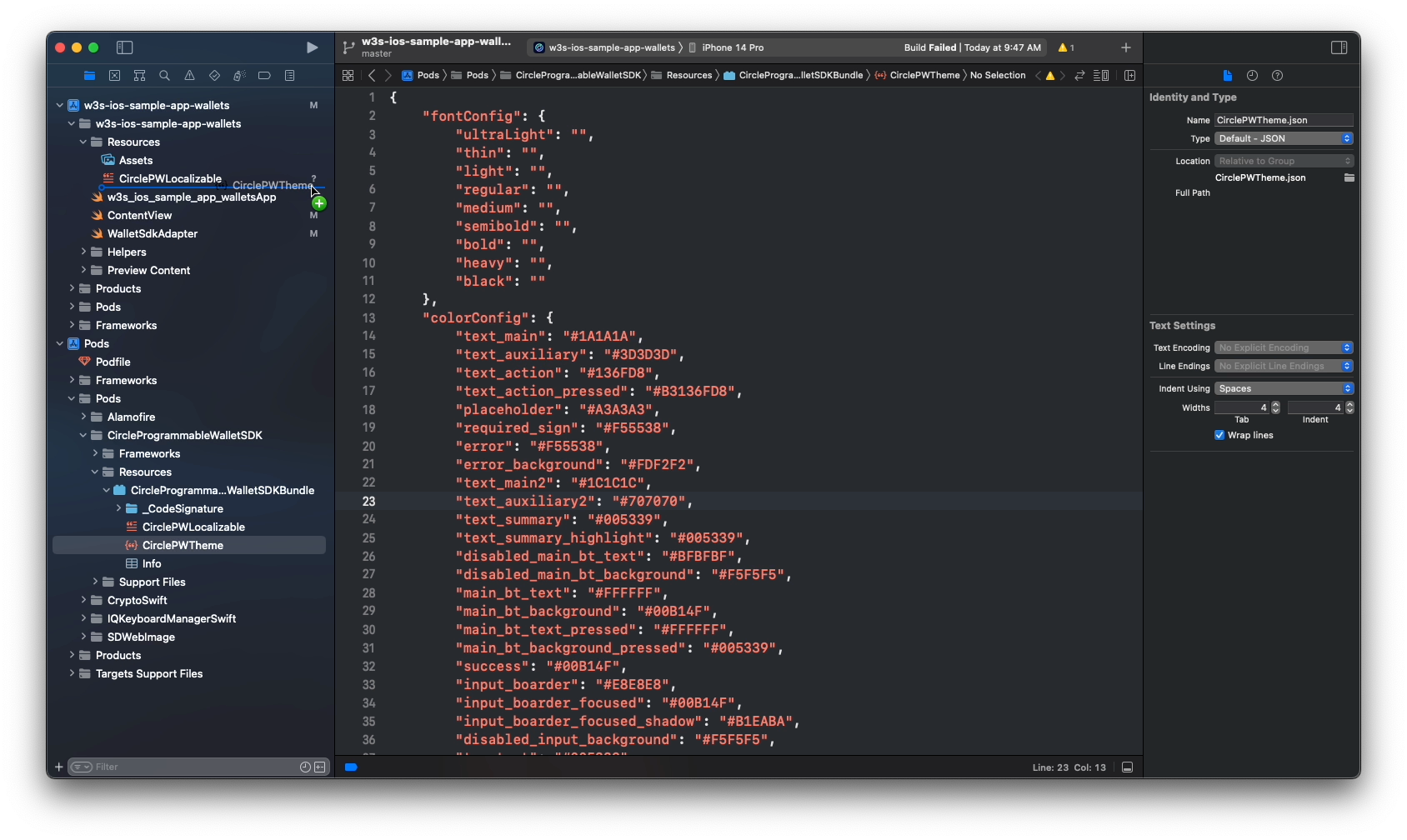 * Make sure you have selected the `Target Membership`.
 * Provide values to set the **font**: To use a custom font, refer to this
document:
[Adding a Custom Font to Your App | Apple Developer Documentation](https://developer.apple.com/documentation/uikit/text_display_and_fonts/adding_a_custom_font_to_your_app "https://developer.apple.com/documentation/uikit/text_display_and_fonts/adding_a_custom_font_to_your_app").
* Set the **color** with a hex string:
### Example: CirclePWTheme.json
```json JSON theme={null}
{
"font": {
"ultraLight": "",
"thin": "",
"light": "",
"regular": "CustomFont-Regular",
"medium": "CustomFont-Medium",
"semibold": "",
"bold": "",
"heavy": "",
"black": ""
},
"color": {
"background": "#FFFFFF",
"divider": "#F0EFEF",
"success": "#0B9C4A",
"error": "#F55538",
"error_background": "#FDF2F2",
"text_main": "#1A1A1A",
"text_main2": "#1C1C1C",
"text_auxiliary": "#3D3D3D",
"text_auxiliary2": "#707070",
"text_summary": "#0073C3",
"text_summary_highlight": "#0073C3",
"text_placeholder": "#A3A3A3",
"text_action": "#136FD8",
"text_action_pressed": "#B3136FD8",
"text_prompt": "#29233B",
"text_prompt2": "#6B6580",
"text_exchange": "#979797",
"text_interactive": "#0073C3",
"text_sign_url": "#8E8E93",
"pin_dot_base": "#FFFFFF",
"pin_dot_base_border": "#707070",
"pin_dot_activated": "#3D3D3D",
"pin_dot_focused": "#0073C3",
"pin_digit_activated": "#3D3D3D",
"input_border": "#E8E8E8",
"input_border_focused": "#46B5FF",
"input_background_disabled": "#F5F5F5",
"main_bt_text": "#FFFFFF",
"main_bt_text_pressed": "#80FFFFFF",
"main_bt_text_disabled": "#BFBFBF",
"main_bt_background": "#0073C3",
"main_bt_background_pressed": "#1AA3FF",
"main_bt_background_disabled": "#F5F5F5",
"second_bt_text": "#0073C3",
"second_bt_border": "#0073C3",
"second_bt_background": "#FFFFFF",
"second_bt_background_pressed": "#F1F9FE",
"plain_bt_text": "#0073C3",
"plain_bt_background": "#FFFFFF",
"plain_bt_background_pressed": "#F1F9FE",
"recover_pin_hint_title": "#3D3652",
"recover_pin_hint_title_bg": "#E1F2FF",
"recover_pin_hint": "#0073C3",
"security_confirm_main_bg": "#E9EEFE",
"tip_text": "#FFFFFF",
"tip_background": "#29233B",
"interactive_background": "#F9F9FC",
"title_gradients": ["#0073C3", "#0073C3"]
}
}
```
## Programmatic Customization
To programmatically customize the UI refers to the following documents:
* The corresponding rendered layout and the notes on
[Index Table B](#index-table-b).
* The [Programmable Wallet iOS SDK](/sdks/user-controlled/ios-sdk) .
## Example Code
```swift Swift theme={null}
extension WalletSdkAdapter: WalletSdkLayoutProvider {
func securityQuestions() -> [SecurityQuestion] {
return [
SecurityQuestion(title: "What is your childhood nickname?", inputType: .text),
SecurityQuestion(title: "What is the middle name of your oldest child?", inputType: .text),
SecurityQuestion(title: "What is your favorite team?", inputType: .text),
SecurityQuestion(title: "When was your birthday?", inputType: .datePicker),
SecurityQuestion(title: "When is your marriage anniversary?", inputType: .datePicker),
]
}
func securityQuestionsRequiredCount() -> Int {
return 2
}
func securityConfirmItems() -> [SecurityConfirmItem] {
return [
SecurityConfirmItem(image: UIImage(named: "img_info"),
text: "This is the only way to recover my account access."),
SecurityConfirmItem(image: UIImage(named: "img_claim_success"),
text: "Circle won't store my answers so it's my responsibility to remember them."),
SecurityConfirmItem(image: UIImage(named: "img_claim_success"),
text: "I will lose access to my wallet and my digital assets if I forget my answers."),
]
}
func displayDateFormat() -> String {
return "yyyy/MM/dd"
}
func imageStore() -> ImageStore {
let local: [ImageStore.Img: UIImage] = [
.naviBack: UIImage(named: "ic_navi_back")!,
.naviClose: UIImage(named: "ic_navi_close")!,
.selectCheckMark: UIImage(named: "ic_checkmark")!,
.dropdownArrow: UIImage(named: "ic_trailing_down")!,
.errorInfo: UIImage(named: "ic_warning_alt")!,
.securityIntroMain: UIImage(named: "img_security_intro")!,
.securityConfirmMain: UIImage(named: "img_driver_blog")!
]
let remote: [ImageStore.Img: URL] = [
.securityIntroMain: URL(string: "https://www.circle.com/hs-fs/hubfs/Sundaes/810/global-payments-810x810.png")!,
.securityConfirmMain: URL(string: "https://www.circle.com/hs-fs/hubfs/Sundaes/810/Trust-810x810.png")!,
]
return ImageStore(local: local, remote: remote)
}
func themeFont() -> ThemeConfig.ThemeFont? {
return ThemeConfig.ThemeFont(
ultraLight: nil,
thin: nil,
light: "CustomFont-Light",
regular: "CustomFont-Regular",
medium: "CustomFont-Medium",
semibold: "CustomFont-SemiBold",
bold: "CustomFont-Bold",
heavy: nil,
black: nil
)
}
}
```
## WalletSdkDelegate
By modifying the `WalletSdkDelegate`, you can get the current view controller
and control the UI parameters in the controller at run time.
```swift Swift theme={null}
public protocol WalletSdkDelegate: AnyObject {
/// Tells the delegate that the SDK is about to be presented in the controller.
/// You can customize the layout as you wish dynamically.
///
/// - Parameter controller: The UIViewController to be presented
func walletSdk(willPresentController controller: UIViewController)
...
}
```
### Example Code
```swift Swift theme={null}
extension WalletSdkAdapter: WalletSdkDelegate {
func walletSdk(willPresentController controller: UIViewController) {
print("willPresentController: \(controller)")
if let controller = controller as? NewPINCodeViewController {
controller.titleLabel1.text = "Hello World"
controller.titleLabel1.textColor = .blue
controller.titleLabel1.font = .systemFont(ofSize: 28, weight: .black)
}
if let controller = controller as? SecurityConfirmViewController {
controller.imageBgView.backgroundColor = .blue
controller.imageView.contentMode = .scaleAspectFill
}
}
...
}
```
### View Public Interface
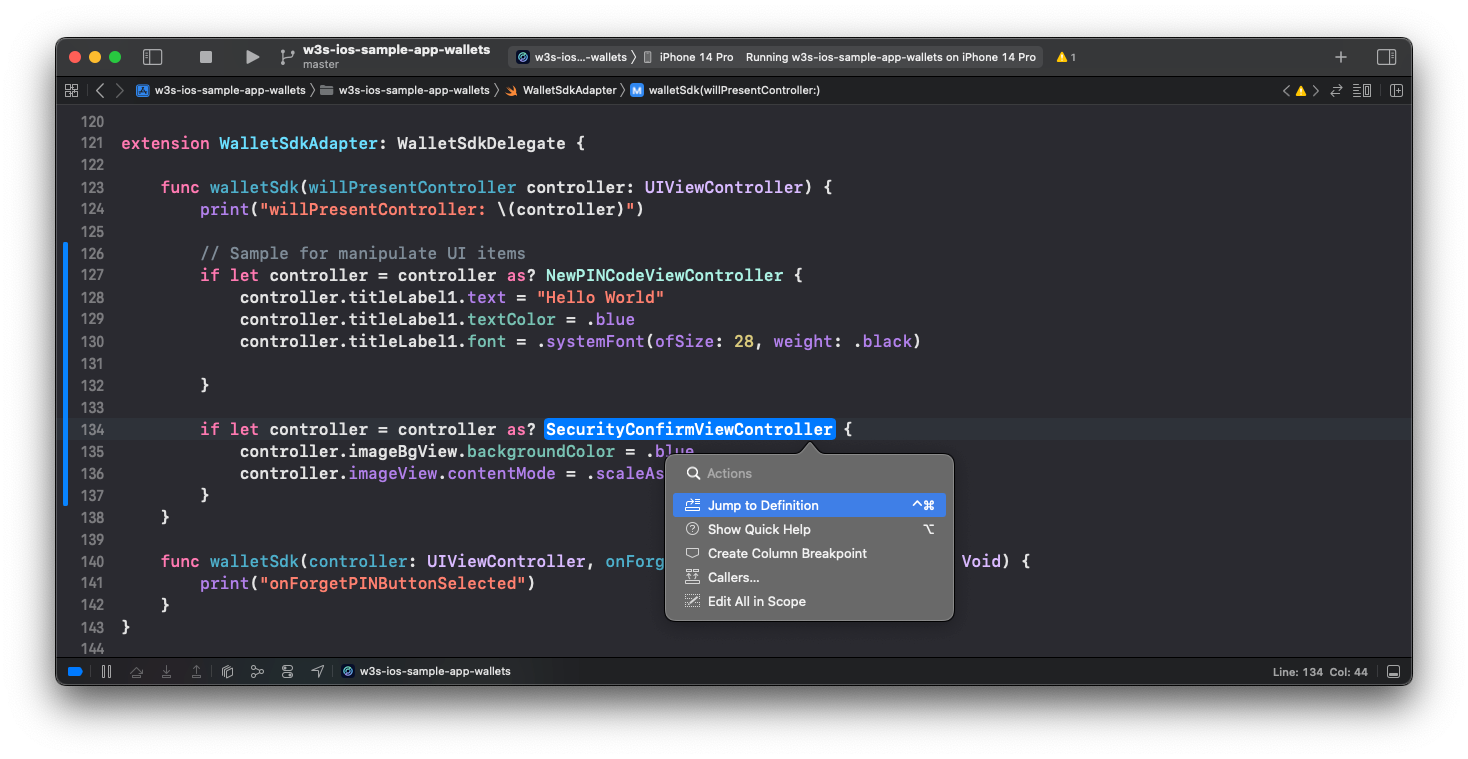
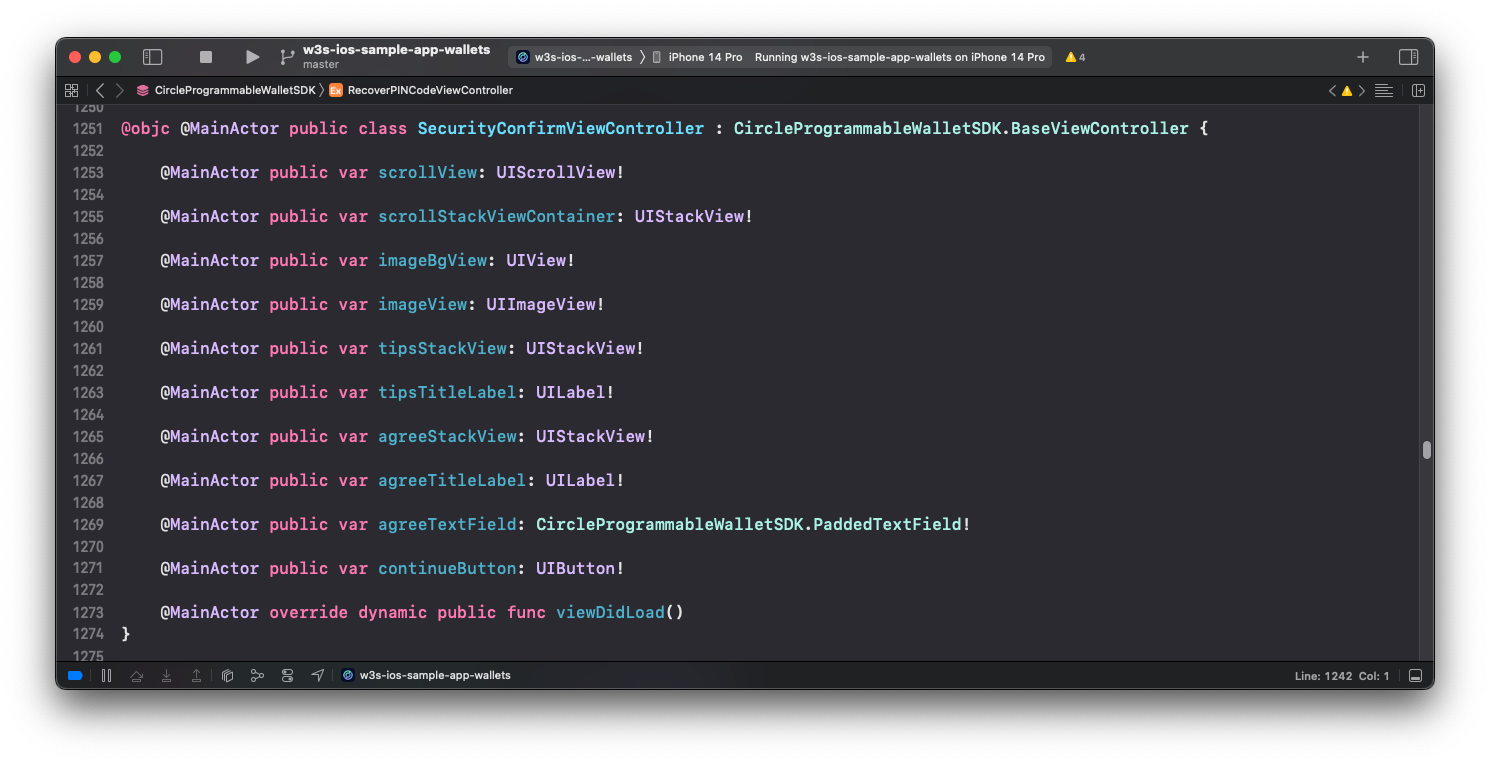
Use Jump to Definition (`Cmd + left click`) to see the public interface of the
view controller. Change the UI items as you need.
#### Jump to Definition
* Provide values to set the **font**: To use a custom font, refer to this
document:
[Adding a Custom Font to Your App | Apple Developer Documentation](https://developer.apple.com/documentation/uikit/text_display_and_fonts/adding_a_custom_font_to_your_app "https://developer.apple.com/documentation/uikit/text_display_and_fonts/adding_a_custom_font_to_your_app").
* Set the **color** with a hex string:
### Example: CirclePWTheme.json
```json JSON theme={null}
{
"font": {
"ultraLight": "",
"thin": "",
"light": "",
"regular": "CustomFont-Regular",
"medium": "CustomFont-Medium",
"semibold": "",
"bold": "",
"heavy": "",
"black": ""
},
"color": {
"background": "#FFFFFF",
"divider": "#F0EFEF",
"success": "#0B9C4A",
"error": "#F55538",
"error_background": "#FDF2F2",
"text_main": "#1A1A1A",
"text_main2": "#1C1C1C",
"text_auxiliary": "#3D3D3D",
"text_auxiliary2": "#707070",
"text_summary": "#0073C3",
"text_summary_highlight": "#0073C3",
"text_placeholder": "#A3A3A3",
"text_action": "#136FD8",
"text_action_pressed": "#B3136FD8",
"text_prompt": "#29233B",
"text_prompt2": "#6B6580",
"text_exchange": "#979797",
"text_interactive": "#0073C3",
"text_sign_url": "#8E8E93",
"pin_dot_base": "#FFFFFF",
"pin_dot_base_border": "#707070",
"pin_dot_activated": "#3D3D3D",
"pin_dot_focused": "#0073C3",
"pin_digit_activated": "#3D3D3D",
"input_border": "#E8E8E8",
"input_border_focused": "#46B5FF",
"input_background_disabled": "#F5F5F5",
"main_bt_text": "#FFFFFF",
"main_bt_text_pressed": "#80FFFFFF",
"main_bt_text_disabled": "#BFBFBF",
"main_bt_background": "#0073C3",
"main_bt_background_pressed": "#1AA3FF",
"main_bt_background_disabled": "#F5F5F5",
"second_bt_text": "#0073C3",
"second_bt_border": "#0073C3",
"second_bt_background": "#FFFFFF",
"second_bt_background_pressed": "#F1F9FE",
"plain_bt_text": "#0073C3",
"plain_bt_background": "#FFFFFF",
"plain_bt_background_pressed": "#F1F9FE",
"recover_pin_hint_title": "#3D3652",
"recover_pin_hint_title_bg": "#E1F2FF",
"recover_pin_hint": "#0073C3",
"security_confirm_main_bg": "#E9EEFE",
"tip_text": "#FFFFFF",
"tip_background": "#29233B",
"interactive_background": "#F9F9FC",
"title_gradients": ["#0073C3", "#0073C3"]
}
}
```
## Programmatic Customization
To programmatically customize the UI refers to the following documents:
* The corresponding rendered layout and the notes on
[Index Table B](#index-table-b).
* The [Programmable Wallet iOS SDK](/sdks/user-controlled/ios-sdk) .
## Example Code
```swift Swift theme={null}
extension WalletSdkAdapter: WalletSdkLayoutProvider {
func securityQuestions() -> [SecurityQuestion] {
return [
SecurityQuestion(title: "What is your childhood nickname?", inputType: .text),
SecurityQuestion(title: "What is the middle name of your oldest child?", inputType: .text),
SecurityQuestion(title: "What is your favorite team?", inputType: .text),
SecurityQuestion(title: "When was your birthday?", inputType: .datePicker),
SecurityQuestion(title: "When is your marriage anniversary?", inputType: .datePicker),
]
}
func securityQuestionsRequiredCount() -> Int {
return 2
}
func securityConfirmItems() -> [SecurityConfirmItem] {
return [
SecurityConfirmItem(image: UIImage(named: "img_info"),
text: "This is the only way to recover my account access."),
SecurityConfirmItem(image: UIImage(named: "img_claim_success"),
text: "Circle won't store my answers so it's my responsibility to remember them."),
SecurityConfirmItem(image: UIImage(named: "img_claim_success"),
text: "I will lose access to my wallet and my digital assets if I forget my answers."),
]
}
func displayDateFormat() -> String {
return "yyyy/MM/dd"
}
func imageStore() -> ImageStore {
let local: [ImageStore.Img: UIImage] = [
.naviBack: UIImage(named: "ic_navi_back")!,
.naviClose: UIImage(named: "ic_navi_close")!,
.selectCheckMark: UIImage(named: "ic_checkmark")!,
.dropdownArrow: UIImage(named: "ic_trailing_down")!,
.errorInfo: UIImage(named: "ic_warning_alt")!,
.securityIntroMain: UIImage(named: "img_security_intro")!,
.securityConfirmMain: UIImage(named: "img_driver_blog")!
]
let remote: [ImageStore.Img: URL] = [
.securityIntroMain: URL(string: "https://www.circle.com/hs-fs/hubfs/Sundaes/810/global-payments-810x810.png")!,
.securityConfirmMain: URL(string: "https://www.circle.com/hs-fs/hubfs/Sundaes/810/Trust-810x810.png")!,
]
return ImageStore(local: local, remote: remote)
}
func themeFont() -> ThemeConfig.ThemeFont? {
return ThemeConfig.ThemeFont(
ultraLight: nil,
thin: nil,
light: "CustomFont-Light",
regular: "CustomFont-Regular",
medium: "CustomFont-Medium",
semibold: "CustomFont-SemiBold",
bold: "CustomFont-Bold",
heavy: nil,
black: nil
)
}
}
```
## WalletSdkDelegate
By modifying the `WalletSdkDelegate`, you can get the current view controller
and control the UI parameters in the controller at run time.
```swift Swift theme={null}
public protocol WalletSdkDelegate: AnyObject {
/// Tells the delegate that the SDK is about to be presented in the controller.
/// You can customize the layout as you wish dynamically.
///
/// - Parameter controller: The UIViewController to be presented
func walletSdk(willPresentController controller: UIViewController)
...
}
```
### Example Code
```swift Swift theme={null}
extension WalletSdkAdapter: WalletSdkDelegate {
func walletSdk(willPresentController controller: UIViewController) {
print("willPresentController: \(controller)")
if let controller = controller as? NewPINCodeViewController {
controller.titleLabel1.text = "Hello World"
controller.titleLabel1.textColor = .blue
controller.titleLabel1.font = .systemFont(ofSize: 28, weight: .black)
}
if let controller = controller as? SecurityConfirmViewController {
controller.imageBgView.backgroundColor = .blue
controller.imageView.contentMode = .scaleAspectFill
}
}
...
}
```
### View Public Interface
Use Jump to Definition (`Cmd + left click`) to see the public interface of the
view controller. Change the UI items as you need.
#### Jump to Definition
 #### Public Interface
 ## ErrorMessenger
## `ApiError` Interface
```swift Swift theme={null}
public struct ApiError: Error {
public let errorCode: ErrorCode
/// Error string from the SDK
public let errorString: String
/// Error string for UI display
public var displayString: String
}
```
By modifying the `ErrorMessenger`, you can customize the `ApiError` messages.
Your customization replaces the default `ApiError.displayString` for UI usage.
You can also manage the localized error message.
```swift Swift theme={null}
public protocol ErrorMessenger {
func getErrorString(_ code: ApiError.ErrorCode) -> String?
}
```
### Example Code
```swift Swift theme={null}
import CircleProgrammableWalletSDK
class MyErrorMessenger: ErrorMessenger {
func getErrorString(_ code: ApiError.ErrorCode) -> String? {
switch code {
case .hintsMatchAnswers:
return "Your custom error message."
case .networkError:
return "Your custom error message."
default:
return nil
}
}
}
// ============ setErrorMessenger ============
WalletSdk.shared.setErrorMessenger(MyErrorMessenger())
```
## ErrorCode and Messages Table
The following table shows the `ApiError.ErrorCode` key names and their default
values:
| ApiError.ErrorCode | Default Value |
| - | - |
| unknown(-1) | Unknown error |
| success(0) | Success |
| apiParameterMissing(1) | API parameter missing |
| apiParameterInvalid(2) | API parameter invalid |
| forbidden(3) | Forbidden |
| unauthorized(4) | Unauthorized |
| retry(9) | Retry |
| customerSuspended(10) | Customer suspended |
| pending(11) | Pending |
| invalidSession(12) | Invalid session |
| invalidPartnerId(13) | Invalid partner ID |
| invalidMessage(14) | Invalid Message published to a SQS queue. |
| invalidPhone(15) | Invalid phone number %@ |
| walletIdNotFound(156001) | \ |
| tokenIdNotFound(156002) | \ |
| transactionIdNotFound(156003) | \ |
| entityCredentialNotFound(156004) | \ |
| walletSetIdNotFound(156005) | \ |
| userAlreadyExisted(155101) | user already existed |
| userNotFound(155102) | user not found |
| userTokenNotFound(155103) | user token not found |
| userTokenExpired(155104) | user token expired |
| invalidUserToken(155105) | invalid user token |
| userWasInitialized(155106) | user was initialized |
| userHasSetPin(155107) | user has set pin |
| userHasSetSecurityQuestion(155108) | user has set security question |
| userWasDisabled(155109) | user was disabled |
| userDoesNotSetPinYet(155110) | user does not set pin yet |
| userDoesNotSetSecurityQuestionYet(155111) | user does not set security questions yet |
| incorrectUserPin(155112) | The PIN you entered is incorrect. You have %@ attempts left. |
| incorrectDeviceId(155113) | incorrect device id |
| incorrectAppId(155114) | app id not found |
| incorrectSecurityAnswers(155115) | The answers you entered are incorrect. You have %@ attempts left. |
| invalidChallengeId(155116) | invalid challenge id |
| invalidApproveContent(155117) | invalid approve content |
| invalidEncryptionKey(155118) | invalid encryption key |
| userPinLocked(155119) | You've used up all PIN attempts. Please wait for %@ mins to retry later. |
| securityAnswersLocked(155120) | The answers you entered are incorrect. Please wait for %@ mins to retry again. |
| walletIsFrozen(155501) | Wallet is Frozen |
| maxWalletLimitReached(155502) | Max wallet limit reached |
| walletSetIdMutuallyExclusive(155503) | WalletSetId can not be used together with blockchain and address filter |
| metadataUnmatched(155504) | metadata array length does not match wallet count |
| userCanceled(155701) | User canceled |
| launchUiFailed(155702) | \ |
| pinCodeNotMatched(155703) | The PIN you entered is not the same as the first one. |
| insecurePinCode(155704) | Your PIN can't have repeating or consecutive numbers. |
| hintsMatchAnswers(155705) | Your hint can't be the same as the answer. |
| networkError(155706) | Network error |
| biometricsSettingNotEnabled(155708) | Biometrics is disabled |
| deviceNotSupportBiometrics(155709) | System doesn't support biometrics |
| biometricsKeyPermanentlyInvalidated(155710) | (Android only) Failed to decrypt biometrics key |
| biometricsUserSkip(155711) | The user has not enabled biometrics yet |
| biometricsUserDisableForPin(155712) | The user refused to enable biometrics |
| biometricsUserLockout(155713) | (Android only) Too many requests. Try again later. |
| biometricsUserLockoutPermanent(155714) | Too many requests. The biometrics sensor on the device is locked. |
| biometricsUserNotAllowPermission(155715) | Biometrics is not permitted by the user. |
| biometricsInternalError(155716) | Unexpected error for biometrics: %@ |
| invalidUserSecret(155718) | User token format is invalid. Please ensure the format of the user token is correct, then perform login and execute the challenge again. |
| userTokenMismatch(155719) | User token and SDK API execute function do not match. Ensure that `executeWithUserSecret` is for users with SSO/Email auth method and `execute` is for users with PIN auth method. |
| socialLoginFailed(155720) | Social login is failed. The social provider returns failed during the execution of social login flow. Please refer to the error message for more details. |
| loginInfoMissing(155721) | Login info is missing. Please perform login and execute the challenge again. |
| walletIdNotFound(156001) | The specified wallet does not exist, or is not visible to the caller. Try the request again with a valid wallet ID. |
| tokenIdNotFound(156002) | The specified token does not exist, or is not visible to the caller. Try the request again with a valid token ID. |
| transactionIdNotFound(156003) | The specified transaction does not exist, or is not visible to the caller. Try the request again with a valid transaction ID. |
| entityCredentialNotFound(156004) | Reusing an entity secret ciphertext is not allowed. Please re-encrypt the entity secret to generate a new ciphertext and try again. |
| walletSetIdNotFound(156005) | The specified wallet set does not exist, or is not visible to the caller. Try the request again with a valid wallet set. |
## ErrorMessenger
## `ApiError` Interface
```swift Swift theme={null}
public struct ApiError: Error {
public let errorCode: ErrorCode
/// Error string from the SDK
public let errorString: String
/// Error string for UI display
public var displayString: String
}
```
By modifying the `ErrorMessenger`, you can customize the `ApiError` messages.
Your customization replaces the default `ApiError.displayString` for UI usage.
You can also manage the localized error message.
```swift Swift theme={null}
public protocol ErrorMessenger {
func getErrorString(_ code: ApiError.ErrorCode) -> String?
}
```
### Example Code
```swift Swift theme={null}
import CircleProgrammableWalletSDK
class MyErrorMessenger: ErrorMessenger {
func getErrorString(_ code: ApiError.ErrorCode) -> String? {
switch code {
case .hintsMatchAnswers:
return "Your custom error message."
case .networkError:
return "Your custom error message."
default:
return nil
}
}
}
// ============ setErrorMessenger ============
WalletSdk.shared.setErrorMessenger(MyErrorMessenger())
```
## ErrorCode and Messages Table
The following table shows the `ApiError.ErrorCode` key names and their default
values:
| ApiError.ErrorCode | Default Value |
| - | - |
| unknown(-1) | Unknown error |
| success(0) | Success |
| apiParameterMissing(1) | API parameter missing |
| apiParameterInvalid(2) | API parameter invalid |
| forbidden(3) | Forbidden |
| unauthorized(4) | Unauthorized |
| retry(9) | Retry |
| customerSuspended(10) | Customer suspended |
| pending(11) | Pending |
| invalidSession(12) | Invalid session |
| invalidPartnerId(13) | Invalid partner ID |
| invalidMessage(14) | Invalid Message published to a SQS queue. |
| invalidPhone(15) | Invalid phone number %@ |
| walletIdNotFound(156001) | \ |
| tokenIdNotFound(156002) | \ |
| transactionIdNotFound(156003) | \ |
| entityCredentialNotFound(156004) | \ |
| walletSetIdNotFound(156005) | \ |
| userAlreadyExisted(155101) | user already existed |
| userNotFound(155102) | user not found |
| userTokenNotFound(155103) | user token not found |
| userTokenExpired(155104) | user token expired |
| invalidUserToken(155105) | invalid user token |
| userWasInitialized(155106) | user was initialized |
| userHasSetPin(155107) | user has set pin |
| userHasSetSecurityQuestion(155108) | user has set security question |
| userWasDisabled(155109) | user was disabled |
| userDoesNotSetPinYet(155110) | user does not set pin yet |
| userDoesNotSetSecurityQuestionYet(155111) | user does not set security questions yet |
| incorrectUserPin(155112) | The PIN you entered is incorrect. You have %@ attempts left. |
| incorrectDeviceId(155113) | incorrect device id |
| incorrectAppId(155114) | app id not found |
| incorrectSecurityAnswers(155115) | The answers you entered are incorrect. You have %@ attempts left. |
| invalidChallengeId(155116) | invalid challenge id |
| invalidApproveContent(155117) | invalid approve content |
| invalidEncryptionKey(155118) | invalid encryption key |
| userPinLocked(155119) | You've used up all PIN attempts. Please wait for %@ mins to retry later. |
| securityAnswersLocked(155120) | The answers you entered are incorrect. Please wait for %@ mins to retry again. |
| walletIsFrozen(155501) | Wallet is Frozen |
| maxWalletLimitReached(155502) | Max wallet limit reached |
| walletSetIdMutuallyExclusive(155503) | WalletSetId can not be used together with blockchain and address filter |
| metadataUnmatched(155504) | metadata array length does not match wallet count |
| userCanceled(155701) | User canceled |
| launchUiFailed(155702) | \ |
| pinCodeNotMatched(155703) | The PIN you entered is not the same as the first one. |
| insecurePinCode(155704) | Your PIN can't have repeating or consecutive numbers. |
| hintsMatchAnswers(155705) | Your hint can't be the same as the answer. |
| networkError(155706) | Network error |
| biometricsSettingNotEnabled(155708) | Biometrics is disabled |
| deviceNotSupportBiometrics(155709) | System doesn't support biometrics |
| biometricsKeyPermanentlyInvalidated(155710) | (Android only) Failed to decrypt biometrics key |
| biometricsUserSkip(155711) | The user has not enabled biometrics yet |
| biometricsUserDisableForPin(155712) | The user refused to enable biometrics |
| biometricsUserLockout(155713) | (Android only) Too many requests. Try again later. |
| biometricsUserLockoutPermanent(155714) | Too many requests. The biometrics sensor on the device is locked. |
| biometricsUserNotAllowPermission(155715) | Biometrics is not permitted by the user. |
| biometricsInternalError(155716) | Unexpected error for biometrics: %@ |
| invalidUserSecret(155718) | User token format is invalid. Please ensure the format of the user token is correct, then perform login and execute the challenge again. |
| userTokenMismatch(155719) | User token and SDK API execute function do not match. Ensure that `executeWithUserSecret` is for users with SSO/Email auth method and `execute` is for users with PIN auth method. |
| socialLoginFailed(155720) | Social login is failed. The social provider returns failed during the execution of social login flow. Please refer to the error message for more details. |
| loginInfoMissing(155721) | Login info is missing. Please perform login and execute the challenge again. |
| walletIdNotFound(156001) | The specified wallet does not exist, or is not visible to the caller. Try the request again with a valid wallet ID. |
| tokenIdNotFound(156002) | The specified token does not exist, or is not visible to the caller. Try the request again with a valid token ID. |
| transactionIdNotFound(156003) | The specified transaction does not exist, or is not visible to the caller. Try the request again with a valid transaction ID. |
| entityCredentialNotFound(156004) | Reusing an entity secret ciphertext is not allowed. Please re-encrypt the entity secret to generate a new ciphertext and try again. |
| walletSetIdNotFound(156005) | The specified wallet set does not exist, or is not visible to the caller. Try the request again with a valid wallet set. |