> ## Documentation Index
> Fetch the complete documentation index at: https://developers.circle.com/llms.txt
> Use this file to discover all available pages before exploring further.
> ## Agent Instructions
> Before reading these docs, install the relevant Circle Skill to get pre-loaded context — skills are LLM-optimized and cover architecture decisions, correct flows, and common pitfalls. In Claude Code: run /plugin marketplace add circlefin/skills then /plugin install circle-skills@circle. With Vercel Skills CLI: run npx skills add circlefin/skills. Available skills: use-usdc https://github.com/circlefin/skills/blob/master/plugins/circle/skills/use-usdc/SKILL.md (balances, transfers, approvals on EVM and Solana); EURC has no skill — see https://developers.circle.com/stablecoins/what-is-eurc.md; bridge-stablecoin https://github.com/circlefin/skills/blob/master/plugins/circle/skills/bridge-stablecoin/SKILL.md (crosschain transfers via CCTP, USDC, EURC, and third-party assets); use-arc https://github.com/circlefin/skills/blob/master/plugins/circle/skills/use-arc/SKILL.md (Arc chain config, contract deployment, USDC bridging — Arc docs: https://docs.arc.io/llms.txt); use-circle-wallets https://github.com/circlefin/skills/blob/master/plugins/circle/skills/use-circle-wallets/SKILL.md (choose wallet type); use-developer-controlled-wallets https://github.com/circlefin/skills/blob/master/plugins/circle/skills/use-developer-controlled-wallets/SKILL.md (custodial wallets for payouts and treasury); use-user-controlled-wallets https://github.com/circlefin/skills/blob/master/plugins/circle/skills/use-user-controlled-wallets/SKILL.md (embedded wallets with Web2 login); use-modular-wallets https://github.com/circlefin/skills/blob/master/plugins/circle/skills/use-modular-wallets/SKILL.md (smart contract wallets with passkeys and ERC-4337); use-gateway https://github.com/circlefin/skills/blob/master/plugins/circle/skills/use-gateway/SKILL.md (unified USDC balance, nanopayments); use-smart-contract-platform https://github.com/circlefin/skills/blob/master/plugins/circle/skills/use-smart-contract-platform/SKILL.md (deploy, interact, monitor contracts). Pair any skill with the Circle MCP server for live SDK signatures, contract addresses, and chain IDs: {"mcpServers":{"circle":{"url":"https://api.circle.com/v1/codegen/mcp"}}}.
> Read the product overview first. Each product has an overview explaining when and why to use it. Read it before quickstarts.
> Pick the right wallet type. Developer-controlled (you hold keys), user-controlled (end user holds keys via PIN/social login), or modular (smart contract wallets with passkeys). See https://developers.circle.com/wallets.md.
> Use CCTP V2 for crosschain transfers. CCTP natively transfers USDC and EURC via burn-and-mint, and supports permissionless wrapping of third-party assets via lock-and-mint. V1 is legacy; always use V2 unless V1 is specified or the chain requires it (Noble, Sui, and Aptos still require V1). Migration guide: https://developers.circle.com/cctp/migration-from-v1-to-v2.md.
> Use Bridge Kit for frontend bridging. Wraps CCTP with a simpler SDK for user-facing apps. Use CCTP directly for backend transfers.
> Gas Station vs Paymaster. Gas Station sponsors gas for Circle Wallet transactions. Paymaster lets users pay gas in USDC. Different use cases — read both overviews.
> Gateway Nanopayments for sub-cent payments. Gasless USDC micropayments down to $0.000001 via x402 and batched settlement. For pay-per-request APIs, AI agent payments, streaming.
> Look up USDC addresses per chain. Never hardcode — use https://developers.circle.com/stablecoins/usdc-contract-addresses.md.
> Prefer SDKs over raw API calls. Node.js and Python SDKs handle auth, retries, and errors.
> API key required. Bearer token in Authorization header. Testnet and mainnet use separate keys and may use different base URLs depending on the product.
> Set up webhooks when available. Most operations are async. Webhooks deliver transaction confirmations and state changes.
> When calling list endpoints, paginate using pageSize and pageAfter until no nextPageAfter cursor is returned—stopping at the first page silently misses records.
> Building an AI agent? Start with the Agent Stack—Circle CLI, agent wallets, and nanopayments built for autonomous use cases: https://developers.circle.com/agent-stack.md.
# Confirmation UIs
For the social logins and email authentication methods, by default, Circle
presents your user with a UI to preview the transaction or signing details
before sending transactions or signatures onto the blockchain. These
confirmation UIs are applicable to the following APIs:
* `POST`
[`/user/transactions/transfer`](/api-reference/wallets/user-controlled-wallets/create-user-transaction-transfer-challenge)
* `POST`
[`/user/transactions/contractExecution`](/api-reference/wallets/user-controlled-wallets/create-user-transaction-contract-execution-challenge)
* `POST`
[`/user/sign/transaction`](/api-reference/wallets/user-controlled-wallets/sign-user-transaction)
* `POST`
[`/user/sign/message`](/api-reference/wallets/user-controlled-wallets/sign-user-message)
* `POST`
[`/user/sign/typedData`](/api-reference/wallets/user-controlled-wallets/sign-user-typed-data)
You can customize various elements of the UIs, which enables your application to
deliver context for on-chain actions.
**NOTE**
Confirmation UIs are not available for the PIN authentication method. With PIN,
you can fully customize the transaction and signing details pages while we
provide a SDK UI for users to enter a PIN for authorization purposes. For more,
see [Authentication methods](/wallets/user-controlled/authentication-methods).
## Predefined confirmation UIs
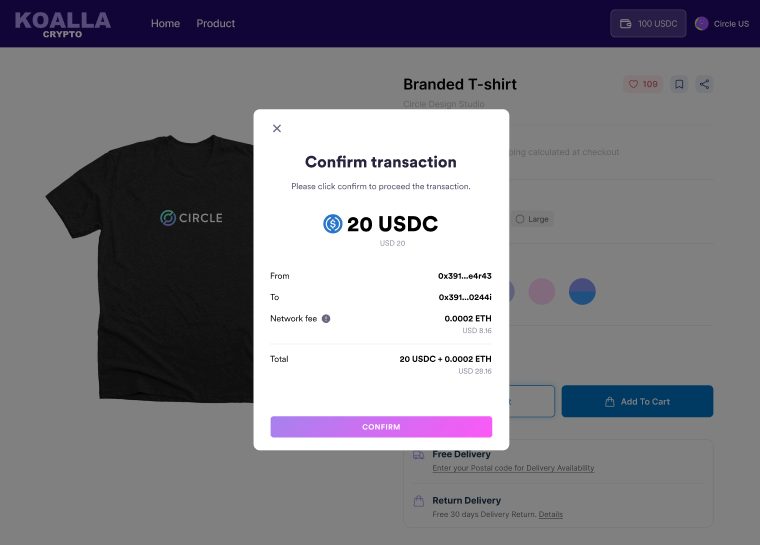
These confirmation UIs are predefined by Circle. The following example shows the
UI for confirming an outbound transfer on the web app:
 There are some nuances to consider in regards to the confirmation UI
customization:
* **From** and **To** addresses: Circle masks addresses so that only the first
and last five digits are displayed. You can pass a string to personalize these
addresses, such as “John's Solana wallet.”
* **Fiat currency amount**: This field is optional and is only displayed if
configured. To configure it, you define the exchange rate to calculate the
fiat currency amount, and then pass the amount to the SDK.
* **Network Fee**: This is an optional field and is only displayed if passed to
the SDK. You can send a `POST` request to the `/createtransferestimatefee` or
`/createtransactionestimatefee` endpoints to get the estimate fee and pass the
fee in the response to the SDK for display. If you offer an SCA wallet with
paymaster functionalities, you can pass a string, such as “sponsored by
Circle.”
## Example customizations for confirmation UIs
For detailed instructions on customizing UIs for web, iOS, and Android, see the
following docs:
* [Web SDK UI Customizations API](/sdks/user-controlled/web-sdk-ui-customizations)
* [iOS SDK UI customization API](/sdks/user-controlled/ios-sdk-ui-customization-api)
* [Android SDK UI customization API](/sdks/user-controlled/android-sdk-ui-customization-api)
Below are examples of customizations for confirmation UIs for an outbound
transfer, contract execution, and sign message or typed data:
## Outbound Transfer
There are some nuances to consider in regards to the confirmation UI
customization:
* **From** and **To** addresses: Circle masks addresses so that only the first
and last five digits are displayed. You can pass a string to personalize these
addresses, such as “John's Solana wallet.”
* **Fiat currency amount**: This field is optional and is only displayed if
configured. To configure it, you define the exchange rate to calculate the
fiat currency amount, and then pass the amount to the SDK.
* **Network Fee**: This is an optional field and is only displayed if passed to
the SDK. You can send a `POST` request to the `/createtransferestimatefee` or
`/createtransactionestimatefee` endpoints to get the estimate fee and pass the
fee in the response to the SDK for display. If you offer an SCA wallet with
paymaster functionalities, you can pass a string, such as “sponsored by
Circle.”
## Example customizations for confirmation UIs
For detailed instructions on customizing UIs for web, iOS, and Android, see the
following docs:
* [Web SDK UI Customizations API](/sdks/user-controlled/web-sdk-ui-customizations)
* [iOS SDK UI customization API](/sdks/user-controlled/ios-sdk-ui-customization-api)
* [Android SDK UI customization API](/sdks/user-controlled/android-sdk-ui-customization-api)
Below are examples of customizations for confirmation UIs for an outbound
transfer, contract execution, and sign message or typed data:
## Outbound Transfer
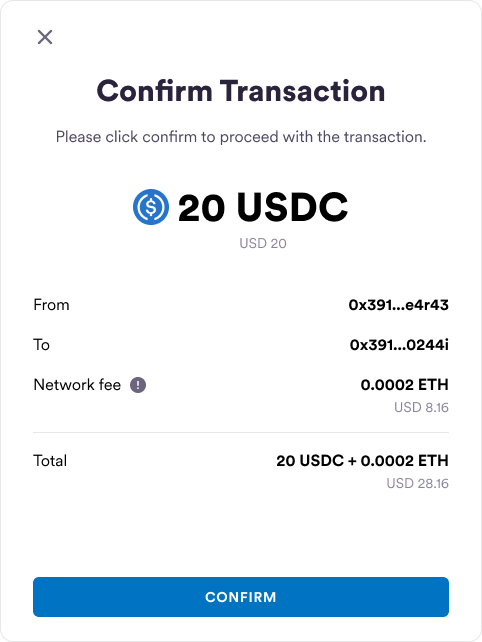 The following table shows which UI elements can be customized based on the
example:
| UI Element | Example | Customization options |
| - | - | - |
| `x` icon | `x` icon in the top-left | Icon image |
| Title | Confirm transaction | Text, color, size, font |
| Subtitle | Please click confirm to proceed with the transaction. | Text, color, size, font |
| Token symbol | USDC token image | Image |
| Token name | USDC | Text, color, size, font |
| Fiat currency and amount | USD 20 | Text, color, size, font |
| From address | 0x391…e4r43 | Text, color, size, font |
| To address | 0x391...0244i | Text, color, size, font |
| Network fee | 0.0002 ETH | Text, color, size, font |
| Network fee hint | `!` icon
The following table shows which UI elements can be customized based on the
example:
| UI Element | Example | Customization options |
| - | - | - |
| `x` icon | `x` icon in the top-left | Icon image |
| Title | Confirm transaction | Text, color, size, font |
| Subtitle | Please click confirm to proceed with the transaction. | Text, color, size, font |
| Token symbol | USDC token image | Image |
| Token name | USDC | Text, color, size, font |
| Fiat currency and amount | USD 20 | Text, color, size, font |
| From address | 0x391…e4r43 | Text, color, size, font |
| To address | 0x391...0244i | Text, color, size, font |
| Network fee | 0.0002 ETH | Text, color, size, font |
| Network fee hint | `!` icon
Hover text: Please note this is an estimated fee. Network fees may vary based on network traffic and transaction complexity. | Icon image, hover text, color, size, font |
| Confirmation button | CONFIRM | Text, color, size, font |
## Contract Execution
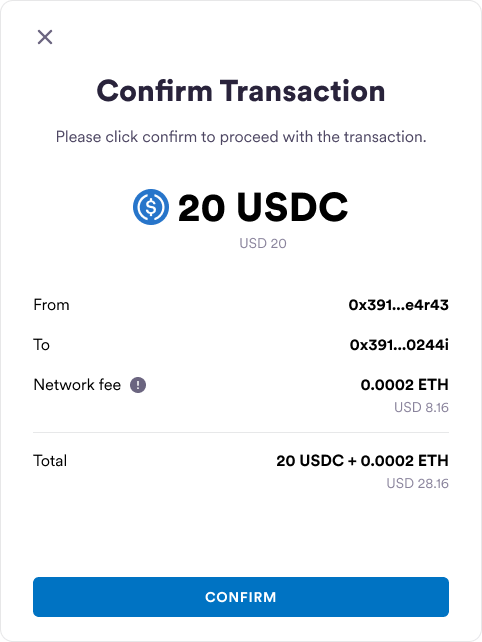 The following table shows which UI elements can be customized based on the
example:
| UI Element | Example | Customization options |
| - | - | - |
| `x` icon | `x` icon in the top-left | Icon image, location |
| Title | Contract interaction | Text, color, size, font |
| Subtitle | Please click confirm to proceed with the contract execution. | Text, color, size, font |
| Token symbol | USDC token image | Image |
| Token name | USDC | Text, color, size, font |
| Fiat currency and amount | USD 20 | Text, color, size, font |
| From address | 0x391...e4r43 | Text, color, size, font |
| Contract address | Fi0x2...c1380 | Text, color, size, font |
| Network fee | 0.0002 ETH | Text, color, size, font |
| Network fee hint | `!` icon
The following table shows which UI elements can be customized based on the
example:
| UI Element | Example | Customization options |
| - | - | - |
| `x` icon | `x` icon in the top-left | Icon image, location |
| Title | Contract interaction | Text, color, size, font |
| Subtitle | Please click confirm to proceed with the contract execution. | Text, color, size, font |
| Token symbol | USDC token image | Image |
| Token name | USDC | Text, color, size, font |
| Fiat currency and amount | USD 20 | Text, color, size, font |
| From address | 0x391...e4r43 | Text, color, size, font |
| Contract address | Fi0x2...c1380 | Text, color, size, font |
| Network fee | 0.0002 ETH | Text, color, size, font |
| Network fee hint | `!` icon
Hover text: Please note this is an estimated fee. Network fees may vary based on network traffic and transaction complexity. | Icon image, hover text, color, size, font |
| Function type | burn(uint256) | Text, color, size, font |
| ABI Parameters | 10000 | Text, color, size, font |
| Confirmation button | CONFIRM | Text, color, size, font |
## Sign Message or Typed Data
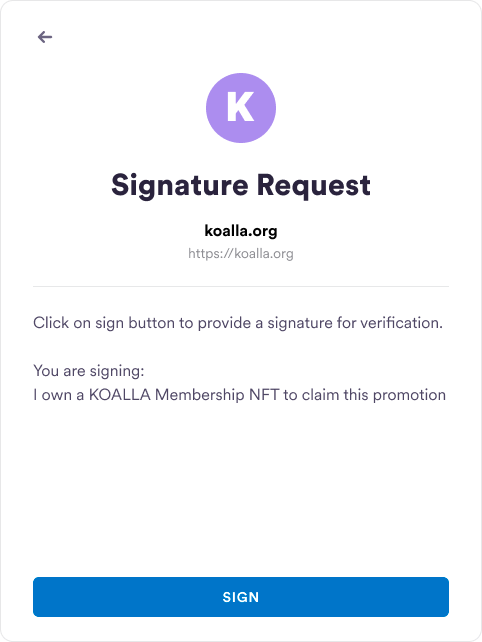 The following table shows which UI elements can be customized based on the
example:
| UI Element | Example | Customization options |
| - | - | - |
| `x` icon | `x` icon in the top-left | Icon image |
| Title | Signature Request | Text, color, size, font |
| Contract name | koalla.org | Text, color, size, font |
| Contract address | `https://koalla.org` | Text, color, size, font |
| Description | Click on sign button to provide a signature for verification
The following table shows which UI elements can be customized based on the
example:
| UI Element | Example | Customization options |
| - | - | - |
| `x` icon | `x` icon in the top-left | Icon image |
| Title | Signature Request | Text, color, size, font |
| Contract name | koalla.org | Text, color, size, font |
| Contract address | `https://koalla.org` | Text, color, size, font |
| Description | Click on sign button to provide a signature for verification
You are signing:
I own a KOALLA Membership NFT to claim this promotion | Text, color, size, font |
| Confirmation button | SIGN | Text, color, size, font |
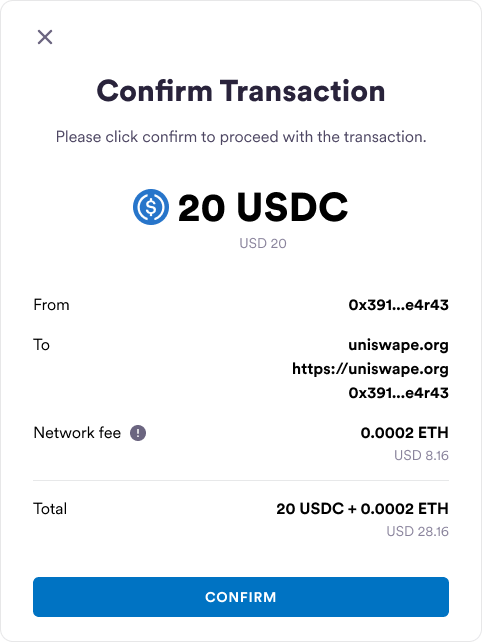
## Sign Transaction
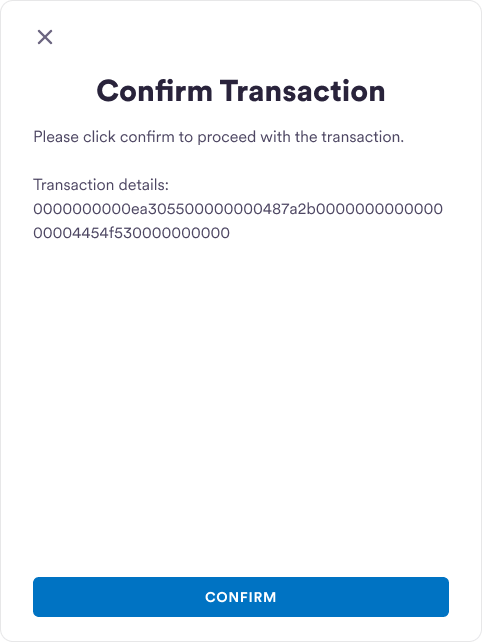
 ## Sign Raw Transaction
 ## Full UI Customization
To use your own UIs, you can opt out of Circle's predefined confirmation UIs.
1. From the Circle Developer Console sidebar, select **Configurator > Wallet
Security Settings**.
2. Toggle the **Confirmation UIs** setting off to disable confirmation UIs.
**CAUTION**
You may want to opt out of Circle's confirmation UIs to further streamline your
application's user experience. Perhaps signature details are difficult for your
users to understand or transaction confirmations, which are required for every
transaction, interrupt your application's flow. This can especially be the case
for gaming applications.
While you may want to opt out of Circle's confirmation UIs, it is highly
recommended that you enable them to strengthen the security of your application
for your users. If you decide to disable it, it means you can submit
transactions on behalf of your users without their consent; therefore, you must
provide context or disclaimers on your application that your users must
acknowledge.
## Full UI Customization
To use your own UIs, you can opt out of Circle's predefined confirmation UIs.
1. From the Circle Developer Console sidebar, select **Configurator > Wallet
Security Settings**.
2. Toggle the **Confirmation UIs** setting off to disable confirmation UIs.
**CAUTION**
You may want to opt out of Circle's confirmation UIs to further streamline your
application's user experience. Perhaps signature details are difficult for your
users to understand or transaction confirmations, which are required for every
transaction, interrupt your application's flow. This can especially be the case
for gaming applications.
While you may want to opt out of Circle's confirmation UIs, it is highly
recommended that you enable them to strengthen the security of your application
for your users. If you decide to disable it, it means you can submit
transactions on behalf of your users without their consent; therefore, you must
provide context or disclaimers on your application that your users must
acknowledge.