> ## Documentation Index
> Fetch the complete documentation index at: https://developers.circle.com/llms.txt
> Use this file to discover all available pages before exploring further.
> ## Agent Instructions
> Before reading these docs, install the relevant Circle Skill to get pre-loaded context — skills are LLM-optimized and cover architecture decisions, correct flows, and common pitfalls. In Claude Code: run /plugin marketplace add circlefin/skills then /plugin install circle-skills@circle. With Vercel Skills CLI: run npx skills add circlefin/skills. Available skills: use-usdc https://github.com/circlefin/skills/blob/master/plugins/circle/skills/use-usdc/SKILL.md (balances, transfers, approvals on EVM and Solana); EURC has no skill — see https://developers.circle.com/stablecoins/what-is-eurc.md; bridge-stablecoin https://github.com/circlefin/skills/blob/master/plugins/circle/skills/bridge-stablecoin/SKILL.md (crosschain transfers via CCTP, USDC, EURC, and third-party assets); use-arc https://github.com/circlefin/skills/blob/master/plugins/circle/skills/use-arc/SKILL.md (Arc chain config, contract deployment, USDC bridging — Arc docs: https://docs.arc.io/llms.txt); use-circle-wallets https://github.com/circlefin/skills/blob/master/plugins/circle/skills/use-circle-wallets/SKILL.md (choose wallet type); use-developer-controlled-wallets https://github.com/circlefin/skills/blob/master/plugins/circle/skills/use-developer-controlled-wallets/SKILL.md (custodial wallets for payouts and treasury); use-user-controlled-wallets https://github.com/circlefin/skills/blob/master/plugins/circle/skills/use-user-controlled-wallets/SKILL.md (embedded wallets with Web2 login); use-modular-wallets https://github.com/circlefin/skills/blob/master/plugins/circle/skills/use-modular-wallets/SKILL.md (smart contract wallets with passkeys and ERC-4337); use-gateway https://github.com/circlefin/skills/blob/master/plugins/circle/skills/use-gateway/SKILL.md (unified USDC balance, nanopayments); use-smart-contract-platform https://github.com/circlefin/skills/blob/master/plugins/circle/skills/use-smart-contract-platform/SKILL.md (deploy, interact, monitor contracts). Pair any skill with the Circle MCP server for live SDK signatures, contract addresses, and chain IDs: {"mcpServers":{"circle":{"url":"https://api.circle.com/v1/codegen/mcp"}}}.
> Read the product overview first. Each product has an overview explaining when and why to use it. Read it before quickstarts.
> Pick the right wallet type. Developer-controlled (you hold keys), user-controlled (end user holds keys via PIN/social login), or modular (smart contract wallets with passkeys). See https://developers.circle.com/wallets.md.
> Use CCTP V2 for crosschain transfers. CCTP natively transfers USDC and EURC via burn-and-mint, and supports permissionless wrapping of third-party assets via lock-and-mint. V1 is legacy; always use V2 unless V1 is specified or the chain requires it (Noble, Sui, and Aptos still require V1). Migration guide: https://developers.circle.com/cctp/migration-from-v1-to-v2.md.
> Use Bridge Kit for frontend bridging. Wraps CCTP with a simpler SDK for user-facing apps. Use CCTP directly for backend transfers.
> Gas Station vs Paymaster. Gas Station sponsors gas for Circle Wallet transactions. Paymaster lets users pay gas in USDC. Different use cases — read both overviews.
> Gateway Nanopayments for sub-cent payments. Gasless USDC micropayments down to $0.000001 via x402 and batched settlement. For pay-per-request APIs, AI agent payments, streaming.
> Look up USDC addresses per chain. Never hardcode — use https://developers.circle.com/stablecoins/usdc-contract-addresses.md.
> Prefer SDKs over raw API calls. Node.js and Python SDKs handle auth, retries, and errors.
> API key required. Bearer token in Authorization header. Testnet and mainnet use separate keys and may use different base URLs depending on the product.
> Set up webhooks when available. Most operations are async. Webhooks deliver transaction confirmations and state changes.
> When calling list endpoints, paginate using pageSize and pageAfter until no nextPageAfter cursor is returned—stopping at the first page silently misses records.
> Building an AI agent? Start with the Agent Stack—Circle CLI, agent wallets, and nanopayments built for autonomous use cases: https://developers.circle.com/agent-stack.md.
# CPN component states and workflows
This page contains information about the states that high-level components of
the CPN system can be in. Your integration should be able to handle and respond
to each of the various states that a given component may present. In some cases,
the state of a component requires immediate or rapid action from an OFI.
Reference these states as a way to confirm your integration is comprehensive.
## Payments
A payment represents the end-to-end CPN payment flow, including the onchain
transaction and RFI check. It is initiated by locking in a quote and providing
the required recipient details.
Payments have the following workflow:
 ### Payment States
| State | Description |
| - | - |
| `CREATED` | A quote has been accepted and the payment is initialized.
### Payment States
| State | Description |
| - | - |
| `CREATED` | A quote has been accepted and the payment is initialized.
When a payment requires an RFI in the created state the RFI must be resolved before the payment can proceed.
A payment can be in the created state without an associated RFI while the BFI completes its compliance check. This can take up to 1 business day to complete. |
| `CRYPTO_FUNDS_PENDING` | The payment has passed a compliance check and is waiting for the onchain transaction of crypto.
The OFI is required to complete the onchain transaction in order to proceed. |
| `FIAT_PAYMENT_INITIATED` | The BFI has received and validated the crypto transfer and has initiated the fiat payment. |
| `COMPLETED` | The BFI has completed the fiat transfer. Depending on the transfer method, the receiver may or may not have received the transfer. |
| `FAILED` | The payment can't be completed. |
A payment can also include an optional `statusAddendum` field that provides
additional context about the current payment status. This field does not
represent a separate state—it supplements the main `status` field. CPN omits
`statusAddendum` from the response when no additional context applies.
| Status addendum | Associated status | Description |
| - | - | - |
| `IN_MANUAL_REVIEW` | `CREATED` | The payment is on hold for a compliance or manual review. The payment remains in the `CREATED` state until the review is complete. |
| `PAYMENT_SETTLEMENT_DELAYED` | `FIAT_PAYMENT_INITIATED` | Settlement timing has slipped. The payment remains in progress while the delay is resolved. |
When a payment is initiated, the BFI performs an initial payment review, which
affects the state that the payment is created in:
* If the BFI approves the initial payment review outright, the payment is
created in the `CRYPTO_FUNDS_PENDING` state.
* If the BFI rejects the initial payment review outright, the payment is created
in the `FAILED` state.
* If the BFI needs to take additional steps to review the payment, the payment
is created in the `CREATED` state. Final approval or rejection of the payment
is sent asynchronously.
## RFIs
Requests for information (RFI) is a process that is initiated by the BFI when
more detailed information about the sender is required to meet regulatory or
risk compliance checks.
RFIs have the following workflow:
 ### RFI states
| State | Description |
| - | - |
| `INFORMATION_REQUIRED` | Initial status. OFI is required to submit the requested data to resolve the RFI. |
| `IN_REVIEW` | OFI has submitted the requested data and BFI is reviewing. |
| `APPROVED` | BFI approves the additional information. |
| `FAILED` | BFI rejects the additional information. This is a resolved state where the OFI can't resubmit additional information to the BFI. |
## Refunds
Refunds occur when the BFI can't complete the transfer of fiat to the receiver.
The BFI creates an onchain transaction to transfer the cryptocurrency back to
the OFI.
Refunds have the following workflow:
### RFI states
| State | Description |
| - | - |
| `INFORMATION_REQUIRED` | Initial status. OFI is required to submit the requested data to resolve the RFI. |
| `IN_REVIEW` | OFI has submitted the requested data and BFI is reviewing. |
| `APPROVED` | BFI approves the additional information. |
| `FAILED` | BFI rejects the additional information. This is a resolved state where the OFI can't resubmit additional information to the BFI. |
## Refunds
Refunds occur when the BFI can't complete the transfer of fiat to the receiver.
The BFI creates an onchain transaction to transfer the cryptocurrency back to
the OFI.
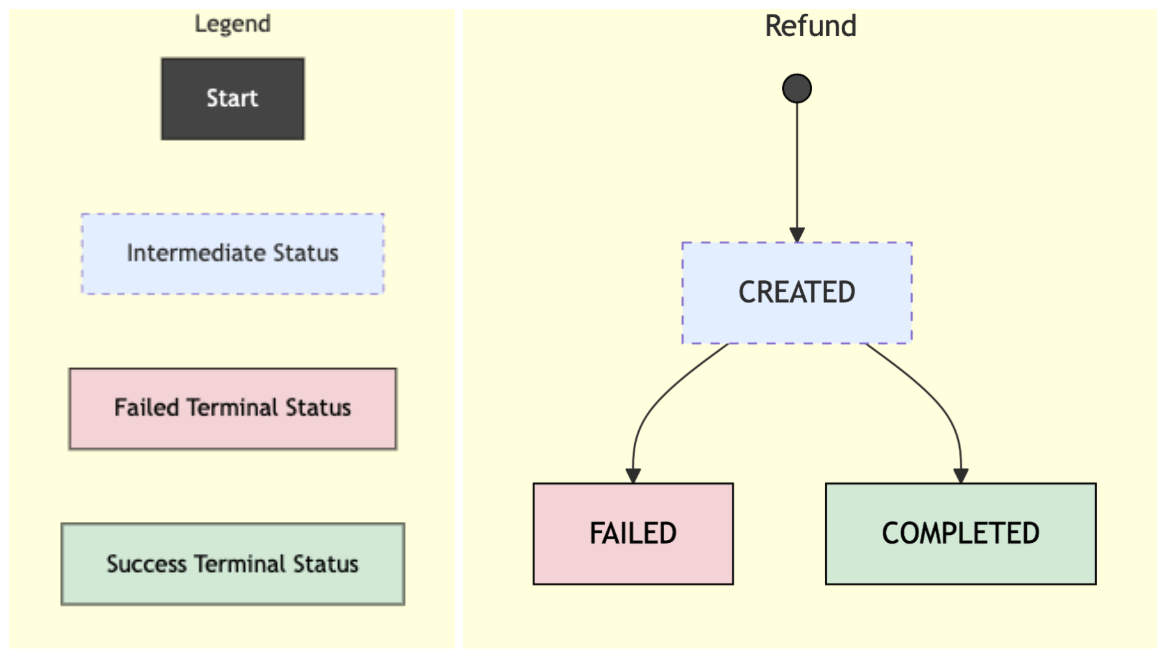
Refunds have the following workflow:
 ### Refund states
| State | Description |
| - | - |
| `CREATED` | The refund is initialized but the onchain transaction has not been created yet. Some BFIs may skip this status and create the refund directly into the `COMPLETED` or `FAILED` state. |
| `FAILED` | The onchain transaction failed. |
| `COMPLETED` | The onchain transaction was successfully broadcast and confirmed by the BFI. The transaction hash is available. |
## Transactions
A transaction on CPN is a data object that represents a funds transfer
transaction on the blockchain. When the payment is in the `CRYPTO_FUNDS_PENDING`
state, the OFI should initiate the onchain transaction with CPN as soon as
possible.
Transactions have the following workflow:
### Refund states
| State | Description |
| - | - |
| `CREATED` | The refund is initialized but the onchain transaction has not been created yet. Some BFIs may skip this status and create the refund directly into the `COMPLETED` or `FAILED` state. |
| `FAILED` | The onchain transaction failed. |
| `COMPLETED` | The onchain transaction was successfully broadcast and confirmed by the BFI. The transaction hash is available. |
## Transactions
A transaction on CPN is a data object that represents a funds transfer
transaction on the blockchain. When the payment is in the `CRYPTO_FUNDS_PENDING`
state, the OFI should initiate the onchain transaction with CPN as soon as
possible.
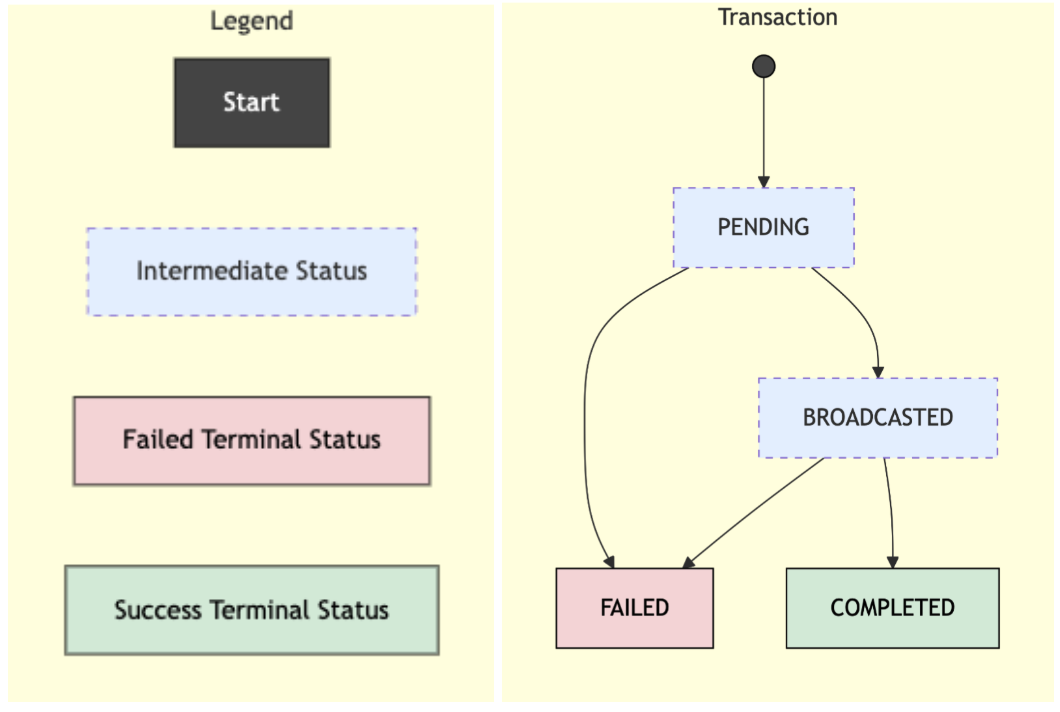
Transactions have the following workflow:
 ### Transaction states
| State | Description |
| - | - |
| `CREATED` | Transaction has been created and the payload returned to the caller, awaiting signature. |
| `PENDING` | OFI has submitted the signed transaction. The transaction is pending broadcast to the blockchain. |
| `BROADCASTED` | The signed transaction has been broadcast to the blockchain. |
| `COMPLETED` | The transaction is confirmed onchain. |
| `FAILED` | The transaction can't be completed. |
## Support tickets
The CPN support tickets API allows you to raise and manage transaction-related
issues such as settlement delays, missing information, or refunds. These tickets
are stored in the CPN platform and routed to the appropriate party for
resolution.
### Transaction states
| State | Description |
| - | - |
| `CREATED` | Transaction has been created and the payload returned to the caller, awaiting signature. |
| `PENDING` | OFI has submitted the signed transaction. The transaction is pending broadcast to the blockchain. |
| `BROADCASTED` | The signed transaction has been broadcast to the blockchain. |
| `COMPLETED` | The transaction is confirmed onchain. |
| `FAILED` | The transaction can't be completed. |
## Support tickets
The CPN support tickets API allows you to raise and manage transaction-related
issues such as settlement delays, missing information, or refunds. These tickets
are stored in the CPN platform and routed to the appropriate party for
resolution.
